Education Blog - Page 3

cancel
Showing results for 
Show  only  | Search instead for 
Did you mean: 

Latest Activity

(1314 Posts)
JosephKerski
Esri Alum

Esri and the GLOBE program (Global Learning and Observation to Benefit the Environment - www.globe.gov) have been working together on initiatives and educator training for decades.  Globe was one of the first major education-focused citizen science programs, and it offers a wealth of data on soil chemistry, water quality, weather, and much more, as well as rigorously tested methods to have your students collect and contribute data, and a network of educators with which to collaborate.  Recently, two GLOBE educators asked me to conduct a webinar for their educators and students, and I documented the highlights in this video.  I have written about this topic before, documented on the GLOBE site here, and as an essay in GeoNet here, but in this recent webinar, I expanded and updated these explanations to include what I consider to include key elements of a project-based workflow:  (1) Obtaining the data > (2) mapping the data > (3)  Analyzing the data, and > (4) creating communications tools from the data.

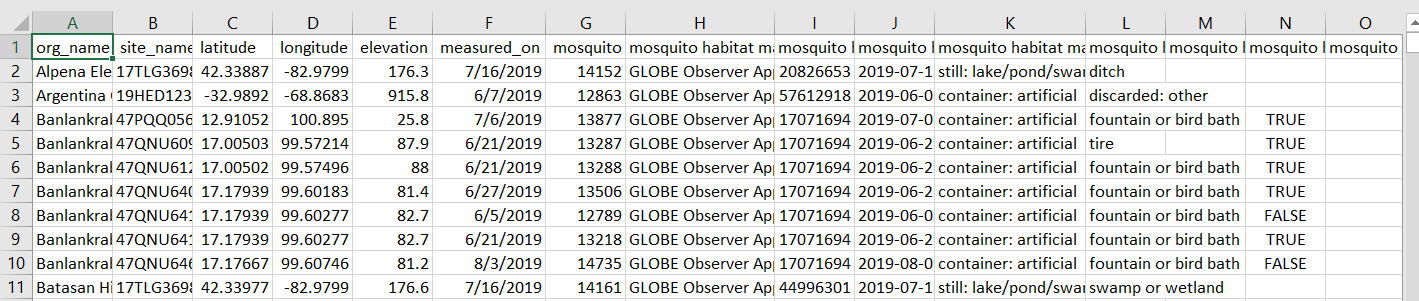
To gather citizen science data, you can use the Globe Observer app, iNaturalist, Survey123 from Esri, or another app.  You can use probes such as those from Pasco, Hanna Instruments, Vernier, or another company; or you can even go "old school" and use clipboards and pencils.  I believe all of these tools have value in education, and in this essay, I describe 6 ways to gather and map your field data.  The most important thing is that you end up with a spreadsheet of data, generated from your app or probe, or one you generate yourself from your clipboard notes.   This spreadsheet becomes the "I", or "Information", part of your GIS. The spreadsheet needs to contain some sort of location, such as street address, or ideally, latitude-longitude values.  In the video and webinar I obtained the data from the Advanced Data Access Tool (GLOBE Advanced Data Access Tools ) and selected the region, time frame, and theme--in my case, mosquito larvae data.  Download the data; in the case of GLOBE data, it is offered as a CSV (Comma Separated Value) table. Oftentimes, data tables need to be edited slightly for ease of use in your mapping software.  In my case, I brought the data into Excel, I removed the second header line, as only one is required, removed extraneous records at the end of the table, and formatted the numeric data for be "integer" or "floating point" numbers as needed.  Once done, I saved the spreadsheet as a CSV file, shown below, linked here, and attached if you would like to use it. 

Globe data table

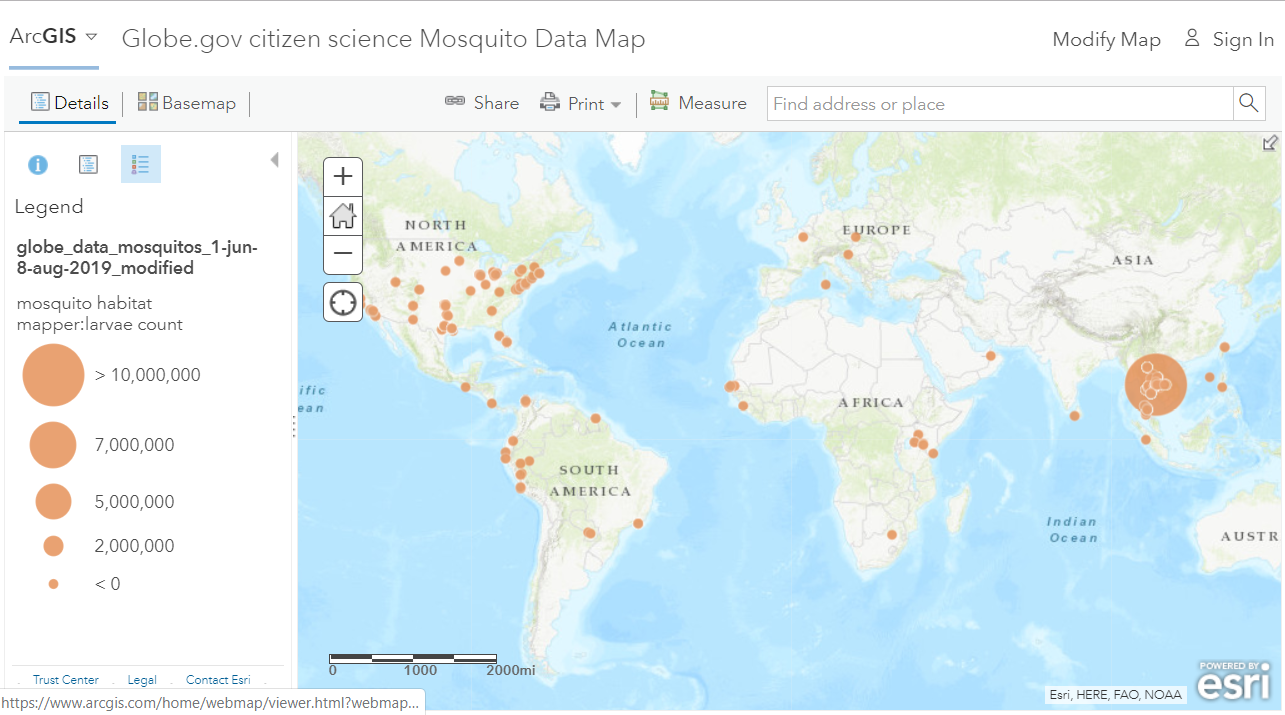
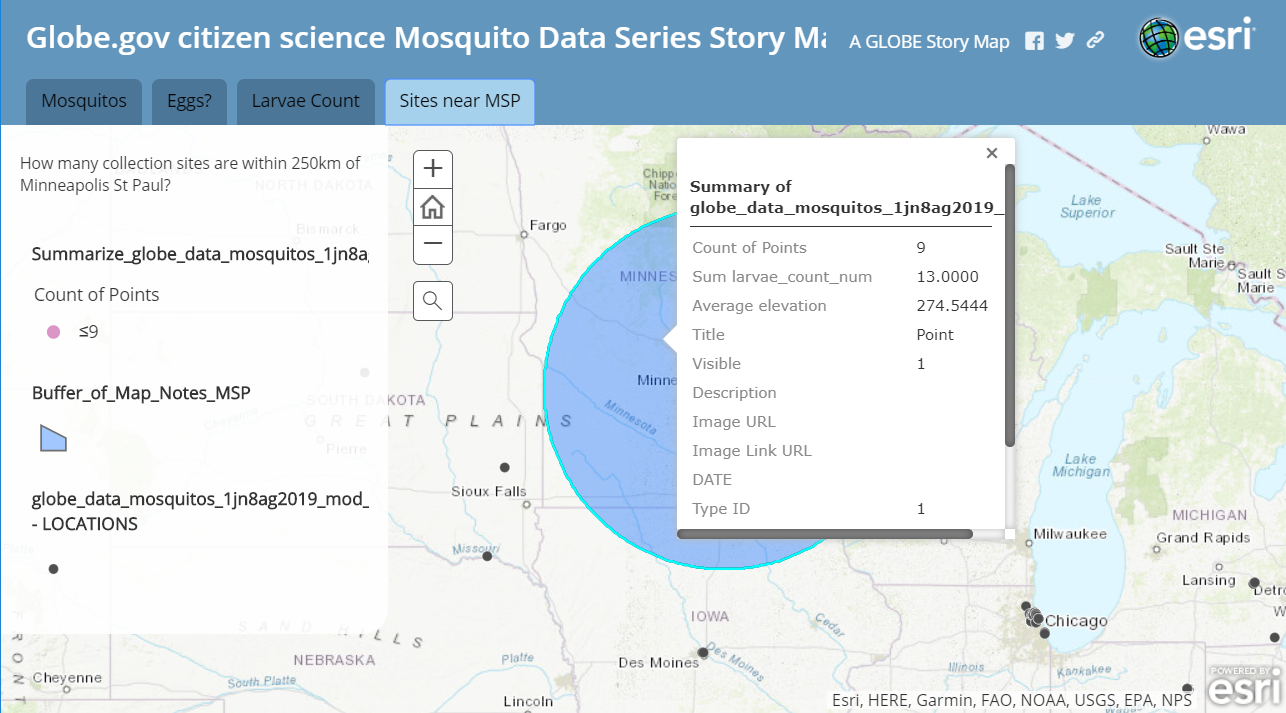
Now for the fun and fascinating part!  In ArcGIS Online (www.arcgis.com), I signed in to my organizational subscription, went to my content, and added the CSV, creating a feature service from the data.  After giving it some tags and other metadata so that I could more easily find it later, and if I share it, so others could be more informed about my data, I then opened up the feature service in the map viewer. Once in the map viewer, I can now symbolize the points by elevation, date collected, number of eggs found, whether larvae were found or not, and on other fields in my data table.  I could make a heat map showing density of the collected points. I can also change the base map and zoom into and study specific locations on a satellite image, or at a regional or national scale, add data such as precipitation, ecoregions, population density, river systems, or other layers from ArcGIS Online and the Living Atlas of the World.  I can add fields, sort fields, and select specific data points to study further.  While doing all this, I am thinking about patterns, relationships, and trends of my data.  I can also use the spatial analysis tools, such as proximity, map overlay, routing, creating maps of statistical significant difference, and summarizing.  In my case, for example, I added a point as a map note on Minneapolis St Paul, and then summarized the number of data points within 250 km of that location.   Once done, I saved and shared my map and layers so others can examine them.  See screen shot below and also this link for the map

Map in ArcGIS Online of Globe Mosquito Data

Map in ArcGIS Online of Globe Mosquito Data.

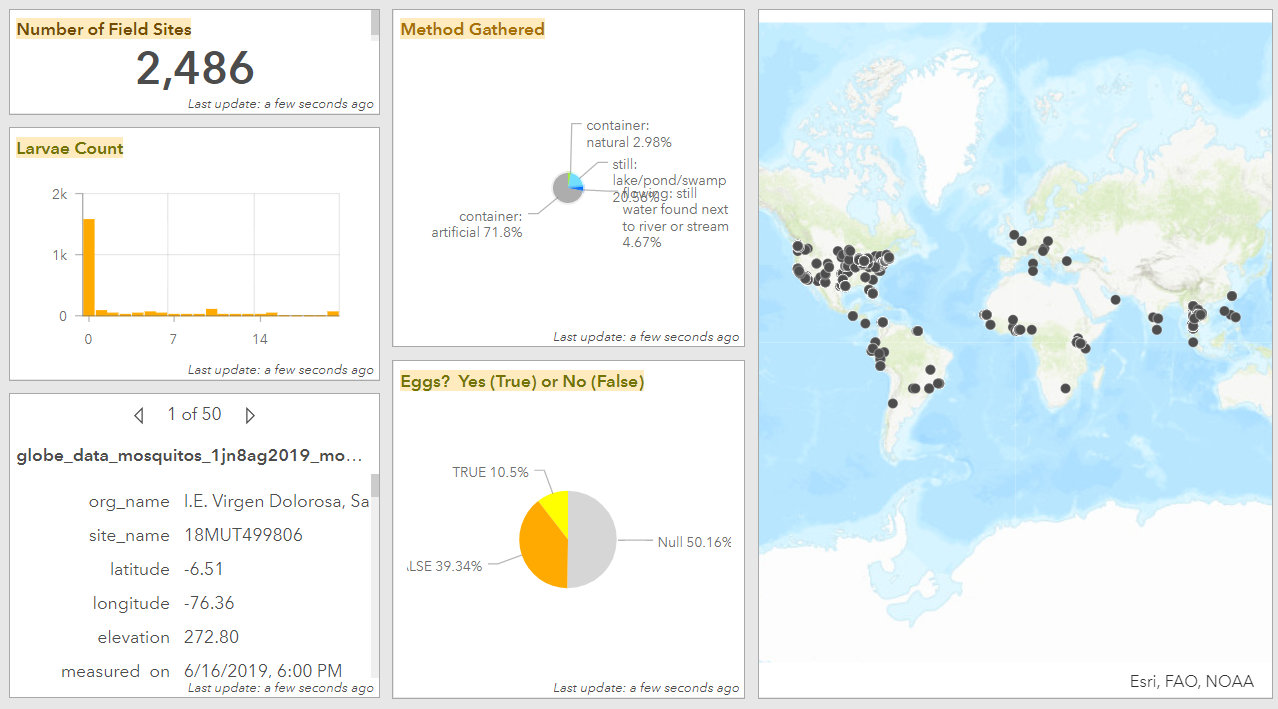
Next, I created communications tools from this data.  Many such tools exist, and I chose to focus on story maps and operations dashboards.  The ones I created are shown below and linked here (story map) (Operations Dashboard).  ArcGIS story maps are multimedia web mapping applications, and Esri Operations Dashboards allow you to create graphs, maps, widgets, and other tools for you to monitor your data in real-time.  These were straightforward to make--once I shared the data in ArcGIS Online, I selected these two tools, choosing a map series story map, with different tabs showing different attributes of the data.  In my operations dashboard, I created a gauge that pointed to the number of points currently in my data set, along with the ArcGIS Online map, and graphs indicating where the mosquitos were found and if eggs were discovered.  If I add to my map in the future, the data in my dashboard automatically updates. 

Story map of Globe mosquito data

Series story map of Globe Data showing spatial analysis results.

Operations Dashboard of Globe data.

Operations Dashboard of Globe Data.

I encourage you to do even more wonderful things with spatial data, such as that from citizen science portals including Globe.gov, and elsewhere, to better understand the patterns, relationships, and trends, and to consider how you can contribute to the scientific community through your efforts!

more
1 0 4,025
GeriMiller
Esri Regular Contributor

Fellow Educators:

ArcGIS Online User Types have been in use for some time now as a way of providing apps and privileges to ArcGIS users. The Creator User Type has been available for Education program licenses.  

With recent updates to the Education Institution Agreements, the GIS Professional Advanced Use Type was added as the default option, versus Creator. GIS Professional Advanced User type differs from the Creator User type in the fact that it provides ArcGIS Pro Advanced licensing.

Everyone who has migrated to the new Institution Agreement (and has the GIS Professional Advanced user type as an option):

  •        Please switch all ArcGIS Online users to GIS Professional Advanced User Type. Instructions are listed here and this video demonstrates the process. Further info is below.
  •        If you do not assign GIS Professional Advanced User Type licenses, you will likely get a message “The number of user types and licenses assigned exceeds the number available”. The reason for this message is that users are now all GIS professional User Type licenses instead of Creator, while you may have Creator User Type licenses assigned.  

Please ensure that you utilize the New Member Defaults to auto-provision licensing for new users, preferably with Enterprise Logins (SSO). Note that the GIS Professional User type does NOT include all ArcGIS Pro extensions. When you set your add-on licensing on New Member Defaults, please note that you will have to add the extensions (and not ArcGIS Pro, since it is now part of the user type). Extensions count as one of the 5 add-on apps.

Note: If you have any ArcGIS Pro licenses who have been taken for "offline use", they will have to be recovered prior to making the switch from Creator to GIS Professional User type (for those specific users with offline licenses). All other users can be converted. We generally encourage administrators to "disable" taking ArcGIS Pro offline: Organization>Licenses>"Prevent Members from Taking ArcGIS Pro Offline".

How to Change User types – documentation here:

  1.       Login as an Administrator – Organization>Members tab.
  2.       On the left, filter by User Type – Creator.
  3.       Ensure that you are showing 100 members per page (maximum default currently), bottom right.
  4.       Check the box to in the upper Left to select all Members.
  5.       In the Upper Right, Manage User Types.
  6.       Select GIS Professional Advanced and Save.
  7.       Maintain the selection and click Manage add-on licenses in the Upper Right and enable ArcGIS Pro extensions, then click Save.

Changing User Types also can be done in an efficient manner via an ArcGIS API for Python script.

Further feedback is welcome!

more
6 21 12K
JosephKerski
Esri Alum

I invite you to explore the Community Walkability map I created, here:

https://storymaps.arcgis.com/stories/1e4847f78ec94fd89e960adfabb5ac5c

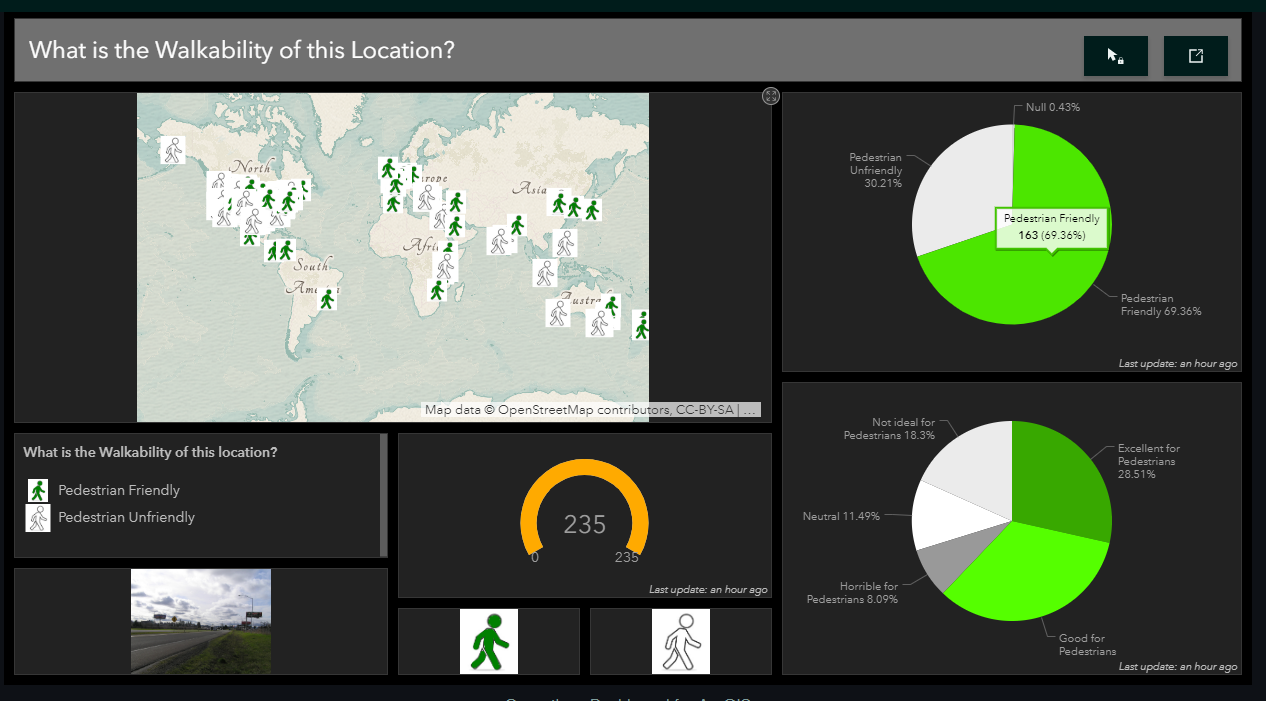
This is a new ArcGIS storymap, and it also includes a button linked to a survey (created with Survey123), plus an Operations Dashboard that provides real-time information on what has been thus far collected. The message I wish to convey through the creation of this resource is that the combination of these connected tools, all part of the ArcGIS platform, offers amazing capabilities. I have created a video on these procedures, here.

Feel free to contribute to this map, ideally, along with a photo, in your own community or another place you have visited.   As you do so, think about the kinds of things YOU and your students, colleagues, stakeholders, friends and family in your communities could be collecting, mapping, and analyzing with these same tools—water quality, graffiti or blight, weather, noise, albedo, types and amount of trash, cell phone signal, historical points of interest, tree height/species/condition, pedestrian or traffic counts, and much more.  Start with these procedures, presented as a story map, that will guide you through the process. 

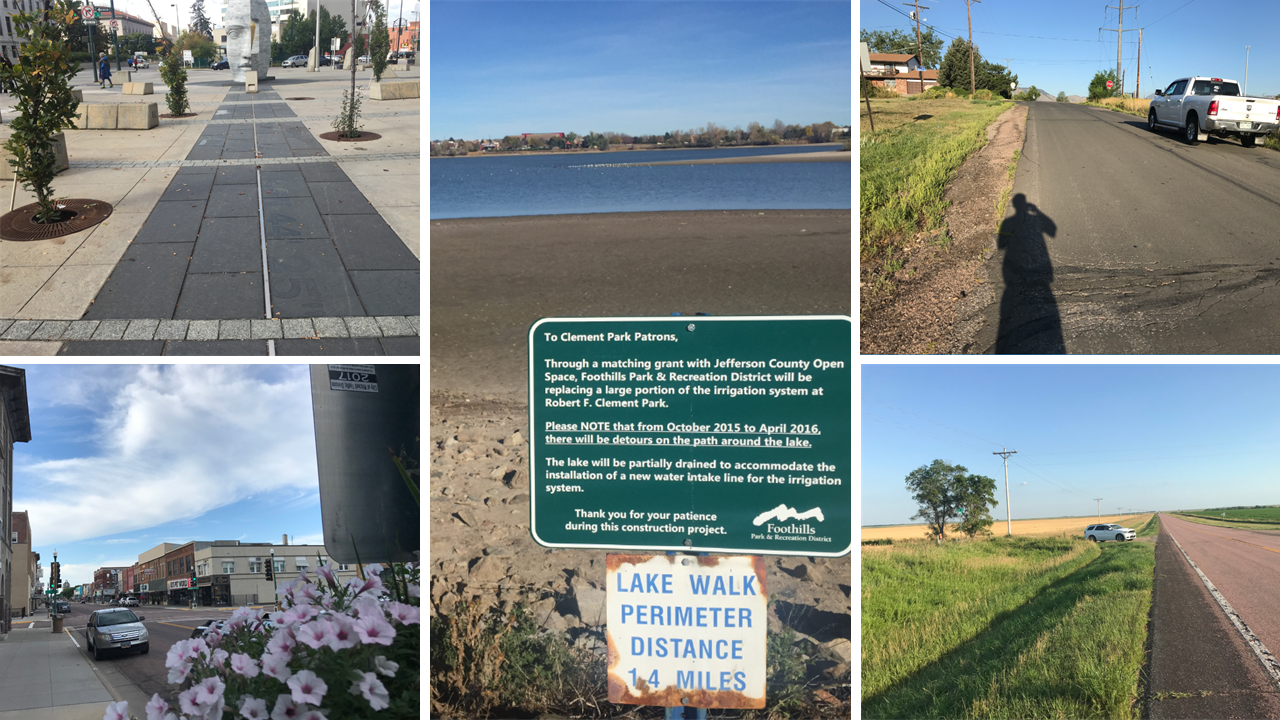
Walkability images submitted to the storymap.

A selection of walkability images submitted to the storymap.

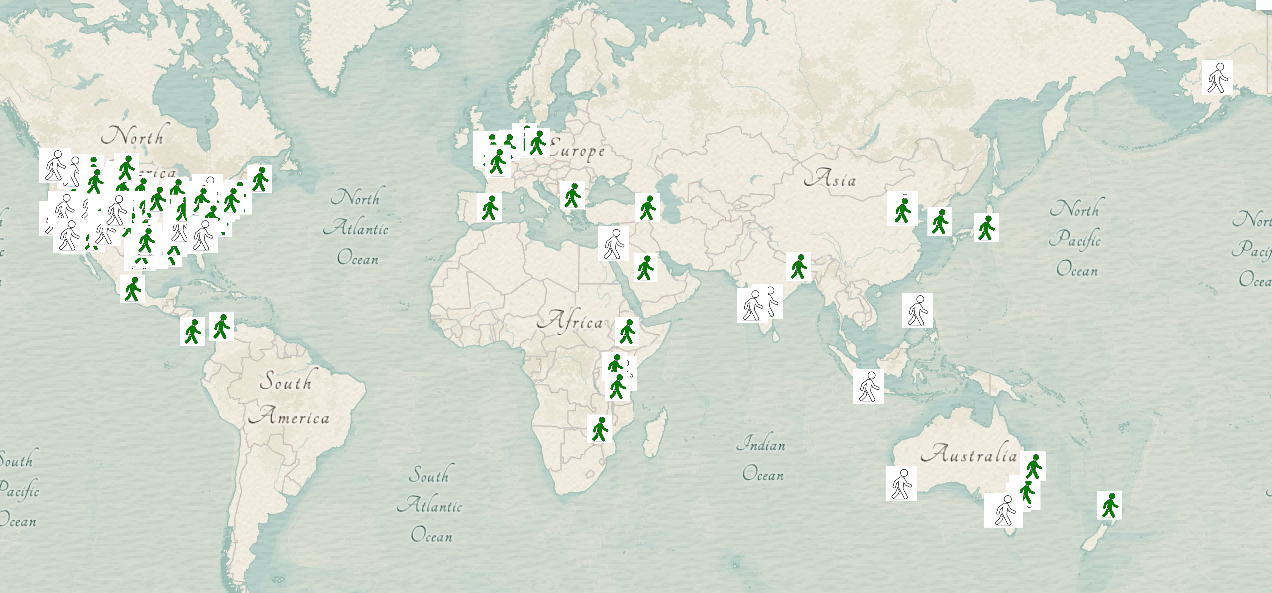
Walkability storymap.

Static screenshot of the walkability map as it appeared in late August 2019; look for more points on the above storymap link, and I encourage you to submit your own point. 

Operations Dashboard of walkability data.

Static screenshot of the walkability operations dashboard as it appeared in September 2019. 

more
7 2 10K
JosephKerski
Esri Alum

During 2017, I met with Michelle Ellington after hearing about her from my Esri colleague George “Geo” Dailey. Geo told me that Michelle was one of the most stellar campus facilities administrators he had ever met, but even this high praise did not prepare me for the amazing work that Michelle showed me when I visited her office at the University of Kentucky. Imagine having the job of managing the best way to create, maintain, and network all of the infrastructure on a major university campus — every light pole, water main, fiber optic cable, sidewalk, tree, exterior door, and much more. That’s what Michelle and her team do, day by day. Meeting her staff, it was immediately apparent that Michelle is one of those rare leaders who inspires everyone to be their absolute best, and no matter what their role, they feel that they are a critical part of the team. The innovative tools and methods they are using are helping make the university more efficient, cost-effective, and sustainable. Therefore, it is my great pleasure to introduce Michelle to you, and, through her story, inspire you to make a positive difference on your campus or wherever you happen to be. 

Michelle’s position is, in my view, one of those “unsung hero” types of positions on a campus.  How did she gain the knowledge and skills necessary to fulfill all of her responsibilities? Michelle said, “I’m currently the GIS coordinator for the University of Kentucky Facilities Information Services as well as the president for the Campus FM Technology Association. I worked in the private sector for seven years before coming to UK and am a past president of the Kentucky Association of Mapping Professionals. Folks in the campus GIS world or Kentucky mapping community are my people and we are a tight group. I enjoy serving in leadership positions for professional non-profit organizations because it connects me closer with people who are passionate about the work they do. I love the CFTA community specifically because everyone so freely exchanges information. There’s a like-minded viewpoint shared across CFTA where everyone wins if we all work together and collectively share our successful strategies and implementations.”

Image
Michelle Ellington, Facilities Manager, University of Kentucky. 

What convinced Michelle to enter this field? “I was living in Alaska in my early 20’s (late 1990’s) in between college years, alpine trekking near Valdez,” she said. “We were using a GPS in whiteout conditions for wayfinding, and I just thought it was a powerful technology. When I went back to school at the University of Georgia, I asked my anthropology professor, Dr. Garrison, if he knew about GPS technology and had any recommendation on what I could do with it upon graduation. He steered me to the university’s Information Technology Outreach Services, and there I landed my first GIS job digitizing lakes to the Georgia base map for the Department of Transportation. Since then, I have worked for engineering and photogrammetry firms using GIS in a variety of applications until I found my home at the University of Kentucky in 2006.”

“A little over a year ago we hired a young woman and fellow alumni from UGA. She is an anthropology graduate, like me, and Dr. Garrison was an inspirational teacher to her as well. She is doing great work in our department and doesn’t have a GIS degree either. GIS is an over-arching technology with unlimited potential and I believe it could be taught across multiple college curriculums. As a hiring official, I’m typically not swayed to hire someone with a GIS degree over someone without. I seek individuals who are technical, methodical, see relationships and patterns, spot anomalies, as well as those who are flexible to adapt to the ever-changing advancements in geospatial technologies.”

I asked Michelle, “What one person, class, or topic most inspired you during your career?” She said, “Without question, my supervisor, Andrew Blues, FIS associate director, is my biggest professional inspiration. I feel fortunate that Andrew has been my mentor for over 10 years. He inspires me to believe that I am the “best in the world” as the GIS coordinator for the University of Kentucky ([see the] Hedgehog Concept from the book “Good to Great” by Jim Collins). He brought lean management principles into my life, which is the foundation of how our department works and why I believe FIS has received several local and international awards. He is a gifted mentor and continues to support me immensely with all I do. A great mentor does not tell you what you want to hear; they see your potential, sharpen you, and encourage you to find your best and work to achieve it. I’m very thankful for Andrew in my life and hope he will continue to mentor me for many more years to come.”

What project is Michelle the proudest of being a part? “There was one significant project that put us on the map as a leader in GIS floor plan mapping. In 2008, we partnered with a contractor to develop the UK GIS Facilities Management System for a new UK hospital, Pavilion A. We went from a vision to successful deployment of an enterprise GIS interior space mapping application used to facilitate the occupancy of a 16-floor 1.2 million square foot Level 1 Trauma Center. The GISFMS had an interactive map interface and dynamically generated Room Data Sheets used to track move-in. The RDS showed where the space was in the building and listed all technologies, furniture, and equipment present in each room. Each RDS was posted to the door of its associated room and assets were checked off in the system until occupancy was complete. This application was well received within the GIS community and in 2011 we received an Esri Vision Award at the Esri Health Conference followed by the Esri Special Achievement in GIS Award in 2012.”

“GIS floor plan mapping wasn’t as pervasive in 2008 as it is now, so we were definitely a leader in this new space. Our application was built off the Flex API so, unfortunately, the GISFMS application died off once Apple’s iOS took hold of the mobile market, but that’s just the price of being on the bleeding edge of technology. Back then, we could take these kinds of risks because it was pretty much just Andrew and me supporting a few projects while building a GIS service area, whereas today we have about 30 employees and three distinct teams in our department. FIS is now a recharge unit that services many customers across multiple UK areas so we have to be more selective when choosing large, high-risk project opportunities that come our way. The experience gained from the GISFMS project, along with Andrew’s leadership, has inspired a belief that we are successful innovators. This mindset has now become part of our department’s DNA.”

“The second project I’m extremely proud of is the Miller Fork rock climbing guidebook that my husband, Ray, and I self-published. We’ve both been rock climbing for over 20 years and Ray has authored many editions of the Red River Gorge Climbing guidebooks since 2005. In 2014, his publisher unexpectedly passed, so we decided to create an innovative guidebook for a new climbing area with a couple of friends. The book is filled with GPS surveyed 3D maps, analytical charts and graphs, eye candy illustrations, professional photography, and Ray’s reputable route descriptions. I developed much of the content and coordinated the entire project from beginning to end in under six months while working a full-time job. It was an extremely challenging and fulfilling project and I definitely think there will be more self-publishing in my future. My husband and I are outdoor enthusiasts with a passion for technology so documenting our recreational activity information in databases is a fun hobby.”

What does Michelle feel is the most important thing we, the geographic community, need to work on? “I think the most important thing every community needs to work on is learning how to be more efficient so we can use our time more wisely to accomplish great things and enjoy life to its fullest (work-life balance). Everyone is so busy! I don’t feel busy; I definitely have a lot of things in motion but I rely on the Lean strategies I’ve learned to create successful plans and accomplish goals. Being a student of Lean for many years has taught me to “be good to my future self” by documenting all my work and developing systems that are self-servicing so I don’t have to always be accountable for their upkeep. Nearly everything I do is standardized, documented, and taught to others with the hopes of growing them into future leaders. I welcome anyone to contact me to learn more about Lean and how it makes life easier, more rewarding, and promotes success.”

What is Michelle’s advice to a new geographer, surveyor, or GIS professional? “My advice would be to focus on the term “geospatial” instead of “GIS.” Our community and industry is not just one technology, tool, or software application. To be successful as a geospatial professional today you must be aware of all the many components and how they integrate. You also must be disciplined and flexible enough to learn new systems and quickly dive into new technologies instead of staying anchored into something just because you’re good at it. Also, join professional non-profit organizations and volunteer to help them meet their mission and goals. Through helping the industry in this way, you will exponentially grow as a professional and make meaningful relationships along the way.”

Michelle also shared this quote, “Opportunity is missed by most people because it is dressed in overalls and looks like work.” – Thomas Edison

To read about more of these "geoinspirations", see my column in Directions Magazine.  This column is published every two months; some are in text format and others are in podcast format.  Enjoy and be inspired! 

more
3 3 2,061
203 Subscribers