- Home
- :
- All Communities
- :
- Services
- :
- Esri Technical Support
- :
- Esri Technical Support Blog
- :
- What happened to the Spatial Analyst toolbar?
What happened to the Spatial Analyst toolbar?

- Subscribe to RSS Feed
- Mark as New
- Mark as Read
- Bookmark
- Subscribe
- Printer Friendly Page
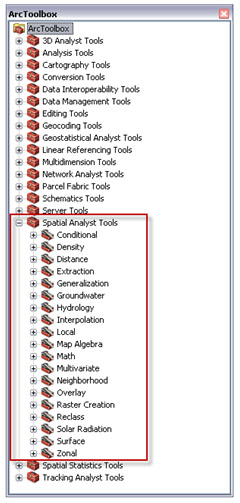
ArcGIS 10 Spatial Analyst Toolbar

ArcGIS 9.3.1 Spatial Analyst Toolbar

The tools can now be directly accessed through ArcToolbox instead of the toolbar. This change makes the tools easily accessed through the Python environment. It also enables the environment settings to be set from a single location, whereas Spatial Analyst at 9.3.1 had its own environment settings. With everything in one location, the Spatial Analyst Tools can access the additional geoprocessing benefits.
You can also customize the Spatial Analyst toolbar to create a menu similar to that of the previous version. See Adding and removing tools on menus and toolbars for more information on customizing toolbars.
Remember, the toolbar will remain grayed out until raster data is added to the map, since it's not functional with vector data. The Spatial Analyst Tools are still accessible from ArcToolbox when the toolbar is grayed out, though, as long as the extension has been activated.
Check out the related links below for additional information on the Spatial Analyst toolbar.
-Timothy H., Support Analyst - Geodata Raster Group, Esri Support Services - Charlotte, NC
Related Links:
</A>Capabilities of the Spatial Analyst toolbox
Accessing the Spatial Analyst toolbox and tools
Working with the Spatial Analyst toolbar
You must be a registered user to add a comment. If you've already registered, sign in. Otherwise, register and sign in.
-
Announcements
70 -
ArcGIS Desktop
87 -
ArcGIS Enterprise
43 -
ArcGIS Mobile
7 -
ArcGIS Online
21 -
ArcGIS Pro
14 -
ArcPad
4 -
ArcSDE
16 -
CityEngine
9 -
Geodatabase
25 -
High Priority
9 -
Location Analytics
4 -
People
3 -
Raster
17 -
SDK
29 -
Support
3 -
Support.Esri.com
60
- « Previous
- Next »