Turn on suggestions
Auto-suggest helps you quickly narrow down your search results by suggesting possible matches as you type.
Cancel
- Home
- :
- All Communities
- :
- Services
- :
- Esri Technical Support
- :
- Esri Technical Support Blog
- :
- Five tips for getting started with CityEngine
Five tips for getting started with CityEngine
1968
0
04-17-2012 01:55 AM


- Subscribe to RSS Feed
- Mark as New
- Mark as Read
- Bookmark
- Printer Friendly Page
04-17-2012
01:55 AM
 CityEngine is a powerful product that can build amazing cityscapes. Digging into this software can be a little tricky at first; however, the more you use it, the easier the functionality becomes. Esri CityEngine on the ArcGIS Resource Center is a great place to start, as you take on the learning curve. There are some tutorial videos and data templates available that will help you to better understand the software. In addition to these resources, here are five quick tips for basic functionality within CityEngine.
Downloading Tutorials and Example Data
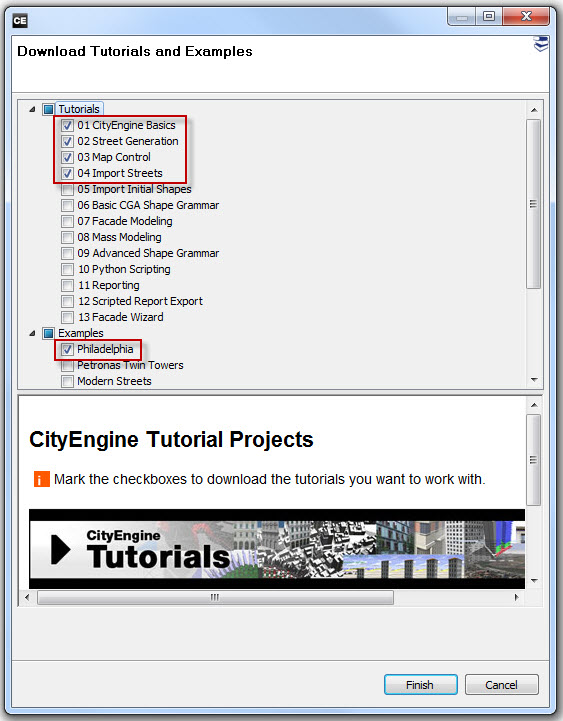
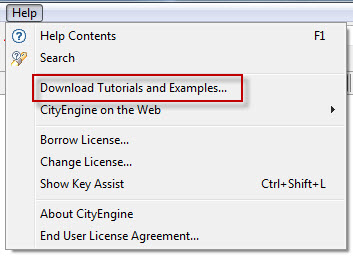 Open the Help menu > Download Tutorials, then download the desired Tutorials and Examples from the Download Tutorials and Examples dialog.
During the download process, the option to run in the background can be set in the data status window, so that you can continue to work on your scene while the data is loaded.
View Settings
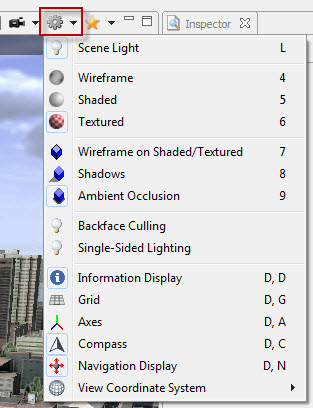 There are a wide range of view settings that can be accessed from the Viewport settings dropdown. To the scene, you can alter lighting settings, activate reference information (grid, axes, compass, etc.).
There are also settings for the 3D display, such as wireframe, shaded, textured, or textured display with wireframe. Also, take note of the shortcut keys for toggling these settings.
Save Screenshot
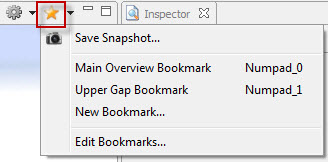 From the bookmarks button in the viewport, you can access the functionality to save a snapshot/screenshot. The output dimensions can be set along with additional information elements. There are a variety of formats available to save the screenshot (.png, .jpg, .tiff, .bmp, etc.).
CityEngine Shortcuts
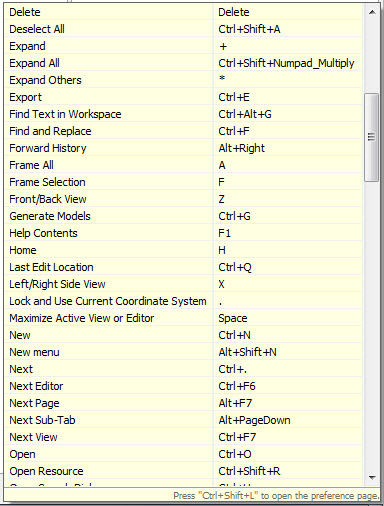 The Key Assist can be accessed from the Help menu or by pressing CTRL + SHIFT + L. This will open a dialog at the bottom right corner with a list of all the shortcut keys.
With the Key Assist Window you can press CTRL + SHIFT + L again, to open the Preference dialog, where the default settings can be modified.
Window Layout
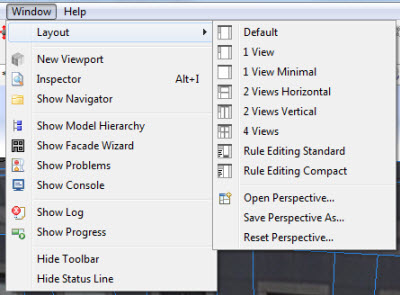 There are many windows available within CityEngine, and you may find yourself looking for a specific one, such as the Viewport or Navigator. The Window Menu will give you access to all windows individually.
Using the spacebar, you can maximize a window to the full screen, docking the other window on the right border. Predefined layouts are available via the Window Menu > Layout.
There is also the ability to save a custom perspective if you have a particular setup you like.
I hope these tips have helped get you started using CityEngine. If you need additional help, visit the CityEngine section in the Support Knowledge Base or the CityEngine forums.
Timothy H. - Raster/3D Support Analyst
Labels
About the Author
Timothy Hales is a Senior Education Specialist for Esri Training Services developing instructor-led and web courses. Before developing training content for Training Services, he was the Enterprise Community Manager for Esri Community (GeoNet).
Labels
-
Announcements
70 -
ArcGIS Desktop
87 -
ArcGIS Enterprise
43 -
ArcGIS Mobile
7 -
ArcGIS Online
21 -
ArcGIS Pro
14 -
ArcPad
4 -
ArcSDE
16 -
CityEngine
9 -
Geodatabase
25 -
High Priority
9 -
Location Analytics
4 -
People
3 -
Raster
17 -
SDK
29 -
Support
3 -
Support.Esri.com
60
- « Previous
- Next »