ArcGIS Maps SDKs Native Blog - Page 19

cancel
Showing results for 
Show  only  | Search instead for 
Did you mean: 

Latest Activity

(238 Posts)
by Anonymous User
Not applicable

I'm not going to hide it, I love the ArcGIS Runtime's loadable design pattern. We find the loadable pattern across the ArcGIS runtime; no doubt you interact with it often.

In short, the pattern allows you to work with an object that might take some time figuring stuff out before it’s ready to be used. For example, it might depend on multiple (possibly remote) resources, sometimes in sequence, before it knows enough about itself to be usable. Once these resources are retrieved, the loadable object executes a callback block signaling that it's ready. An AGSMap is a good concrete example as it might need to load multiple remote layers before it knows what extent and spatial reference to use.

Some other qualities of a good loadable object include:

  • calling the completion block on a suitable thread based off the thread the load was started from (see this blog post).
  • providing an observable loadStatus and loadError, though generally you just wait for the completion block to be called.
  • handling load failure elegantly with the option to retry later if needed (perhaps the network connection was interrupted).

As an added bonus, a full implementation of <AGSLoadable> can be found in AGSLoadableBase, a class designed to be subclassed (and which saves you reinventing a lot of wheels, doing a lot of the heavy lifting of load state and callback thread considerations).

"It's only a protocol," you might say. "You can't always subclass AGSLoadablebase," you might suggest. "Try implementing AGSLoadable yourself, do you still love it?" you might pronounce.

Hot take, but of course you'd be right. As an engineer, I'm tickled by problems like this and eagerly look for solutions.

Today I'd like to share with you a delightful maneuver that allows any class to adhere to <AGSLoadable> with neither the need for a custom async implementation (yikes) nor subclassing AGSLoadableBase.

I'd like to introduce you to LoadableSurrogate & <LoadableSurrogateProxy>, a member/protocol solution that offloads the heavy lifting of async loading onto a surrogate loader.

There are two actors in this maneuver, engaged in a parent/child delegate-like relationship:

  1. LoadableSurrogate is a concrete subclass of AGSLoadableBase that routes messages to a proxy object.
  2. A proxy object that adheres to <LoadableSurrogateProxy> we'd like to make loadable with the help of a loadable surrogate.

A class can leverage this tool by creating a LoadableSurrogate member, adhering to <LoadableSurrogateProxy> and specifying the LoadableSurrogate's proxy.

In this example, I've built a simple loader that downloads an image of (my favorite muppet) Kermit the Frog hanging out on the legendary Hollywood walk of fame.

class KermitLoader: NSObject, LoadableSurrogateProxy { }

I can use the kermit loader object like any other <AGSLoadable>:

let kermitLoader = KermitLoader()  kermitLoader.load { (error) in  
   
    if let error = error {         
        print("Error: \(error.localizedDescription)")     
    }

    imageView.image = kermitLoader.kermitImage
}

The kermit loader is initialized with a LoadableSurrogate member, assigning the surrogate's proxy to self.

class KermitLoader: NSObject, LoadableSurrogateProxy {

    private let surrogate = LoadableSurrogate()          

    override init() {
        super.init()         
        surrogate.proxy = self
    }     
    /* ...

For the kermit loader to conform to <LoadableSurrogateProxy> it must also conform to <AGSLoadable>. Conveniently, all <AGSLoadable> methods can be piped through the surrogate.

    ... */
    func load(completion: ((Error?) -> Void)? = nil) {
        surrogate.load(completion: completion)     
    }          

    func retryLoad(completion: ((Error?) -> Void)? = nil) {         
        surrogate.retryLoad(completion: completion)     
    }          
 
    func cancelLoad() {         
        surrogate.cancelLoad()     
    }     
    /* ...

Following the same pattern outlined above, you might opt to compute the <AGSLoadable> properties loadStatus and loadError on the fly, getting those values from the surrogate.

Instead, I've opted to persist those properties and thus, expose them to KVO.

    ... */
    @objc var loadStatus: AGSLoadStatus = .unknown

    @objc var loadError: Error? = nil
    //
    // Proxy informs of changes to `loadStatus` and `loadError`.
    //

    func loadStatusDidChange(_ status: AGSLoadStatus) {         
        self.loadStatus = status     
    }          

    func loadErrorDidChange(_ error: Error?) {         
        self.loadError = error     
    }     
    /* ...

Everything we've seen up until this point is boilerplate and can be copied and pasted. Let's get to the good stuff.

First, in order to perform the loadable operation we'll need to set up some resources and properties. We need a URL to the image, a data task, and of course a reference to the loaded image.

    ... */
    private let kermitURL = URL(string: "https://c1.staticflickr.com/2/1033/1024297684_582bc1c05a_b.jpg")!

    private var kermitSessionDataTask: URLSessionDataTask?

    var kermitImage: UIImage? = nil
    /* ...

What comes next is the custom loadable implementation. If you have ever subclassed AGSLoadableBase directly, this should feel familiar.

The proxy object is responsible for starting the load and completing with an error or nil, depending on the success of the operation. The proxy object is also responsible for canceling any async operations as well.

    ... */
    func doStartLoading(_ retrying: Bool, completion: @escaping (Error?) -> Void) {    

        if retrying {                          
            let previousDataTask = kermitSessionDataTask             
            kermitSessionDataTask = nil
            previousDataTask?.cancel()             
            kermitImage = nil
        }                  

        kermitSessionDataTask = URLSession.shared.dataTask(with: kermitURL) { [weak self] data, response, error in

            guard let self = self else { return }                          

            if let data = data, let image = UIImage(data: data) {                 
                self.kermitImage = image             
            }                          

            if response == self.kermitSessionDataTask?.response {                 
                completion(error)             
            }         
        }                  

        kermitSessionDataTask!.resume()     
    }     
    /* ...

The proxy object is also responsible for canceling running operations. If you want the surrogate to supply a generic CancelledError, you can return true. In this example the data task reliably provides its own cancel error in the task's callback and thus we return false.

    ... */
    func doCancelLoading() -> Bool {                  
        kermitSessionDataTask?.cancel()         
        kermitSessionDataTask = nil
        kermitImage = nil
        // Returns `false` because the URLSession returns a cancel error in the completion callback.
        // Return `true` if you want the surrogate to supply a generic cancel error.
        return false
     } 
 }

Cool! Now let's take a look under the hood of the LoadableSurrogate, powering much of the kermit loader.

To start, a LoadableSurrogate is a subclass of AGSLoadableBase.

class LoadableSurrogate: AGSLoadableBase { /* ...

A LoadableSurrogate passes messages to a proxy object. As you saw in the KermitLoader.init(), the kermit loader specifies itself as the proxy.

    ... */
    weak var proxy: LoadableSurrogateProxy? {         
        didSet {             
            proxy?.loadStatusDidChange(loadStatus)             
            proxy?.loadErrorDidChange(loadError)         
        }     
    }     
    /* ...

A LoadableSurrogate observes loadError and loadStatus so that it may immediately inform the proxy of changes to either of these properties.

... */
    // Cocoa requires we hold on to observers.
    private var kvo: Set<NSKeyValueObservation> = []          

    override init() {            

        super.init()      

        let loadStatusObservation = self.observe(\.loadStatus) { [weak self] (_, _) in

            guard let self = self else { return }                          

            self.proxy?.loadStatusDidChange(self.loadStatus)         
        }                  

        kvo.insert(loadStatusObservation)                  

        let loadErrorObservation = self.observe(\.loadError) { [weak self] (_, _) in

            guard let self = self else { return }                          

            self.proxy?.loadErrorDidChange(self.loadError)         
        }                  

        kvo.insert(loadErrorObservation)     
    }     
    /* ...

And finally a LoadableSurrogate handles piping the loadable method calls to and from the proxy.

    ... */
    private let UnknownError = NSError(domain: "LoadableSurrogate.UnknownError", code: 1, userInfo: [NSLocalizedDescriptionKey: "An unknown error occurred."])          

    override func doStartLoading(_ retrying: Bool) {                  

        // We want to unwrap the delegate, if we have one.
        if let proxy = proxy {                

            // Call start loading on the delegate.
            proxy.doStartLoading(retrying) { [weak self] (error) in

                guard let self = self else { return }                                  

                // Finish loading with the reponse from the delegate.
                self.loadDidFinishWithError(error)             
            }         
        }         
        else {             
            // No delegate, finish loading.
            loadDidFinishWithError(UnknownError)         
        }     
    }

    private let CancelledError = NSError(domain: "LoadableSurrogate.CancelledError", code: NSUserCancelledError, userInfo: [NSLocalizedDescriptionKey: "User did cancel."])      

    override func doCancelLoading() {   

        // Call cancel delegate method.
        if proxy?.doCancelLoading() == true {                          

            self.loadDidFinishWithError(CancelledError)         
        }     
    } 
}

To see this maneuver in action, have a look at this playground.

Happy loading!

more
0 0 598
MarkDostal
Esri Regular Contributor

The latest release of the ArcGIS Runtime Toolkit for iOS is here. It has been updated to work with the 100.5 release of the Runtime SDK for iOS.
 
This release includes:
• New PopupController component and example; the PopupController provides a complete feature editing and collecting experience.
• New TemplatePickerViewController component and example; the TemplatePickerViewController allows the user to choose from a list of AGSFeatureTemplates, commonly used for creating a new feature.
• Fix for a TimeSlider issue when using a combination of play/pause and manual dragging.
• Project updates for Xcode 10.2

You can find the Toolkit here.

See this blog post for information on the SDK release.
 
We hope you enjoy the new release! Let us know what you're building with it.

more
0 0 666
LucasDanzinger
Esri Frequent Contributor

Yesterday, we released Update 5 of ArcGIS Runtime SDK for Qt version 100. To get an overview all of the new functionality across all of the Runtime SDKs, you can read the blog on the ArcGIS Blog. Some notable new features include support for WFS, 3D subsurface navigation, mobile scene packages, and several new 3D layer types. In addition to this, the Qt team has been working very hard on some additional work items throughout the release. Here are some noteworthy things to know about the Update 5 release for the Qt SDK:

Qt 5.12 Upgrade


We updated our build environment to be based on Qt 5.12. This brought us a whole host of new features such as improved performance and memory consumption. In addition, 5.12 brought in support for Xcode 10, which is critical for apps that are deployed to Apple's AppStore. Finally, 5.12 brought in a compiler change in Android from gcc to clang. This allowed us to update our NDK minimum and bring in support for Android armv8 (64-bit). This is crucial for apps that are deployed to the Google Play Store and also opens the door for performance gains.

C++ 11 range-based for loops


We now fully support using C++ 11 style range-based for loops with our list model types. This means you can migrate your C-style loops from this:

for (int i = 1; i < m_graphicsOverlay->graphics()->size(); i++)
{
}

to this:

for (auto graphic : *(m_graphicsOverlay->graphics()))
{
}

New compiler warnings for deprecations


We have refactored the selection mechanism for visually selecting features and graphics in 2D and 3D. As such, we have some newly deprecated members. As part of this release, we have introduced new compiler warnings that will warn you if you are using these deprecated members. We plan to use this pattern going forward to notify you of any API deprecations.

ECMAScript 6 & 7 Support


One of the cool new features of Qt 5.12 is the inclusion of ES 6 & 7 features within QML's JavaScript engine. We have sanity tested many of the newer JS language features and everything thus far is working as expected. Some new features include arrow functions, string interpolation, constant variables (const instead of var), block scoped variables (let instead of var), function default parameters, classes, static functions, and more. This was one of the topics of discussion at this year's Dev Summit, so feel free to check out this video of the presentation if you'd like to hear more.

TableView


Qt 5.12 brings in support for a new Qt Quick Table View. At the Dev Summit last month, Neil MacDonald gave an interesting talk on how you can use our AttributeListModel and the Qt Quick Table View to build an attribute table. You can watch this presentation here.

Sample Improvements


Upgrading our minimum to Qt 5.12 means that we now fully embrace Qt Quick Controls 2 and have removed Qt Quick Controls 1 from all samples (Qt Quick Controls 1 were deprecated at 5.11). As such, we now have a unified style throughout the samples and our sample viewer app, and we were also able to utilize Qt's new high DPI support. This can be enabled by setting 

QGuiApplication::setAttribute(Qt::AA_EnableHighDpiScaling);

in your main.cpp. Once this is enabled, your code can be cleaned up by removing all of the scaleFactor multiplications that were previously required to scale pixel values on different DPI devices. In the coming weeks, we will be adding more Update 5 samples to the master branch of our GitHub page, so please continue to watch the repo here.

Platform updates


As mentioned in our 100.4 release notes, 100.5 will no longer support Ubuntu 14.04, macOS Sierra, or iOS 10. As such, 100.5 also dropped support for 32-bit iOS, which means our static library size was cut in half, and the macOS installer is now significantly smaller than previous releases. As mentioned earlier, we now support 64-bit android, and we also have an embedded Linux beta available for ARM devices. You can join this beta program through the early adopter site.

more
1 0 983
Nicholas-Furness
Esri Regular Contributor

The latest release of the Runtime SDK for iOS is here (see the release notes, and the general announcement over on the ArcGIS Blog), and it brings with it a slew of great new features, and some cool new internals that pave the way for even more goodness in future releases.

Some highlights from the iOS perspective:

  • We're now promoting the use of the Dynamic Framework for integrating ArcGIS Runtime SDK for iOS into your projects (and have deprecated the Static framework, which will be removed in a future release). This is Apple's preferred approach and matches what CocoaPods has been doing since Runtime 100.1. It also makes integration with the project simpler (e.g. you no longer explicitly add ArcGIS.bundle to your projects). See Configure your Xcode Project in the iOS SDK Guide.
  • In alignment with Apple's policies and since 100.5 now requires iOS 11 or higher, support for 32-bit devices has been dropped. You shouldn't notice any change as a developer, but it means means that the SDK installer package is now much smaller to download!
  • If you've been using custom views in an AGSCallout, the Runtime now makes use of AutoLayout to fit the view. See this release note.

This is not specific to the iOS Runtime SDK, but if you work with selections in your map view, please note the new behavior we have introduced at 100.5. These changes were brought about as we prepare for significant features down the line (including Metal support).

As has been mentioned before, 100.5 is the last release of the dedicated Runtime SDK for macOS.

The Samples app and Toolkit have already been updated for 100.5, and the Open Source apps will be update shortly (Data Collection already has been!).

We hope you enjoy the new release! Let us know what you're building with it.

more
1 4 2,154
Nicholas-Furness
Esri Regular Contributor

After some discussion, the decision has been made to deprecate the ArcGIS Runtime SDK for macOS. The upcoming 100.5 update will be the last release of the dedicated Runtime SDK for macOS. As with any other release, support will be provided according to the Product Lifecycle Support Policy.

It's not a decision taken lightly but, for a number of reasons, we're confident that it's the right move. 

Firstly: interest in the Runtime SDK for macOS has been low. By freeing up team members from maintaining it (including not just the ArcGIS Framework, but also the Samples App, guide documentation, etc.), we'll be able to implement improvements across the entire Runtime SDK family more effectively.

Secondly: the decision was made easier given that developers targeting macOS as a platform still have the option of using the ArcGIS Runtime SDK for Java or ArcGIS Runtime SDK for Qt. If you are considering developing Runtime apps targeting macOS, we recommend you investigate those.

If you have questions about this deprecation, feel free to use the comments section below or, if you're coming to the Developer Summit in Palm Springs, come and see us at the developer island.

more
0 0 1,682
MaraStoica4
Regular Contributor

Data is at the heart of every business. Collecting and storing data is done in a variety of ways, from paper forms to custom-built applications. You, our customers, have asked us to help with the transition from paper to digital by providing you with a collection app that is configurable and customizable to work with your own data and specific workflows.

We are proud to deliver an open source app that hopefully fits many of your organization's data collection needs. Because we are releasing the app open source and under an Apache license, you are welcome to take it, modify it to match your needs, and use it as you see fit.

Data Collection for .NET is a WPF application built using the ArcGIS Runtime SDK for .NET and it features common functionality encountered when collecting data.

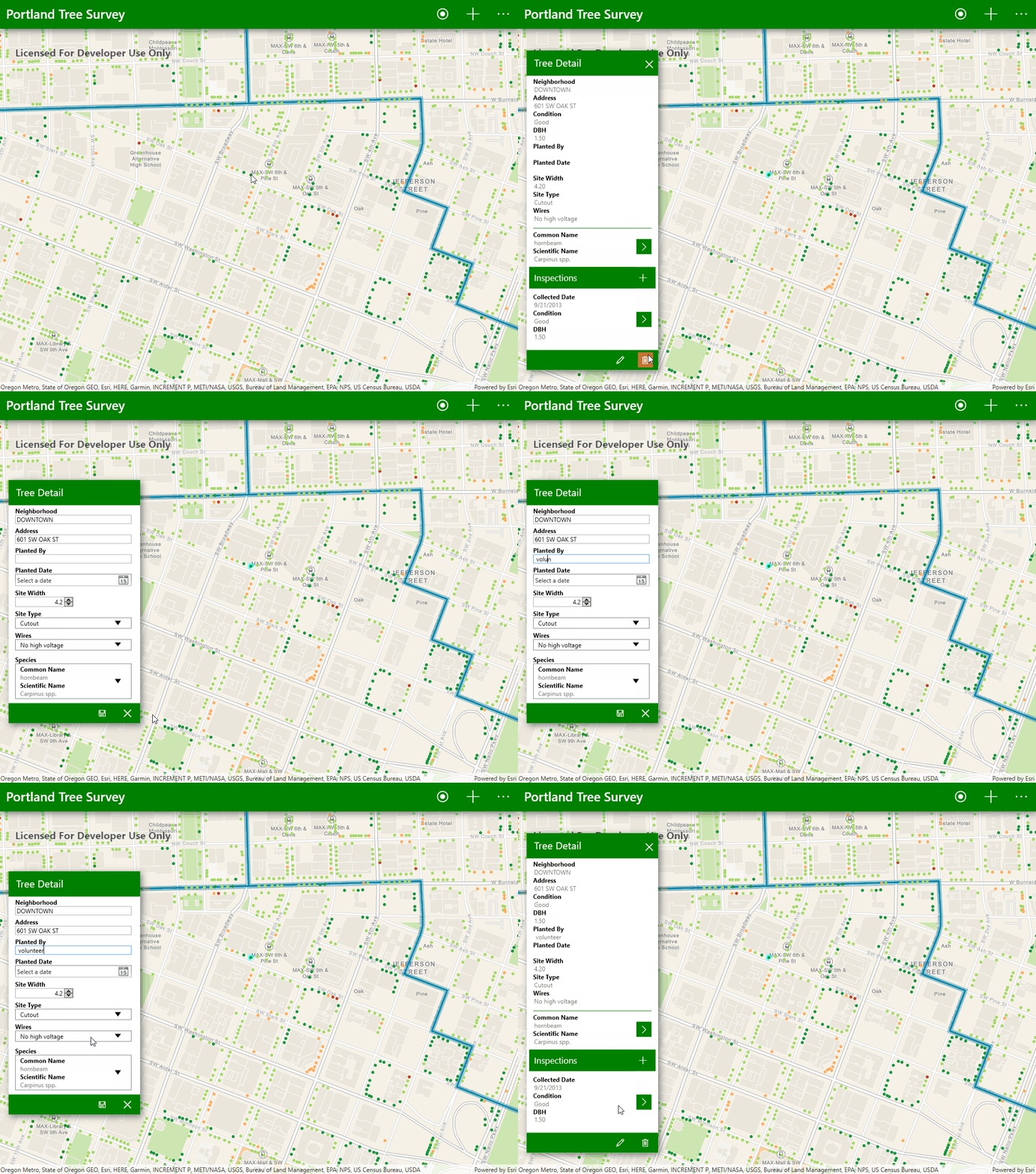
Identify map data

Identify

Collecting data means also knowing what is around you. Click on one of the data points on the map to bring up information about it. If you need to edit it, clicking on the pencil icon will start an edit session. It's as simple as that!

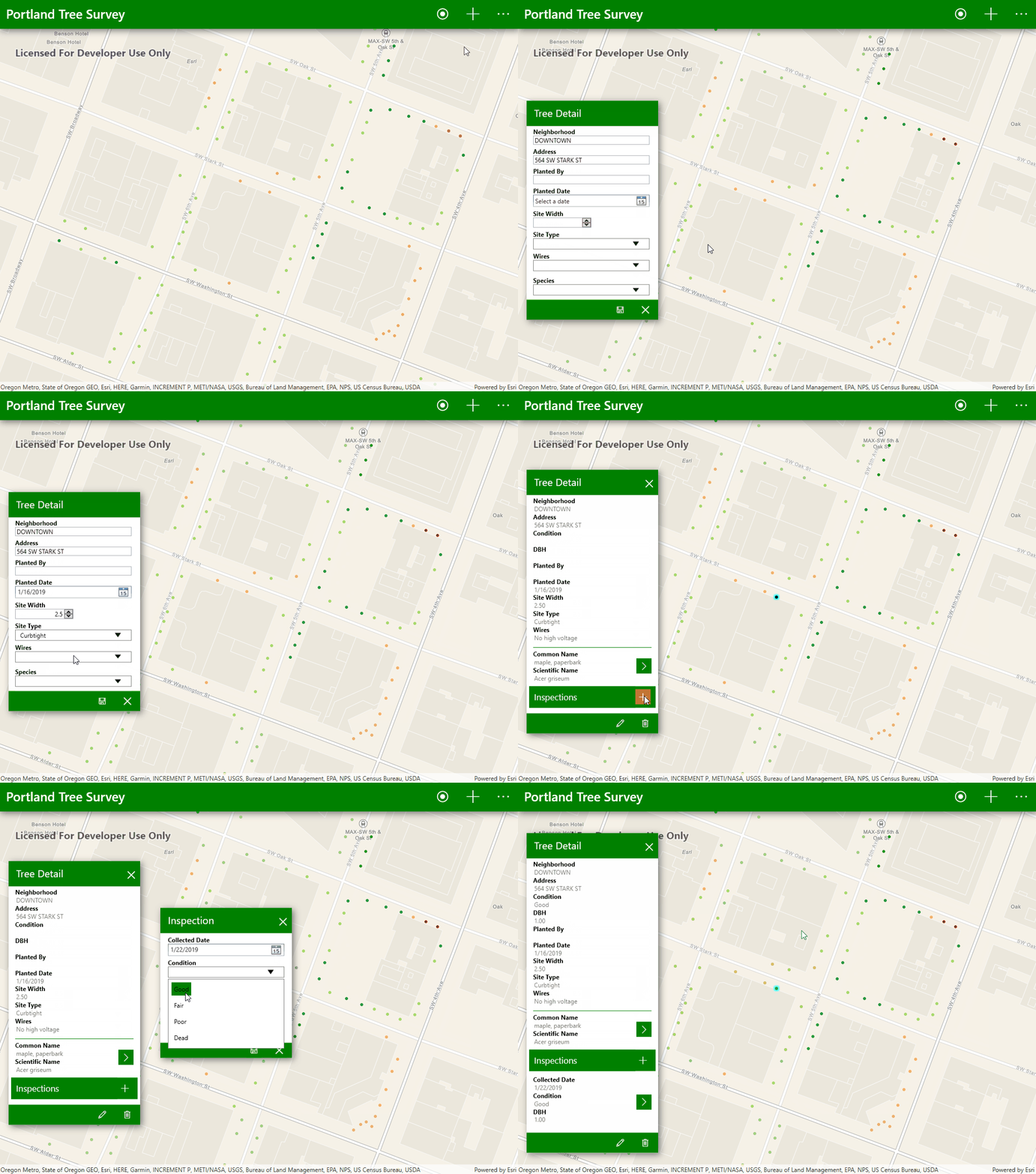
Collect new data point

Collect

When you're ready to add a new data point, click the plus button to begin. You'll be prompted to select a location for your new data point and add some information about it.

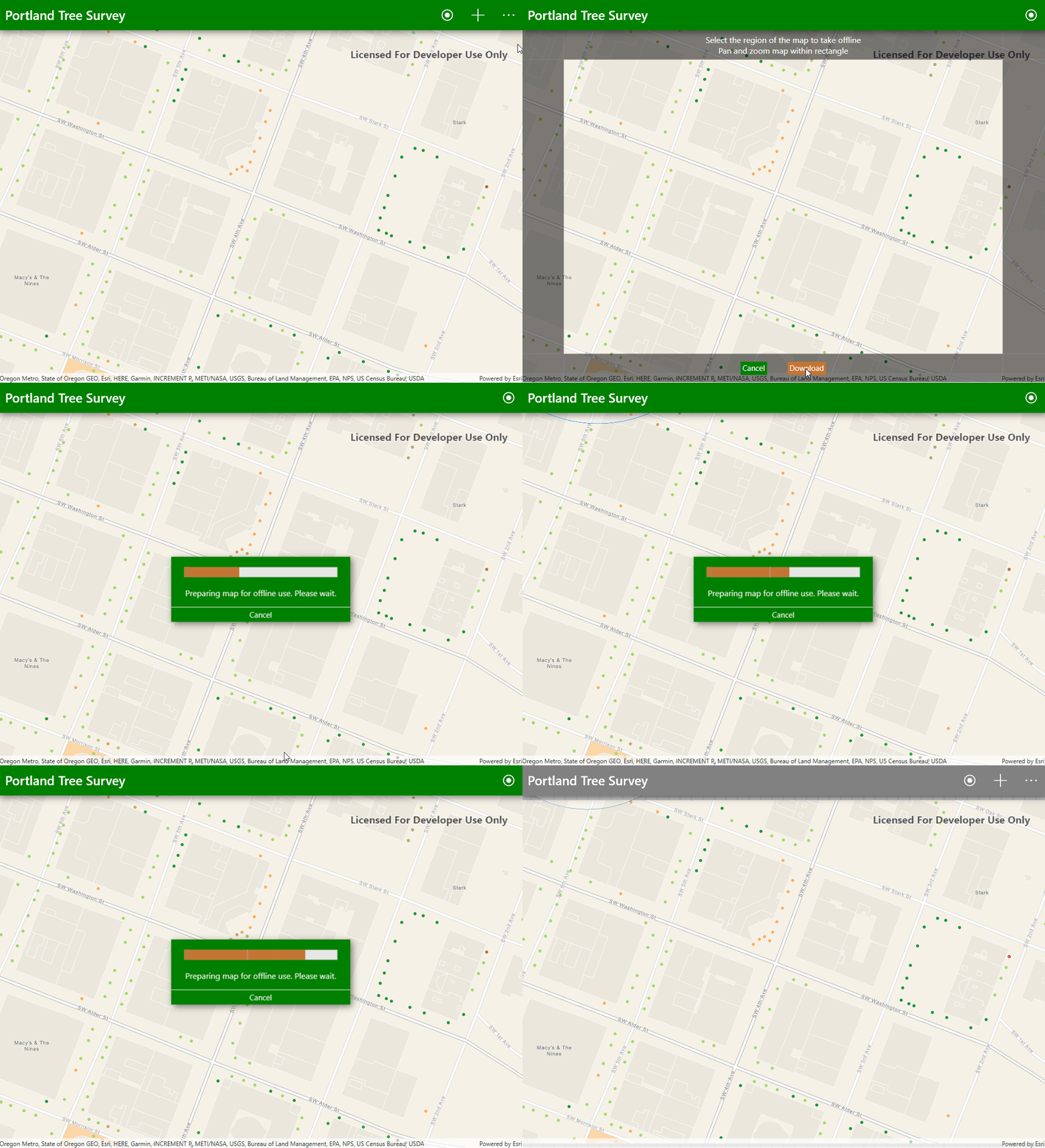
Work offline

Offline

To support remote collection in areas without network access, we added the ability to work offline. Simply navigate the map to your desired work area and select "Work Offline" from the menu. The app will download the map along with its data and will allow you to collect data points when you are disconnected from the network. When you're back in the office or able to connect to a network, select "Sync Map" from the menu to have your changes merged with the online version of your map.

Do you think this is something you could use? Take a look at the full documentation and get the source code to the app from GitHub!

Happy collecting!

more
3 4 3,321
Nicholas-Furness
Esri Regular Contributor

The Runtime SDK does a lot of work behind the scenes to make it as simple as possible for you to write great, interactive mapping apps with fast, smooth user interfaces.

Getting out of the way

Key to that is making sure that when you ask Runtime to do something asynchronous (query some features, autocomplete an address, load a service definition etc.), that it gets off the thread you called from as quickly as possible and does its work on another thread. Runtime does this really well and you should never see it get in your way while it's doing something.

But when it's done doing that something, which thread does Runtime use to let you know?

The good news is iOS and Runtime work together so you might never have to worry about this. But you're a good developer, and you're doing some carefully thought out threading yourself, so you want to know the details, right?

UI and the main thread

Where you need to know which thread you're on is if you're updating your app's UI. In iOS, all UI updates must be done on the main thread (or the Main Thread Checker will come after you and your UI won't behave). So if you're not on the main thread and you want to enable that button and update that label, you need to fix that.

Luckily, any time iOS enters your code because of a user interaction or view-related hook (e.g. viewDidLoad()), you will already find yourself on the main thread. For a lot of developers this means not having to worry about threading at all until they build something cpu-intensive, at which point they'll need to push that work onto another thread¹.

Efficient behavior

Even though Runtime will use other threads to get out of your way, there are some reasons it's better not to switch threads if possible.

  • Context switching between threads takes up CPU cycles.
  • There are some common workflows where even though the pattern is asynchronous, it's quite possible Runtime already has the answer for you and can hand it over immediately. In those cases, context switching would be a waste of time.

Adding it all together

These considerations combine to help Runtime determine how to call back to you on the various callback blocks, observers, and change handlers provided by the Runtime SDK.

Here's a quick rundown of the ways the ArcGIS Runtime SDK for iOS might call back to you, and the thread you should expect to be called back on:

Operation/HandlerThreadNotes

Explicit Calls:

Main | Any
  • If you call from Main, Runtime will call back on Main.
  • If you don't call from Main, Runtime could call back on any thread.

Calling Runtime from the main thread is a pretty good indicator that you're calling because of a user interaction, so it's reasonable to expect that you'd want to update some UI when Runtime responds (and that always needs to happen on the main thread).

But if you didn't call Runtime from the main thread, maybe there isn't a pair of eyes waiting for the result so Runtime skips the overhead of making sure it's back on the main thread when it responds, ensuring your robots can continue at full speed.

AGSGeoViewTouchDelegate

Main
  • Runtime will always call back on Main.

Just as iOS enters your code on the main thread when there's some user interaction, Runtime makes sure to do the same through the AGSGeoViewTouchDelegate. So if you're handling a user tapping on the map, for example, it's safe to update your UI directly.

However, if you're observing some property that happens to be changing because of user interaction (e.g. using KVO to monitor mapScale), the "State Feedback" rule below applies.

AGSLoadableMain
  • Runtime will always call back on Main².

More often than not, customer code calls into load() or retryLoad() from the main thread. If an item is already loaded, Runtime can then respond immediately with no context switching required. It makes the loadable pattern very fast for the case where, as the result of a user interaction, you need to ensure something is loaded before doing something else (e.g. determining a feature layer's renderer). In that case, only the very first interaction will incur a performance penalty, but you write your code once and it'll handle the first time or the 100th.

State Feedback:

Any
  • Runtime could call back on any thread.

Context switching back to the main thread could mean that feedback is returned out of order or be delayed, so Runtime will provide that feedback immediately on whichever thread is current. If you need to update your UI as a result, you should dispatch your UI code to the main thread yourself with something like:

DispatchQueue.main.async {
    /* update the UI */
}‍‍‍‍‍‍‍‍‍‍‍‍‍‍‍‍‍‍‍‍‍‍‍‍‍‍‍‍‍‍‍‍‍‍‍‍‍‍‍‍‍‍‍‍‍‍‍‍‍‍‍‍‍‍‍‍‍‍‍‍‍‍‍‍‍‍‍‍‍‍‍‍‍‍‍‍‍‍‍‍‍‍‍‍‍‍‍‍‍‍‍‍‍‍‍‍‍‍‍‍‍‍‍‍‍‍‍‍‍‍‍‍‍‍‍‍‍‍‍‍‍‍‍‍‍‍‍‍‍

Summary

The above can largely be summarized like this:

  • Things that update status or state (progress, KVO, etc.) can happen on any thread.
  • Deliberate actions (Tasks and Jobs) that are called from the main thread will receive their status updates and results on the main thread. If they're called from some other thread, the thread used to respond could be any thread.
  • AGSLoadable and AGSGeoViewTouchDelegate will always call back on the main thread.

Let me know in the comments if you have questions about any of the topics brought up here. This can be a complex issue, but iOS and the Runtime SDK make sure that you usually don't need to worry about it.


¹ iOS includes a powerful thread abstraction API (Grand Central Dispatch, or GCD) that's worth learning about to help with concurrent programming and slick app experiences. Here's a great 2-part tutorial.

² Note: this load() behavior was updated at release 100.3 to provide a number of performance optimizations. Up until release 100.2.1, Runtime would promise to call back on the main thread only if you called in from the main thread (identical to the current Task/Job behavior).

more
3 2 2,087
EricBader
Honored Contributor

Today, The Qt Company announced the release of Qt 5.12 LTS. This release brings with it support for Xcode 10 for the first time. ArcGIS Runtime SDK for Qt 100.4 was built with Qt version 5.9, which for iOS builds, utilizes Xcode 9. 

What does this mean?

If you develop iOS apps with ArcGIS Runtime SDK for Qt 100.4, you should continue to use Xcode 9. We have performed some ad-hoc testing with Xcode 10, and have not found any new issues, but it is possible that there are some binary compatibility issues, and we therefore do not recommend this. Starting in March 2019, Apple's App Store will require that all submission be built with Xcode 10. We recommend pushing any required updates before this date and waiting for the 100.5 release of ArcGIS Runtime, which will support Xcode 10. We are planning on releasing 100.5 near the end of Q1 2019, so we hope this will cause minimal issues.

Thanks!

The ArcGIS Runtime SDK for Qt Development Team

more
1 1 1,112
EricBader
Honored Contributor

Today, The Qt Company announced that Qt 5.12 LTS has been released! LTS. This stands for "Long-Term Support". There are some important changes in this release that could affect current ArcGIS Runtime Qt developers who build for Android. We would like to bring these to your attention.

Prior to Qt 5.12, the Qt Android kits were built using the GCC compiler. Starting with Qt 5.12, the Android kits are now built with the Clang compiler and a newer version of the NDK, which no longer supports GCC. What does this mean to you? If you develop Qt Android apps and use ArcGIS Runtime SDK for Qt versions 100.0-100.4, you will not be able to use 5.12, as the currently released Android binaries support GCC only. If you require Android and Qt 5.12, you will need to wait for our 100.5 release, which will be built with 5.12 and Clang. Other platforms are not affected, and you can use 5.12 with our previous releases of ArcGIS Runtime without any known issues.

As always, we are keen to hear about your experiences.

Happy coding!

The ArcGIS Runtime SDK for Qt Development Team

more
0 0 1,354
MichaelBranscomb
Esri Frequent Contributor

We are excited to announce the release of the Toolkit for ArcGIS Runtime SDK for .NET v100.4. The Toolkit contains controls and utilities you can use out-of-the-box to accelerate the development of your .NET apps for Android, iOS, and Windows. You also have access to the complete Toolkit source code on Github enabling you to fully customize the Toolkit for your specific project requirements.

Features

  • Legend: Display a legend for a single layer in your map or scene and optionally for its sub layers.
  • SymbolDisplay: Render a symbol in a control (also used in the Legend).
  • PopupViewer: Display details and media, edit attributes, geometry and related records, and manage the attachments of features and graphics (popups are defined in the popup property of features and graphics).
  • Compass: Automatically show a compass when the user rotates map. Optionally auto-hide the compass when the user rotates the map north up.
  • FeatureDataField: Display and optionally allow editing of a single field attribute of a feature.
  • MeasureToolbar: Measure distances and areas on the map view.
  • ScaleLine: Display the current scale of the map view.
  • TimeSlider: Allow the interactive definition of a time extent and animate time moving forward or backward. Can be used to manipulate the time extent in a map or scene view.

Where possible each control is available for all APIs supported for development with ArcGIS Runtime SDK for .NET: UWP, WPF, Xamarin.Android, Xamarin.iOS, and Xamarin.Forms for Android, iOS, and UWP. Feature availability by platform/API is indicated in the Github repo readme.

Getting started

As a developer you have three options for working with the Toolkit:

  1. Reference the latest stable or pre-release package from NuGet.org
  2. Reference the latest master branch commit NuGet package from AppVeyor
  3. Build the Toolkit source

A set of basic samples are included in the Toolkit repo.

Roadmap

The Toolkit is an active development project with more controls and utilities on the roadmap. You can even get an early glimpse of some of these new controls in the Toolkit Preview package (currently in preview are the SignInForm and TableOfContents for WPF). Also on the roadmap are improved Guide and API reference documentation and additional samples.

Reporting issues

We encourage you to try out and use the Toolkit within your projects and we look forward to hearing your feedback. If you find any bugs while using the Toolkit please submit new issues in the Toolkit repo. At this time we are not accepting new PRs for full features but if there are new controls you would like to see included please submit an issue to request the enhancement.  

Cheers

The ArcGIS Runtime .NET Team

more
0 13 5,563
123 Subscribers