Turn on suggestions
Auto-suggest helps you quickly narrow down your search results by suggesting possible matches as you type.
Cancel
- Home
- :
- About TimothyHales

TimothyHales
Esri Notable Contributor
since
04-10-2014


01-15-2026
2859
Posts created
965
Kudos given
226
Solutions
2130
Kudos received
Turn on suggestions
Auto-suggest helps you quickly narrow down your search results by suggesting possible matches as you type.
My Ideas
(3 Idea Submissions)Latest Contributions by TimothyHales
|
POST
|
What is the average point spacing of your points? Do your points coincide with each of those depressions? Have you tried creating a TIN with the data to see if you get different results?
... View more
12-08-2011
04:52 AM
|
0
|
0
|
1741
|
|
POST
|
There are a couple things you ca do. You can use the Select by Location tool to select the roads based upon a defined search distance. If you school point is part of a larger file then you can select the single point and chose the option to use the selected features. The second option is to buffer the point using the Buffer tool or the Multiple Ring Buffer tool. The you can clip your roads based upon the resulting buffer polygons.
... View more
12-06-2011
05:55 AM
|
0
|
0
|
932
|
|
POST
|
Sounds like the raster was created with the GDAL raster library. ArcGIS 9.3.1 used the RDO raster library. More than likely, the software isn't able to read the GDAL tags for the projection information. How was the raster created? If ArcGIS, which version and service pack?
... View more
12-05-2011
10:43 AM
|
0
|
0
|
2504
|
|
POST
|
You're right Richard, you can also use: !SHAPE.FirstPoint.X! and !SHAPE.FirstPoint.Y!
... View more
12-05-2011
08:15 AM
|
0
|
0
|
3624
|
|
POST
|
You are probably looking at compression differences between the formats. JPEG2000 (20:1) uses a higher compression ratio than JPEG (10:1) and TIFF. Additionally, the output compression quality is probably different from the input. Raster compression
... View more
12-05-2011
08:07 AM
|
0
|
0
|
1860
|
|
POST
|
You can calculate geometry without using the Field Calculator. Right click the field > Calculate Geometry. You can chose the desired geometry and the coordinate system to use.
... View more
12-05-2011
04:50 AM
|
0
|
0
|
3624
|
|
POST
|
You have to first download the Military Analyst extension first, and then active it from Customize > Extensions. Additionally, you have to add the Military Analyst toolbox in ArcToolbox or access the toolbar from Customize > Toolbars. Open ArcToolbox Right click on the white area and click Add Toolbox... Navigate to C:\Program Files\ArcGIS\Desktop10.0\ArcToolbox\Toolboxes Choose Military Analyst Tools.tbx
... View more
12-02-2011
09:22 AM
|
0
|
0
|
668
|
|
POST
|
Check out the ArcGIS Military Analyst extension. Coordinate Tool The Coordinate tool supports Military Grid Reference System (MGRS) and coordinate conversion. Coordinate conversion and point position entry in decimal degrees, degrees/minutes/seconds, Universal Transverse Mercator (UTM), and MGRS can be achieved using the Coordinate tool. Conversion Tool The Conversion Tool enables batch coordinate conversion, streamlining data preparation, and loading workflow. Batch conversions can use feature classes, geodatabases, and DBF tables.
... View more
12-02-2011
06:25 AM
|
0
|
0
|
668
|
|
POST
|
You will need to convert your raster to an integer. Float rasters cannot be converted to a polygon.
... View more
11-29-2011
10:05 AM
|
1
|
0
|
816
|
|
POST
|
You can use either the Zonal Statistics tool or the Zonal Statistics as Table tool to sum the pixels. The Zonal Statistics as Table will provide your results in a table where the Zonal Statistics result will be a raster with a single value. The error message you are getting (Error 000863) is probably from using the same raster that is to be summed as the input. The input zone layer must either be a integer raster or a polygon file. You can either use a polygon file that covers the entire raster or the Raster Domain tool to create a boundary raster. Then use this polygon as the input zone and the raster to be summed as the input value raster. Specify the Sum statistics and the results will be returned as a table or raster depending on which tool you used.
... View more
11-29-2011
10:00 AM
|
0
|
0
|
16258
|
|
POST
|
Check out the following blog post on Using TINs Created with ArcGIS 10 in Previous Versions of ArcGIS.
... View more
11-08-2011
09:03 AM
|
0
|
0
|
646
|
|
BLOG
|
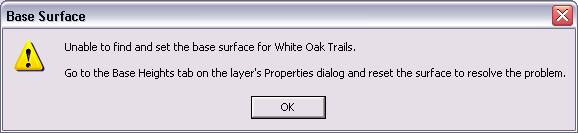 If the TIN appears to have a broken data source (the greyed out checkbox with a red exclamation point next to it), check the data source to see if the TIN file has been replaced with a folder. 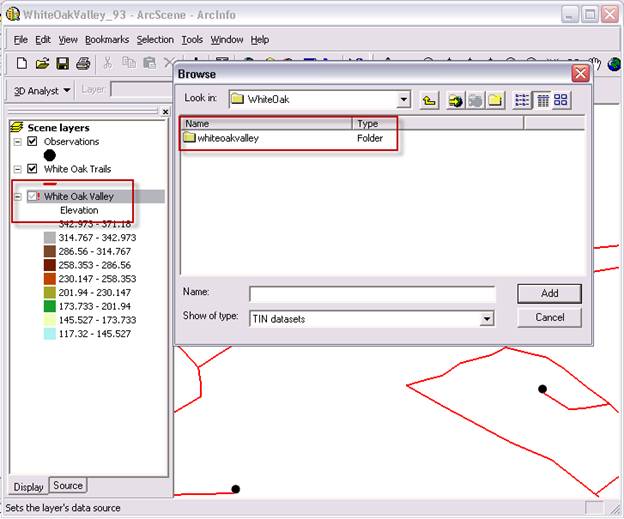 If you encounter this issue, you have a TIN that was created using a different triangulation version. You will need to use the Copy TIN tool in ArcGIS 10 and set the version to ‘PRE_10.0’. 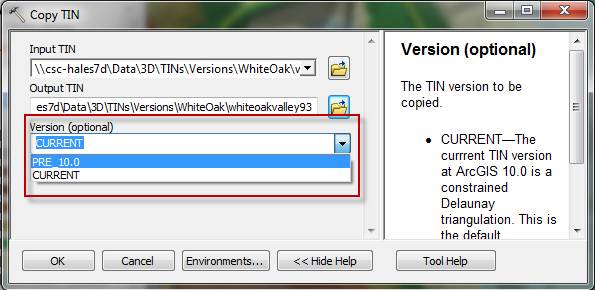 Once you save a copy of a TIN using the ‘PRE_10.0’ version option, the TIN will be properly read by previous versions of ArcGIS. The new TIN can then be added into the document or set as the data source of the original TIN. 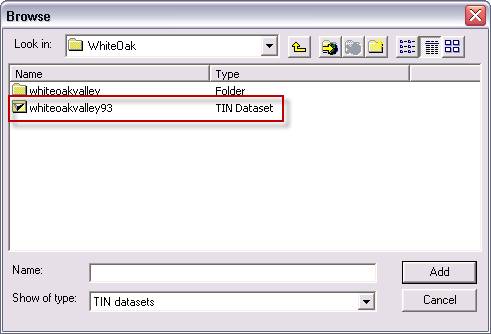 One other thing to note - there is an option within the Environment Settings to set the default storage version. Setting this option before creating your TIN will allow you to avoid the need for creating a copy of the TIN. If you choose to use the ‘PRE_10.0’ setting, the TINs can be read in ArcGIS 10.0 and previous versions, as well. 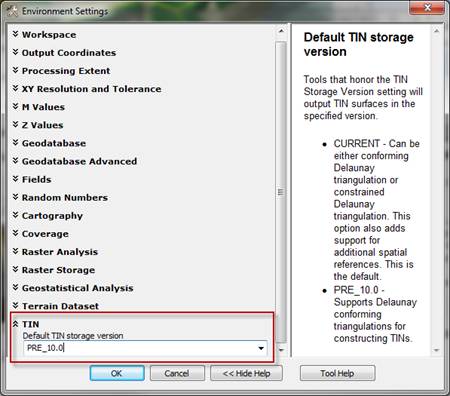 Related LinksTimothy H. - Raster/3D Support Analyst Related LinksTimothy H. - Raster/3D Support Analyst |