This guide is copied from a post by @TonghuiMing. https://community.esri.com/t5/arcgis-experience-builder-questions/overwrite-default-map-filter/m-p/1...
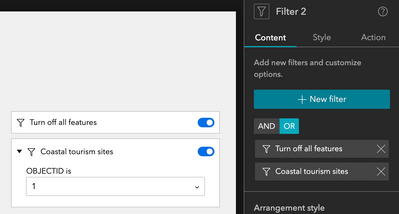
The first option is that you can configure a filter widget with clauses like the following - one clause with a solid none case, like ("OBJECTID=-1"), and not ask for values; then add other clauses that ask for values (they must not contain preset values, being all empty to make it work). Remember to set the logic operator to "OR":

Last but not least, you need to turn on the option "Apply this filter automatically". In this way, you will have the following behavior which starts with none on the map and filter by the desired/input values.
The second is pretty much the same but could be a little more straightforward - add a single filter item to do the above configurations, with only that special clause & turned on automatically. In other filter items, add the criteria for your cases. You can use OR/AND depending on how you want your users to experience:
Additional Tip: If you want to hide something in a feature layer completely from the user, you can set a filter in your webmap. Users in this example will never see a park that without the DevelopmentClass of Developed.


