Before we get into the meat of today's post, let's clarify some terms. Both Experience Builder and the Maps SDK for JavaScript (or JavaScript API, if like me, you refuse to accept the name change) have things called Widgets. In both platforms, Widgets are blocks of reusable code designed to do some task that can be easily called in to an application by Builders. We will be discussing both types of Widgets today, so to make things a bit clearer Widgets in Experience Builder will be referred to as ExB Widgets and Widgets in the JavaScript API will be called JS Widgets.
In my opinion, one of the greatest selling points of Experience Builder Developer Edition is that anything in the JavaScript API, including JS Widgets, are readily available. So by firing up Experience Builder, I instantly get access to all the code that the Experience Builder team has made for me and, with a little more effort, all the code the JavaScript API team made for me. If, for example, I was disappointed that Experience Builder does not have a simple, cleanly designed, user-friendly way to switch between exactly two basemaps, I could create a Custom ExB Widget and call in the JS Widget that does the job. Calling in JS Widgets from ExB Widgets is a common programming pattern. In fact, if you look into the code, many of the OOTB ExB Widgets are little more than loaders of JS Widgets. It sure would be a problem for people making Custom ExB Widgets, if JS Widgets went away...
Hey, did you click that last link? Did you see that red rectangle?
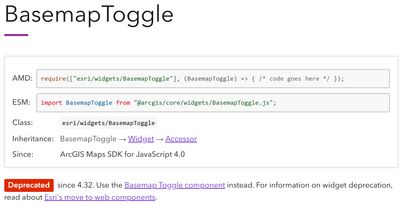
It's deprecated. Every JS Widget is either already deprecated or is about to be. Starting next year, JS Widgets are going to start being Thanos snapped out of existence.

Way back in the second most popular post on this Blog, my React primer, I noted that Experience Builder 1.13 would include Components, a new part of the JavaScript API better designed for working with frameworks like React that use a Virtual DOM, and that you should probably prefer to use Components over JS Widgets. Have I done that? Nope. And now it is official, Components are coming to kill JS Widgets. Better learn how to use Components. Hey, that's what this post is about. Are we finally getting to the point?
And now that I've wasted enough words that this post becomes legally copyrightable, like an online recipe, let's build a Basemap Toggle ExB Widget using a JavaScript API Component. I will start with some boilerplate code in widget.tsx:
import { React } from 'jimu-core'
import { MapViewManager, JimuMapView, JimuMapViewComponent } from 'jimu-arcgis'
import { Loading } from 'jimu-ui'
import reactiveUtils from 'esri/core/reactiveUtils'

const { useEffect, useState } = React

const Widget = (props) => {
	const viewManager = MapViewManager.getInstance()
	const mapView = viewManager.getJimuMapViewById(viewManager.getAllJimuMapViewIds()[0])
	const [jimuMapView, setJimuMapView] = useState<JimuMapView>(mapView)
	const [mapReady, setMapReady] = useState(false)

	useEffect(() => {
		if (jimuMapView) {
			reactiveUtils.whenOnce(() => jimuMapView.view.ready)
				.then(() => {
					setMapReady(true)
				}
			)
		}
	}, [jimuMapView])

	const activeViewChangeHandler = (jmv: JimuMapView) => {
		if (jmv) {
			setJimuMapView(jmv)
		}
	}

	return (
		<div className='jimu-widget' >
			{
				props.useMapWidgetIds &&
				props.useMapWidgetIds.length === 1 && (
					<JimuMapViewComponent
						useMapWidgetId={props.useMapWidgetIds?.[0]}
						onActiveViewChange={activeViewChangeHandler}
					/>
				)
			}

			{mapReady ? 'map ready' : <Loading />}
		</div>
	)
}

export default Widget
On it's own, this code doesn't really do anything. The net effect is to wait for JimuMapView to load, then save it to a variable and display the 'map ready' text. Let's breakdown exactly how we accomplish nothing with this code.
On the first render, the mapView is captured by the viewManager and stored into state as jimuMapView. It's actually a null value at this point. mapReady is given a default value of false. Somewhere about this point, the map starts to load, triggering the onActiveViewChange property of the JimuMapViewComponent.
One thing that frequently confuses developers is that the onActiveViewChange property only fires when the entire mapView object changes. As in, the Map Widget contains two maps and the user switches between them. For an example of someone not quite getting this concept, you can look at the official using map components example, which requires having two maps in the Map Widget and the end-user to swap between them before the Legend and Map Layers will actually load.
The onActiveViewChange property calls the activeViewChangeHandler function that sets jimuMapView to the actual mapView object and triggers render number two. Because jimuMapView has changed from null to a truthy object, the useEffect function fires on the second render. useEffect and the activeViewChangeHandler functions also started on the first render but their if clauses prevented them from doing anything. At this point, jimuMapView is truthy, but it is a very complex object and may not actually be fully loaded, so reactiveUtils is called to wait a little bit for the map to actually be ready. And when jimuMapView says it's really, actually ready this time, the mapReady value is set to true, triggering render number three.
Theoretically, the ExB Widget has been showing a loading graphic through the first two renders, but they have actually happened faster than Loading can load and now that mapReady is true the ExB Widget should be showing text saying 'map ready'. And that was a Shakespearian amount of ado about nothing. Isn't React fun? Now that we've got the code to load the map without crashing, we can start adding the functional bits.
In the import statements, I'll add this:
//Before 1.19
import { ArcgisBasemapToggle } from '@arcgis/map-components-react'
//In 1.19, use this instead
import 'arcgis-map-components'
//Works in either version
import Basemap from 'esri/Basemap'
I change the ternary in the return statement to this:
//Before 1.19
{mapReady ? <ArcgisBasemapToggle id='basemapToggle' /> : <Loading />}
//In 1.19, use this instead
{mapReady ? <arcgis-basemap-toggle id='basemapToggle' /> : <Loading />}
And add this block between the activeViewChangeHandler and the return:
const toggle = document.getElementById('basemapToggle')
if (toggle) {
	toggle.componentOnReady().then(() => {
		toggle.referenceElement = jimuMapView
		toggle.nextBasemap = new Basemap({
			portalItem: {
				id: 'id'
			},
            thumbnailUrl: 'url'
		})
	})
}
Assuming I have entered the correct values for id and thumbnailUrl, this Widget should now be fully functional. Let's talk about what this code does.
The code asks the browser to find the Basemap Toggle Component by the id we gave it. On the first two renders, the browser won't be able to find it because it doesn't exist yet. On render three, it will exist, toggle will become truthy and we will enter the if statement. If you console log toggle, you will find it is a DOM node, but it can also be treated as a JavaScript Object, functionally the same as a JS Widget. I don't really understand what quantum mechanics trickery is going on here, but it does work and you will see many examples like this if you look at the Components documentation. We will choose to believe that the cat is alive and collapse the waveform with toggle as a JavaScript Object.
TypeScript will claim everything inside this if statement is impossible. TypeScript is often right about things, but not today. You can just ignore TypeScript if you don't like what it says, if the Widget doesn't crash, then you were probably doing something legal after all. The first thing TypeScript doesn't believe in is the componentOnReady() method. This method is on every Component and it tells the code to wait for the Component to fully load before proceeding with the rest of the function. By my count, this is the fourth time we have asked the browser to slow down and wait in the past 100 micro-seconds, making it only slightly more patient than my four-year-old.
Now inside the then() statement, toggle is ready to receive further instruction. We will set the referenceElement property to jimuMapView. This tells the toggle what map to toggle. The nextBasemap property is the basemap it should toggle to. The toggle also has an activeBasemap property, but we don't need to worry about setting that, toggle will pull it from jimuMapView automatically. For ease creating a Settings Panel, I am making my nextBasemap from a Portal Item. In testing, I found that the thumbnail image will not load until the toggle is clicked, unless a thumbnailUrl is specifically added, so I'm doing that as well.
If I was making this Widget as a one-off, I could stop here, but I want to make this re-usable, so we'll build a Settings Panel next. Here is some boilerplate for setting.tsx:
import { React } from 'jimu-core'
import { AllWidgetSettingProps } from 'jimu-for-builder'
import { MapWidgetSelector } from 'jimu-ui/advanced/setting-components'

const Setting = (props: AllWidgetSettingProps<any>) => {

    const onMapWidgetSelected = (useMapWidgetIds: string[]) => {
        props.onSettingChange({
            id: props.id,
            useMapWidgetIds: useMapWidgetIds
        })
    }

    return (
        <div className="widget-setting">
            <MapWidgetSelector
                useMapWidgetIds={props.useMapWidgetIds}
                onSelect={onMapWidgetSelected}
            />
            <p>This widget id: {props.widgetId}</p>
        </div>
    )
}

export default Setting
Not much to say about this code, it just lets Builders tell this Widget what Map Widget it should work with. I also like to show props.widgetId in the Settings Panel of all my Widgets. I don't have any specific need for it in this Widget, but it's useful information that ESRI doesn't want you to have. I have been known to temporarily add one of my Widgets to a project, just so I can figure out the id of an ESRI Widget, usually a Sidebar.
Now the functional bits, in the imports:
import { TextInput, Label, TextArea } from 'jimu-ui'
Between onMapWidgetSelected and return:
const handleBasemapId = (e) => {
    props.onSettingChange({
        id: props.id,
        config: props.config.set('basemapId', e.target.value)
    })
}

const handleThumbnailUrl = (e) => {
    props.onSettingChange({
         id: props.id,
         config: props.config.set('thumbnailUrl', e.target.value)
    })
}
In the return statement:
<Label
    className='w-100'
>
    Portal Item Id Of Other Basemap:
    <TextArea
        defaultValue={props.config.basemapId}
        onChange={(e) => handleBasemapId(e)}
    />
</Label>
<Label
    className='w-100'
>
    Thumbnail Url Of Other Basemap:
    <TextInput
        defaultValue={props.config.thumbnailUrl}
        onChange={(e) => handleThumbnailUrl(e)}
    />
</Label>
I also need to change config.json to this:
{
  "basemapId": "",
  "thumbnailUrl":  ""
}
I also need to go back to widget.tsx and change that if statement we looked at earlier to this:
if (toggle) {
	toggle.componentOnReady().then(() => {
		toggle.referenceElement = jimuMapView
		if (props.config.basemapId) {
			toggle.nextBasemap = new Basemap({
				portalItem: {
					id: props.config.basemapId
				}
			})
			if (props.config.thumbnailUrl) {
			        toggle.nextBasemap.thumbnailUrl = props.config.thumbnailUrl
		        }
		}
	})
}
The settings.tsx allows Builders to enter an id and thumbnailUrl for the basemap they want to add. With onSettingsChange() being a built-in method for turning typing in the Settings Panel into data stored in the config.json in the server files. The changes in widget.tsx are designed to grab the stored values from the config.json file and use them in the Widget and the if statements are designed to prevent the Widget from crashing when/if the data is missing.
That pretty much does it. We built an ExB Widget using Components instead of JS Widgets, but since you all waited patiently through my story, how about a treat? Here's a Basemap Toggle Widget that probably won't crash next year.
Edit: It didn't break next year, at least not yet. It broke this year. The way to import Components changed in Developer Edition 1.19. See the 1.19 version comments in the code blocks above to fix this Widget.
Edit 2: Upon further review, there is a race condition between this Widget loading in memory vs. it's DOM representation. In 1.19, it appears to get into memory much faster than it makes it to the DOM and so fails to reliably load. I hope there is a better way to do this, but a recursive function call using setTimeout() does appear to load more reliably.
const prepToggle = (attempts=0) => {
	setTimeout(() => {
		const toggle = document.getElementById('basemapToggle')
		attempts++
		if (toggle) {
			toggle.componentOnReady().then(() => {
				toggle.referenceElement = jimuMapView
				if (props.config.basemapId) {
					toggle.nextBasemap = new Basemap({
						portalItem: {
							id: props.config.basemapId
						}
					})
					if (props.config.thumbnailUrl) {
						toggle.nextBasemap.thumbnailUrl = props.config.thumbnailUrl
					}
				}
			})
			return
		} else if (attempts === 20) {
			return
		} else {
			return prepToggle(attempts)
		}
	}, 500)
}

prepToggle()
This function is uses setTimeout() to wait half a second, then it attempts to find the Basemap Toggle Component and give it the necessary properties. If it doesn't, it calls itself again. The attempts variable is designed to break the loop if the Component never loads.


