- Home
- :
- All Communities
- :
- Industries
- :
- Education
- :
- Education Blog
- :
- Using Jupyter Notebooks from within ArcGIS Pro env...
Using Jupyter Notebooks from within ArcGIS Pro environment


- Subscribe to RSS Feed
- Mark as New
- Mark as Read
- Bookmark
- Subscribe
- Printer Friendly Page
For those using Jupyter notebooks and ArcGIS Pro out there, this is exciting news! With the release of ArcGIS Pro 2.5, you can now create, edit, and save Jupyter notebooks as part of your ArcGIS Pro project with ArcGIS Notebooks, Esri’s Jupyter notebook environment. You can also import existing notebooks created within the open source Jupyter. No additional license is needed for using ArcGIS Notebooks in ArcGIS Pro 2.5 since it’s part of the core functionality.
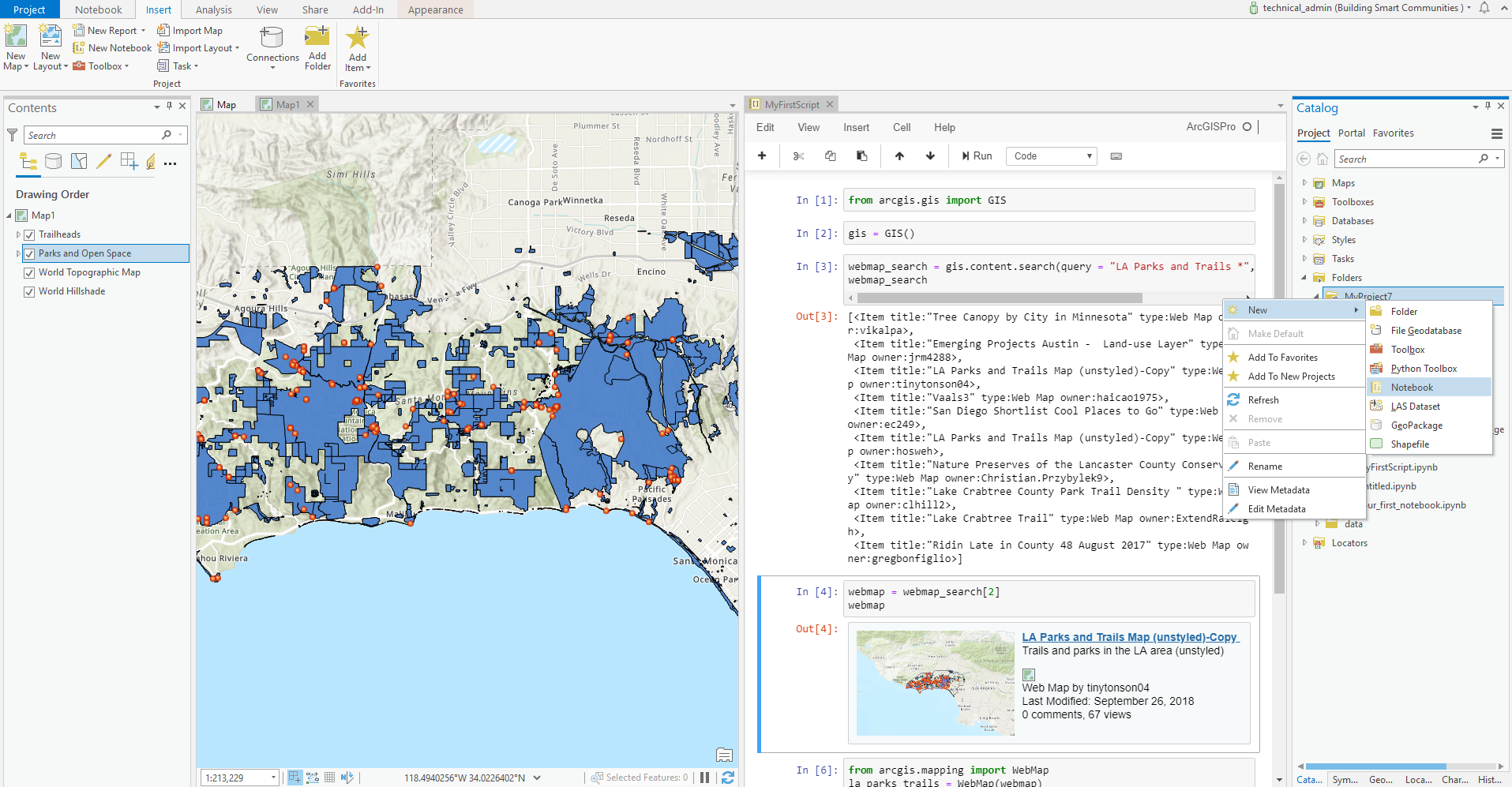
With this integration, it is easy to access and combine python libraries from ArcGIS Pro and open source python in one integrated environment. The content in your map can also be easily accessed through codes in the notebook window. It works seamlessly between the notebook and the ArcGIS Pro user interface (UI). For those teaching, the integration makes it easier to incorporate python programming into your GIS courses.
Features and Capabilities
To learn more about the feature and capability and how to get started, refer to the following blogs and documentation:
- Introducing ArcGIS Notebooks in ArcGIS Pro
- How to create and add Python notebooks in ArcGIS Pro 2.5
- What’s new in ArcGIS Pro 2.5
- Notebooks in ArcGIS Pro documentation
- Training Seminar: Python Libraries for Spatial Data Science
Massive Open Online Course (MOOC)
Register for the upcoming MOOC Spatial Data Science: The New Frontier in Analytics that will start on Oct 28th, 2020. It’s a free online course to explore the application of spatial data science to uncover hidden patterns and improve predictive modeling.
Have Questions?
If you have questions about the using notebooks in ArcGIS Pro, feel free to:
You must be a registered user to add a comment. If you've already registered, sign in. Otherwise, register and sign in.
-
Administration
96 -
Announcements
89 -
Career & Tech Ed
1 -
Curriculum-Learning Resources
292 -
Education Facilities
24 -
Events
80 -
GeoInquiries
1 -
Higher Education
626 -
Informal Education
288 -
Licensing Best Practices
106 -
National Geographic MapMaker
44 -
Pedagogy and Education Theory
246 -
Schools (K - 12)
282 -
Schools (K-12)
316 -
Spatial data
43 -
STEM
3 -
Students - Higher Education
261 -
Students - K-12 Schools
152 -
Success Stories
47 -
TeacherDesk
1 -
Tech Tips
131
- « Previous
- Next »