- Home
- :
- All Communities
- :
- Products
- :
- ArcGIS Pro
- :
- ArcGIS Pro Questions
- :
- placement of line end point is off
- Subscribe to RSS Feed
- Mark Topic as New
- Mark Topic as Read
- Float this Topic for Current User
- Bookmark
- Subscribe
- Mute
- Printer Friendly Page
placement of line end point is off

- Mark as New
- Bookmark
- Subscribe
- Mute
- Subscribe to RSS Feed
- Permalink
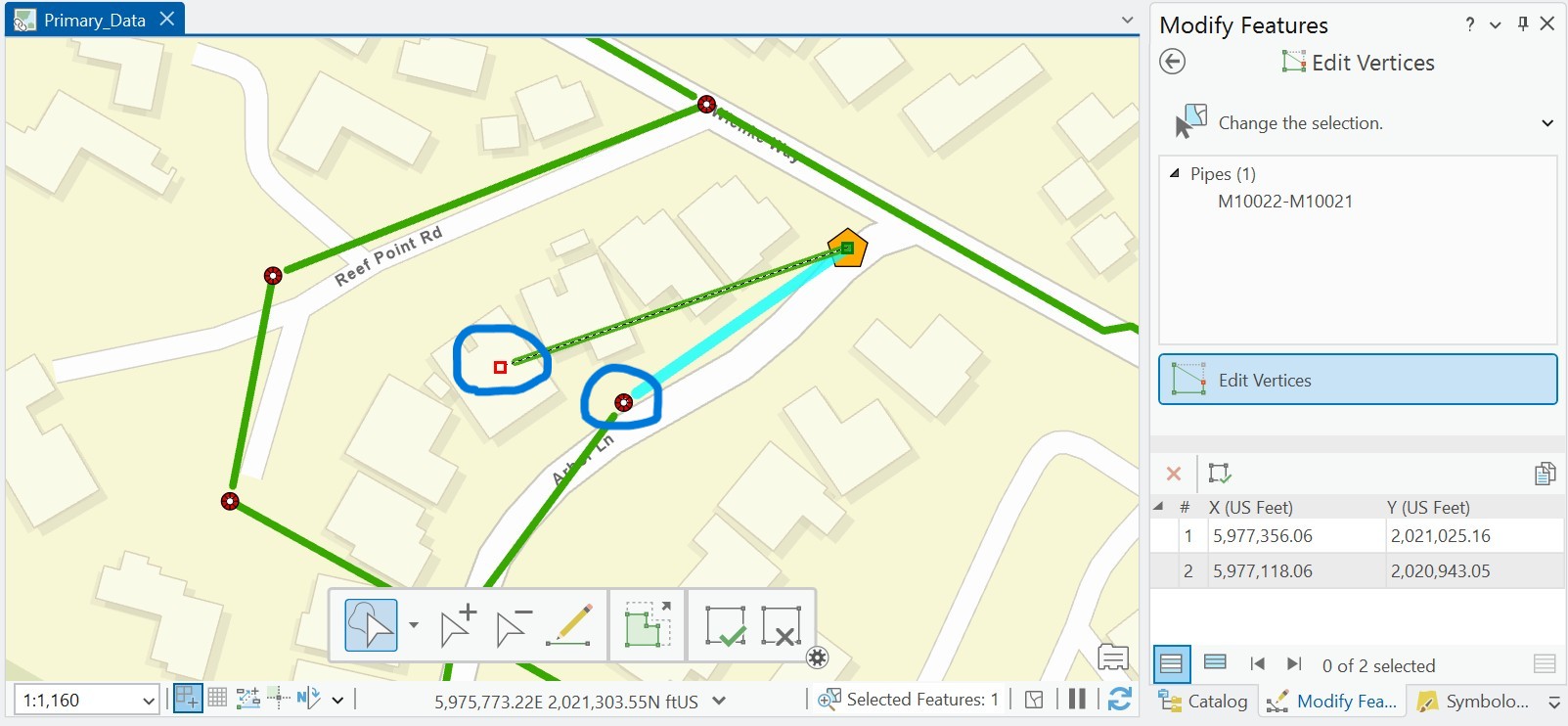
Beginner ArcGIS Pro 3.4.4 I think - I am drawing pipelines from manhole to manhole and on my map, the line does not reach all the way to the end point. When I click to fix the vertex, it shows a red box for the vertex but they don't match. To get the green pipeline to reach to the manhole, I have to take the end vertex past the end point.
Anyone have an idea what is going on?
Solved! Go to Solution.
Accepted Solutions


- Mark as New
- Bookmark
- Subscribe
- Mute
- Subscribe to RSS Feed
- Permalink
@BarbaraDabney A few suggestions:
- Try changing the symbol that the green line uses to see if something in the symbology is causing the offset.
- Try adding the line and point feature classes to a new map by dragging and dropping them from the geodatabase into the map.
- Are there any transformations required on the data? Maybe one is missing? Check in the map's properties > transformation tab.

- Mark as New
- Bookmark
- Subscribe
- Mute
- Subscribe to RSS Feed
- Permalink
@BarbaraDabney, what graphics card does your computer/laptop have that you are using?


- Mark as New
- Bookmark
- Subscribe
- Mute
- Subscribe to RSS Feed
- Permalink
Still looking for a solution. Anyone?


- Mark as New
- Bookmark
- Subscribe
- Mute
- Subscribe to RSS Feed
- Permalink
It's unclear what you are describing. You say "you have to" but does that actually snap the pipe to the manhole so you are drawing your pipes correctly? I would capture a short video of what your problem is and upload that to this thread. I often screenTogif for such things.
- Mark as New
- Bookmark
- Subscribe
- Mute
- Subscribe to RSS Feed
- Permalink


- Mark as New
- Bookmark
- Subscribe
- Mute
- Subscribe to RSS Feed
- Permalink
It might be an issue with not drawing the pipeline continuously, resulting in many bends. Perhaps you can refer to the methods mentioned here.
- Mark as New
- Bookmark
- Subscribe
- Mute
- Subscribe to RSS Feed
- Permalink
@BarbaraDabney A few suggestions:
- Try changing the symbol that the green line uses to see if something in the symbology is causing the offset.
- Try adding the line and point feature classes to a new map by dragging and dropping them from the geodatabase into the map.
- Are there any transformations required on the data? Maybe one is missing? Check in the map's properties > transformation tab.
- Mark as New
- Bookmark
- Subscribe
- Mute
- Subscribe to RSS Feed
- Permalink
Thanks Scott. You put me on the right track. Turns out I had added an offset effect by accident and didn't know what it meant. Now I do!! Appreciate everyone's help.
