- Home
- :
- All Communities
- :
- Products
- :
- ArcGIS Pro
- :
- ArcGIS Pro Questions
- :
- placement of line end point is off
- Subscribe to RSS Feed
- Mark Topic as New
- Mark Topic as Read
- Float this Topic for Current User
- Bookmark
- Subscribe
- Mute
- Printer Friendly Page
placement of line end point is off

- Mark as New
- Bookmark
- Subscribe
- Mute
- Subscribe to RSS Feed
- Permalink
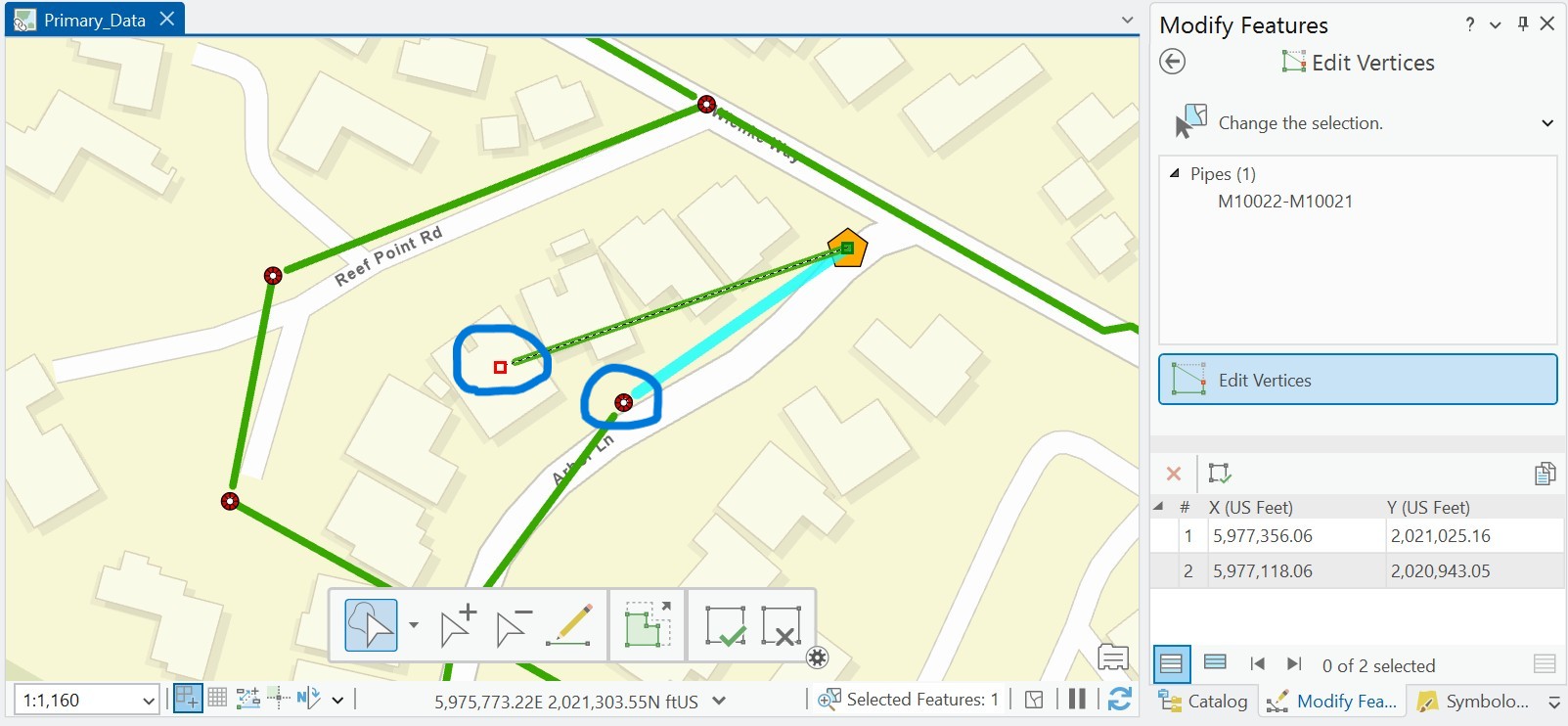
Beginner ArcGIS Pro 3.4.4 I think - I am drawing pipelines from manhole to manhole and on my map, the line does not reach all the way to the end point. When I click to fix the vertex, it shows a red box for the vertex but they don't match. To get the green pipeline to reach to the manhole, I have to take the end vertex past the end point.
Anyone have an idea what is going on?
Solved! Go to Solution.


- Mark as New
- Bookmark
- Subscribe
- Mute
- Subscribe to RSS Feed
- Permalink
I think @Scott_Harris might be on to something with regards to the symbology. A simple line has these cartographic settings, do you have anything else turned on?

As he suggested, try adding the layers directly from their geodatabase into a new map and see how the editing behaves then? Don't simply copy the layer into a new blank map as you'll be inheriting the symbology, you want to try this with default symbology to nail down the issue.

- « Previous
-
- 1
- 2
- Next »
- « Previous
-
- 1
- 2
- Next »