- Home
- :
- All Communities
- :
- Developers
- :
- JavaScript Maps SDK
- :
- JavaScript Maps SDK Questions
- :
- Re: Changing Color Properties of Dijit Dialog?
- Subscribe to RSS Feed
- Mark Topic as New
- Mark Topic as Read
- Float this Topic for Current User
- Bookmark
- Subscribe
- Mute
- Printer Friendly Page

- Mark as New
- Bookmark
- Subscribe
- Mute
- Subscribe to RSS Feed
- Permalink
Good morning. I have added a splash window to my application as shown below.
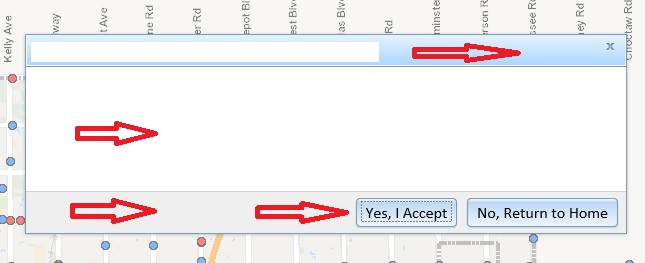
I am looking to change the colors of the title banner, main text space, bottom banner, button color, and dialog border (see red arrows). I am using the DIV ID's and trying to specify the properties in .css, but I am not getting what I need.
Here is a sample of my HTML code:
<!-- Application Splash Screen -->
<div data-dojo-type="dijit/Dialog" data-dojo-id="dialogWelcome" id="dialogWelcomeTitle" title="City of Edmond, Oklahoma - Survey Monuments" style="width: 600px;">
<table class="dijitDialogPaneContentArea">
<tr>
<td>
<div id="splashScreenDialogMessage">
This is where the main test goes.
<br>
</div>
</td>
</tr>
</table>
<div class="dijitDialogPaneActionBar">
<div dojotype="dijit.form.Button" id="buttonClose" data-dojo-type="dijit/form/Button" type="button" style="align-content: center" onclick="dialogWelcome.onCancel();">Yes, I Accept</div>
<div dojotype="dijit.form.Button" id="buttonExit" data-dojo-type="dijit/form/Button" type="button" style="align-content: center">No, Return to Home</div>
</div>
</div>
I have looked at the dijit guide online for assistance, but have not found what I am looking for. For those who have customized some splash screen windows, can you provide some guidance? Thank you.
Solved! Go to Solution.

- Mark as New
- Bookmark
- Subscribe
- Mute
- Subscribe to RSS Feed
- Permalink
What does your css look for that element?
- Mark as New
- Bookmark
- Subscribe
- Mute
- Subscribe to RSS Feed
- Permalink
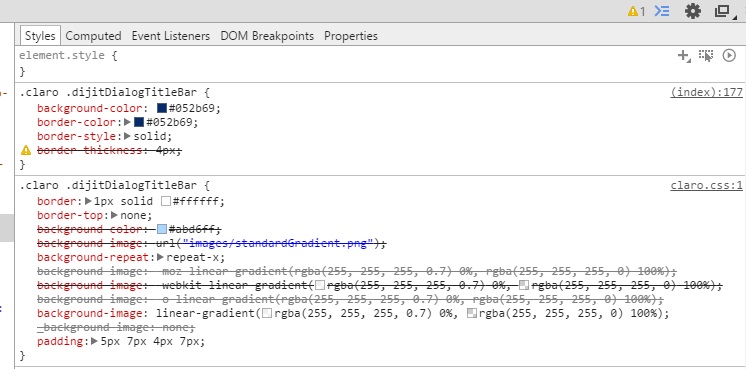
It looks like this. Properties are specified on index line number 177.

- Mark as New
- Bookmark
- Subscribe
- Mute
- Subscribe to RSS Feed
- Permalink
I would think that
background-image: none;
or
background-image: none !important;
should do it. That should eliminate the CSS gradients that are there by default (or not display the gradient PNG image).
- Mark as New
- Bookmark
- Subscribe
- Mute
- Subscribe to RSS Feed
- Permalink
Steve,
That did the trick:
background-image: none !important;
I have a solid blue title bar. Going to change the text to white. Thank you much!


- Mark as New
- Bookmark
- Subscribe
- Mute
- Subscribe to RSS Feed
- Permalink
I really like the work the developer of this dojo theme (Flat Dojo) has done. Its a nice modern looking theme for many dojo (and Esri) widgets. It has a pretty bare-bones looking dialog that I think would be fairly straightforward to customize to suit your needs.
- Mark as New
- Bookmark
- Subscribe
- Mute
- Subscribe to RSS Feed
- Permalink
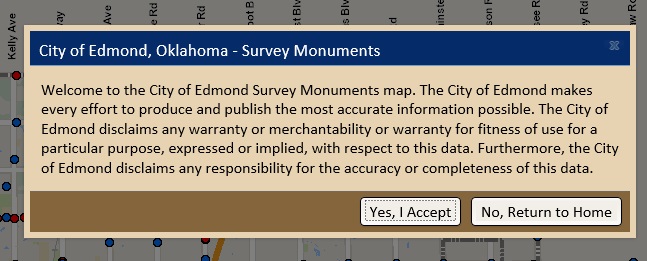
Thank you for all of the assistance. I was able to solve the issue with all of your input. Lots of great feedback. The splash window looks pretty nice (see below). It matches the application.

- « Previous
-
- 1
- 2
- Next »
- « Previous
-
- 1
- 2
- Next »