ArcGIS Hub Blog

cancel
Showing results for 
Show  only  | Search instead for 
Did you mean: 

Other Boards in This Place


Latest Activity

(113 Posts)
JoeVTavano
Esri Contributor

ArcGIS Hub site editors can now unlock expanded functionality in their site content catalog. When signed in to a site workspace, look for the Upgrade catalog notice on the Catalog > Content pane. Select Upgrade to upgrade your site's catalog for added functionality.


Upgrade catalog noticeUpgrade catalog notice

When you upgrade, your existing content catalog is preserved and you won't lose anything. Best of all, this new catalog functionality gives you more control and granularity to build custom catalogs and share your content as you see fit.

Upgrading means that users who have opted out of workspaces will not be able to use the classic editing interface, including the following functionality for a site: Classic groups manager, Classic feeds configuration, Classic content library, and Classic feedback.

Benefits of upgrading

Configurable catalogs are a powerful way to organize your content. Before upgrading, the classic content library has limited customization options. Upgraded catalogs offer greater control, better organization, real-time customization, and future-proof design. Learn more.

Create custom collections

The ability to create custom collections is the big benefit Hub site editors and all site visitors will experience with the catalog migration. Custom collections allow you to organize content into distinct subsets for easier browsing and discovery. Previously, you were able to rename, reorder, show, or hide your collections.

Now, you can do so much more! In the Catalog configuration window find Configure collections, where you can create and modify collections using a wide range of parameters:

  • Manual selection
  • Created date
  • Modified date
  • Type
  • Sharing
  • Categories
  • Tags

Catalog parametersCatalog parameters

Each parameter will offer different criteria and selectable options. The image below shows options for Type.

Options for Type parameterOptions for Type parameter

You can also modify collections that existed prior to upgrading. Previously, default collections could only be renamed. Now you will have the ability to configure those collections to better suit your needs.

Be sure to select Save changes (at the bottom of the Catalog configuration window) when finished to save all your custom settings for the content catalog. Upgrade your site catalog today to see these benefits and have greater control over customizing catalogs of curated content.

Catalog functionality matrix


Basic

Premium

Unmigrated Catalogs

Collections per catalog

≤4 collections

≤10 collections

4 default collections

Modify the position and visibility of collections?

All collections

All collections

All collections

Remove collections?

All collections

All collections

Default collections cannot be removed

Edit collection details?

Name, filters

Name, filters

Name only

Filters per collection

1 filter

Any number of filters

Default collection filters cannot be changed


Not ready to upgrade quite yet? No problem. Just select Cancel on the upgrade notification. You can upgrade at any time. Just return to your site’s content catalog to find the Upgrade catalog button.

Upgrade catalog buttonUpgrade catalog button


more
1 0 361
IkechukwuChristian-Ezeofor
Esri Contributor

You are an administrator managing a community organization using ArcGIS Hub Premium and need to effectively and efficiently share content privately from your primary organization to members of the community organization. 

IkechukwuChristianEzeofor_0-1761873118913.jpeg


ArcGIS Hub Premium enables seamless collaboration between primary and community organizations. This guide walks you through an admin-friendly setup that ensures: 

  • A secure content sharing framework from primary to community organization 
  • All existing community members can access shared content 
  • New community members automatically receive the same access 
  • A robust and sustainable process 
Read more...

more
2 0 258
EthanMink
Esri Contributor

The 2025 Esri User Conference is right around the corner, and we are excited to connect with you. UC is filled with many presentations and events, with hundreds of topics covered. To help you get the most out of your experience, we’ve created a custom agenda for ArcGIS Hub. We hope these sessions will be enjoyable and informative as you continue your geospatial journey.

View our Hub custom agenda that you can add directly to your UC account.

We also have SIGs (Special Interest Groups) available for you to attend this year. Two great SIGs that you might find particularly interesting are the:

Geospatial Ecosystems SIG: Improving ROI for Modern SDI

Community Engagement SIG: Using Hubs for Deeper Collaboration

SIGs are a great way to hear from and network with like-minded professionals. This year advanced sign-ups for SIGs will be required, ensuring everyone who signs up will have a seat, and that there is ample room. It’s easy to reserve, just register for UC and add sessions to your schedule. You can also join a waitlist if your SIG is full, as seats will open as others update their plans. Reservations will be held until 5 minutes before the start time.  If you forget to sign up, or find yourself available at the last minute, any extra spots will be made available at the door on a first-come, first served basis.

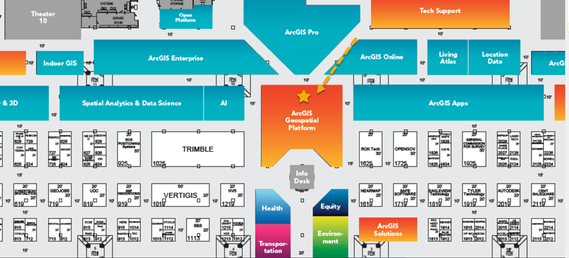
The ArcGIS Hub kiosk will be in the ArcGIS Geospatial Platform area. If you would like a like a pdf of the Hub schedule to print and take with you, it is attached below.
EthanMink_0-1748535885495.png

We hope you have a wonderful UC experience this year!

more
1 0 2,008
HarshithaDondapati1
Esri Contributor

With the ArcGIS Online February 2025 update, all existing Creator user type community accounts in Hub community organizations have been automatically updated to the Hub Community Member user type.

Read more...

more
3 0 559
ChelseaNivison
Esri Alum

In June 2024, user types were updated across Esri technology to streamline licensing and better align with customers’ needs. Accordingly, to more closely match user types with the needs of Hub community members, an updated Hub Community Member user type will go into effect with the ArcGIS Online update in February 2025. This update will happen automatically, and user types will continue to facilitate workflows and productivity. 

Read more...

more
4 6 4,714
198 Subscribers