- Home
- :
- All Communities
- :
- Products
- :
- ArcGIS Reality
- :
- ArcGIS Drone2Map
- :
- ArcGIS Drone2Map Questions
- :
- Re: Drone2Map OBJ and SLPK quality
- Subscribe to RSS Feed
- Mark Topic as New
- Mark Topic as Read
- Float this Topic for Current User
- Bookmark
- Subscribe
- Mute
- Printer Friendly Page
Drone2Map OBJ and SLPK quality

- Mark as New
- Bookmark
- Subscribe
- Mute
- Subscribe to RSS Feed
- Permalink
Hello,
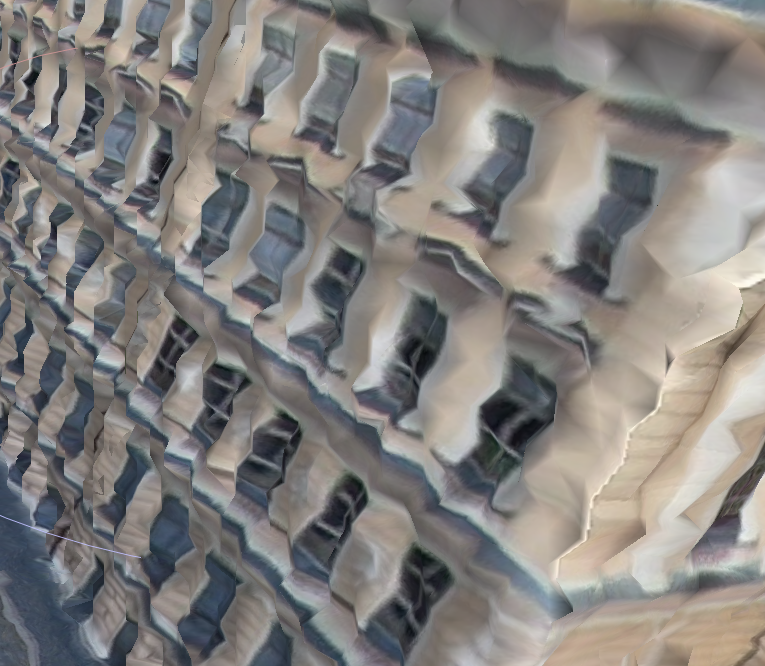
I have an issue with creation of 3D model of a building in D2M. The .slpk in D2M and also in ArcGIS Pro looks great, but when I open the .obj file (which is my main goal), it looks absolutely horrible (see below). I have tried opening it in City Engine, Meshlab and Blender and it was the same, so the issue must be with the format or export from D2M. I've tried .dae, but I cannot open the exported file in any software, not even City Engine, so I cannot check the quality. Has anyone encountered problem like this?


- Mark as New
- Bookmark
- Subscribe
- Mute
- Subscribe to RSS Feed
- Permalink
Hello,
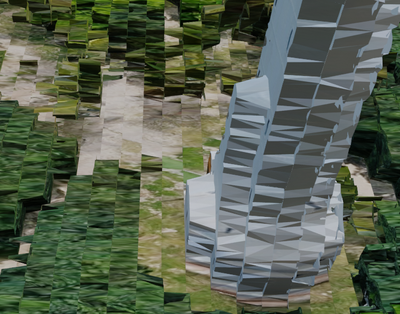
I have the same issue, OBJ is looking horrible and is barely usable
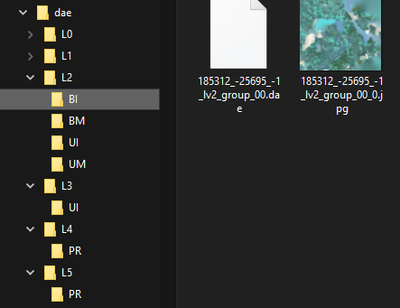
and DAE is composed of many small files ordered by level of detail, which I don't know how to use in blender or another 3D software.
Did you find a solution ?

- Mark as New
- Bookmark
- Subscribe
- Mute
- Subscribe to RSS Feed
- Permalink
I asked about the issue of multiple folders and files a while back in the beta testing. Apparently no way to resolve this yet?
I also wanted FBX files as they are easier and smaller to handle.

- Mark as New
- Bookmark
- Subscribe
- Mute
- Subscribe to RSS Feed
- Permalink
@CodyBenkelman Was this ever solved? Any idea why this is still happening in 2025?


- Mark as New
- Bookmark
- Subscribe
- Mute
- Subscribe to RSS Feed
- Permalink
Hi @BenjaminMittler ,
The OBJ should be identical in quality to the SLPK format. If that's not what you are seeing then I would like to get a look at the dataset if possible. Please feel free to email me directly: [email protected]
I can setup a file share and investigate further.
Regards,
Mark
- Mark as New
- Bookmark
- Subscribe
- Mute
- Subscribe to RSS Feed
- Permalink
I'm still encountering the same problem with version 2025.2.0.
The result is always disastrous for the OBJ file, even if the SLPK file is correct.


- Mark as New
- Bookmark
- Subscribe
- Mute
- Subscribe to RSS Feed
- Permalink
@MarkBarker1 Hey Mark, sending you an email now. What the user shared above is exactly what i'm seeing as well.
-Ben
- Mark as New
- Bookmark
- Subscribe
- Mute
- Subscribe to RSS Feed
- Permalink
We ran tests with Mark, and it seems to be a software issue related to how geographic coordinates are handled.
Apparently, Blender (or the Windows 3D viewer) fails to display OBJ files correctly with certain coordinates.
However, if you open your OBJ file in CloudCompare, the software will offer to convert it to a local system, and the mesh will then display correctly.
If you don't accept this offer, the display will be just as disastrous in CloudCompare as it is in Blender.
I'm still looking for a solution for use in Blender or other software.


- Mark as New
- Bookmark
- Subscribe
- Mute
- Subscribe to RSS Feed
- Permalink
Appreciate the research and responses!
- Mark as New
- Bookmark
- Subscribe
- Mute
- Subscribe to RSS Feed
- Permalink
Hi Everyone,
Thank you for sharing out the datasets and you responses on this behavior. I did some further testing with the 3D viewers that you were mentioning. As @PierreloupDucroix alluded to in his comment above, OBJ files from Drone2Map have vertices that use global coordinate system values with the expectation that the files will be used within GIS software. These values are too large for typical 3D viewer software to accurately convert as these programs don’t typically have coordinate reference system reading built in. Viewers such as MeshLab or Blender are trying to display vertices within a local coordinate system that prioritizes much smaller coordinate values. A global shift is required before the export is made or within a viewing software, such as CloudCompare, where the actual geometry of the vertices is modified to lower precision and can be read within the viewers local coordinate system.

Unfortunately, a lot of these viewers don't have quick and easy ways to apply this global shift. We are going to look into if its possible for us to export the OBJ format with the shift applied. In the meantime, if you would like to log an idea for this on our ideas page you can track any progress we make.
https://community.esri.com/t5/arcgis-drone2map-ideas/idb-p/arcgis-drone2map-ideas
Regards,
Mark
