
EVENT FOLLOW UP
WEBINAR – March 31, 2026
- WEBINAR RECORDING IS HERE.
- SLIDES AND RESOURCES ARE ATTACHED (ESRI, UNIVERSITY OF FLORIDA, UNIVERSITY OF MICHIGAN).
- EXAMPLE GOVERNANCE POLICIES (UNIVERSITY OF MICHIGAN).
WEBINAR DETAILS AND MESSAGES
WEBINAR PRESENTERS:
Thank you to Peter Knoop, University of Michigan and Sam Palmer, University of Florida for sharing their knowledge!
- Geri Miller, Esri
- Peter Knoop, University of Michigan
- Sam Palmer, University of Florida
WEBINAR GOALS
- Understanding the importance of governance
- Create governance standards for ArcGIS
- Evolving governance practices to manage storage, content, credits and users
- Providing support and communication to stakeholders
- Monitoring ArcGIS usage
- Building capacity to manage ArcGIS
TAKEAWAYS
Mission and Governance
- ArcGIS Governance is evolving to encompass a structured approach - institutional mission and policies should guide how ArcGIS is governed.
- Governance policies must be established first.
- Establishing governance for ArcGIS is an incremental and iterative process, not a one‑time exercise.
- Institutions do not need to create an entirely new governance framework from scratch. Instead, effective ArcGIS governance builds on existing institutional policies, practices, and decision‑making structures already in place for other enterprise systems.
- How to establish governance policies.
- Create a governance team
- Review existing Institutional policies.
- Establish ArcGIS-specific Governance policies.
- Communicate and reinforce policies.
- Perform ongoing evaluation.
- What is governed?
- Access and Eligibility
- Accounts and Identity
- Data Stewardship and Content Management
- Communication and Transparency
- Auditing and Monitoring
System
- Evaluate your existing system and implement consistent reporting – check slides and resources for further information:
- Review feature data storage usage - check your feature data storage on ArcGIS Online Overview page
- Review status dashboard - monitor and analyze usage - storage, credits, users, apps - Use the Dashboard.
- Review storage, run Item report
- gain insights on items which consume large amounts of file or feature storage - Create and schedule reports, create an “Item” report.
- Review credits, run Credit report
- understand your credit consumption patterns, generate a credit report.
- Review named users, identify whether users are authorized or not - decide whether you will need additional users.
- Ensure your Administrator contacts are up to date. Ensure you have more than one administrator - your Administrative contacts will receive important technology updates.
- Review My Esri permissions for team members who manage ArcGIS - ensure proper permissions are set correctly, verify Authorized Support Callers.
- There are various options and approaches for addressing storage, credits and users.
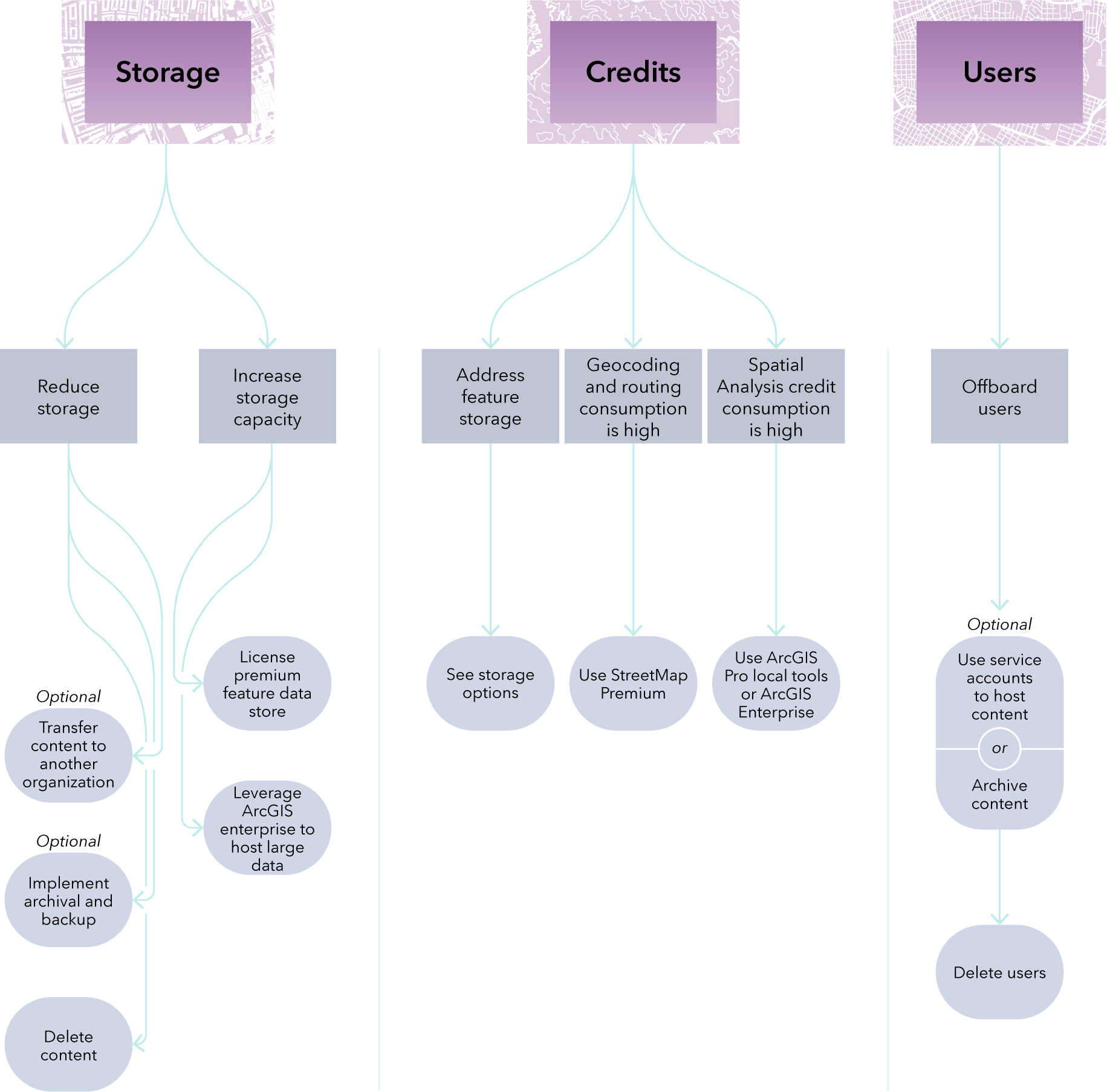
- Reduce Storage
- Export content from system before deleting
- Implement Archival and Backup
- Archive hosted feature layers to cloud storage as file geodatabases
- Archive ArcGIS StoryMaps as a JSON and file resources
- GEO Jobe Back Up My Org
- Leverage ArcGIS Enterprise as an archival solution
- ArcGIS Online Notebook: Demo Backup to Dropbox
- Delete content
- Increase Storage Capacity and additional options
- Buy additional credits
- $100 for 100,000 credits for academic use
- Leverage in near future, not a long-term solution, as price will change.
- License Premium Feature Data Store
- Provides additional storage – does not consume credits
- Provides additional dedicated database resources such as memory, CPU, and input/output (I/O)
- Could improve your organization's overall performance
- Premium Feature Data Store
- Leverage ArcGIS Enterprise to host large datasets
- Runs in your infrastructure, consider setup and ongoing costs
- Manage Credits and alternatives for Credits
- Manage storage – as outlined above
- Geocoding and Routing Solutions
- ArcGIS StreetMap Premium
- Spatial Analysis
- Leverage ArcGIS Pro local tools or deploy ArcGIS Enterprise for analysis
- Manage Users
- Use of Service Accounts
- Account used to “house” content from multiple users
- Alumni
- Follow your institutional policy
- Delete/Offboard Users
- Using the ArcGIS Online tools (GUI)
- GEO Jobe – provides tools for bulk deletion of users
- Scripting
Engagement
- Continuous engagement and continuous monitoring throughout the user lifecycle are key. Processes and procedures for monitoring usage of ArcGIS should be in place to ensure compliance with organizational transparency.
- Proactively inform users of their responsibilities
- Post guidelines and policies publicly
- Empower users within your organization to be good data stewards
- Send periodic reminder bulk emails about managing content
- Advise users to dispose of their groups and content before they leave
- Advise users to utilize metadata
- See guidance from administrator on storing “large” items
- Send emails about updates to technology
- When updates happen to any of the apps (ArcGIS Pro, web apps, mobile apps)
- When new capabilities are added to ArcGIS
- When a product is being retired
- Monitoring Usage
- Use ArcGIS Dashboards – as described above, check feature data store, tracking credit consumption, app usage, member activities, etc.
- Admin Insights Template – toolkit for monitoring
- 3 dashboards – Users & Licensing, Content, Groups
- Build your own Usage dashboard
Capacity
- There are different approaches to build and maintain skills for GIS administration. Administration is a continuous, involved process which requires various responsibilities and skills that might not be available currently in-house, therefore it is important to 1) get the right training to bring existing staff up to speed or 2) hire team members or external consultants who have the right skills. Some of the responsibilities and skills to manage daily operation of ArcGIS and enforce governance policies are below.
- Key Responsibilities:
- Administer users, groups, roles, and privileges
- Manage content lifecycle, sharing rules, and ownership
- Monitor performance, and system health
- Manage data services, publishing standards, and metadata
- Needed Skills:
- Understanding of cloud systems (in general)
- Understanding of ArcGIS as a system which includes various software components (apps, desktop, mobile, server, developer, database)
- Understanding of ArcGIS licensing model (Named User, Standalone options)
- Knowledge of ArcGIS Online and/or ArcGIS Enterprise administration
- Web GIS publishing, sharing and service optimization
- Scripting/automation (Python, ArcPy, REST API)
- Monitoring tools (dashboards, logging systems)
- Leverage existing resources (below) – Esri documentation and training, community resources or your organizational resources. Get involved with community - Education Community and Education Blog.
ADDITIONAL RESOURCES
- WEBINAR RECORDING IS HERE.
- SLIDES AND RESOURCES ARE ATTACHED (ESRI, UNIVERSITY OF FLORIDA, UNIVERSITY OF MICHIGAN).
- EXAMPLE GOVERNANCE POLICIES (UNIVERSITY OF MICHIGAN).
Governing ArcGIS – Guide for Higher Education – coming out in June 2026. In the meantime, the following blogs with ideas on governance approaches could be helpful.
FURTHER HELP
Let us know how we can help.
