- Home
- :
- All Communities
- :
- Developers
- :
- Developers - General
- :
- Developers Questions
- :
- Re: FeatureSetById not working as expected
- Subscribe to RSS Feed
- Mark Topic as New
- Mark Topic as Read
- Float this Topic for Current User
- Bookmark
- Printer Friendly Page
FeatureSetById not working as expected

- Mark as New
- Bookmark
- Subscribe to RSS Feed
- Permalink
Hi
I got a FeatureServer with 1 layer and 1 table.
Im trying to create a popup on a webmap, the popup should display some data from the table, but the result is not as i expected. To figure out the issue, im using the following code
var all =FeatureSetById($map, "TrafoContainer_5842")
console("countAll: "+count(all))
console("TypeAll: "+TypeOf(all))
var tt = top(all,10)
console("TypeTT: "+TypeOf(tt))
console("countTT: "+count(tt))
var fst = First(all)
console("TypeFirst: "+TypeOf(fst))
return
In the console the following is printed
countAll: 15633 <---- This matches the number of features in the tableTypeAll: FeatureSet <---- Looking good
I would have expected 10 TypeFirst: <------
Any ideas on what is wrong?


- Mark as New
- Bookmark
- Subscribe to RSS Feed
- Permalink
Hi leon oestergaard ,
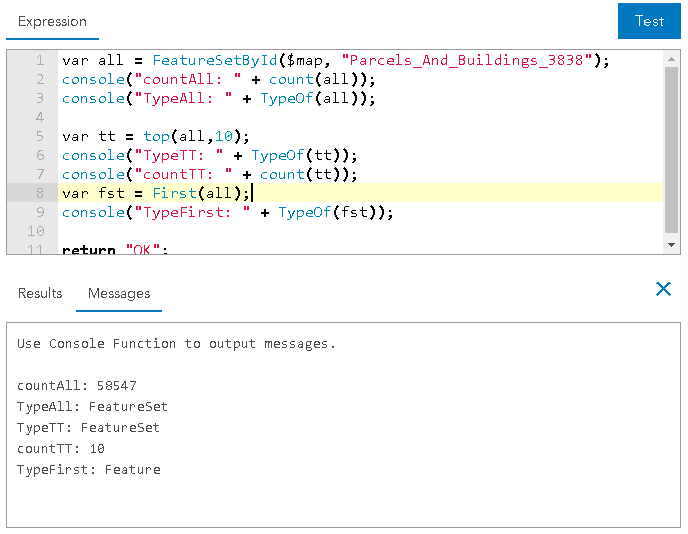
There is something strange going on in your case. I just used your code in the playground (ArcGIS Arcade | ArcGIS for Developers ) using one of the available layers and it works just fine:
- Mark as New
- Bookmark
- Subscribe to RSS Feed
- Permalink
Hi Xander Bakker
Thank you for your reply.
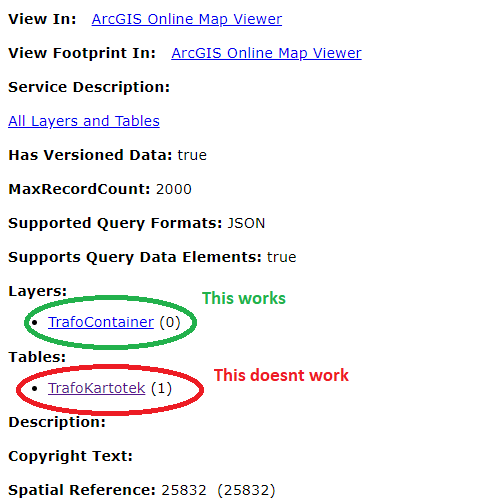
Can you confirm that "Parcels_And_buildings_3838" is a table?
The feature service I'm using consists of a layer and a table. If I query the layer using the same arcade script it works fine.
- Mark as New
- Bookmark
- Subscribe to RSS Feed
- Permalink
Hi leon oestergaard ,
Thanks for clarifying. The layer I used is not a table. I will test against a table and post back the result.
- Mark as New
- Bookmark
- Subscribe to RSS Feed
- Permalink
Hi [email protected] ,
Just did a test on a table and it still works.
Is the data a hosted feature layer and table in ArcGIS Online? If so, could you share this data with me? You can create a group, share the data inside that group and invite me using my AGOL account "xbakker.spx".
- Mark as New
- Bookmark
- Subscribe to RSS Feed
- Permalink
Hi Xander Bakker
Its on our entreprise installation. Ive just tried a table from another service, and it works perfect. Guess we will have look at the table for that specific service. Thank you for the help
- Mark as New
- Bookmark
- Subscribe to RSS Feed
- Permalink
Hi [email protected] ,
It makes sense that it might be data-related. Please post back if you find a reason.
- Mark as New
- Bookmark
- Subscribe to RSS Feed
- Permalink
Hi Xander Bakker
We tried to removed all attributes from the table except objectid and globalid, the it worked, after re-adding the attributes it stil works. So the service might have been in some undefineable state
