- Home
- :
- All Communities
- :
- Products
- :
- ArcGIS Pro
- :
- ArcGIS Pro Questions
- :
- Re: Popups: Sort related records?
- Subscribe to RSS Feed
- Mark Topic as New
- Mark Topic as Read
- Float this Topic for Current User
- Bookmark
- Printer Friendly Page


- Mark as New
- Bookmark
- Subscribe to RSS Feed
- Permalink
I have a point feature class which participates in a 1:M relationship with a table.
The popup is set up to show the related table.
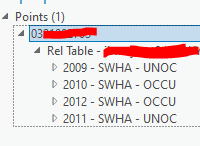
The issue is that the records are displayed according to OBJECTID (That is, the record for 2012 was created before the record for 2011).
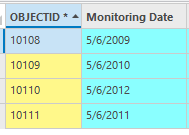
Is there a way return the related records sorted by another field?
Solved! Go to Solution.
Accepted Solutions


- Mark as New
- Bookmark
- Subscribe to RSS Feed
- Permalink
You might want to experiment with the commands found here:
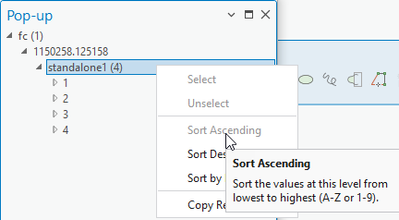
The sort order seems to be remembered for me when re-opening the project.

- Mark as New
- Bookmark
- Subscribe to RSS Feed
- Permalink
If you submit an idea for this, I’d vote for it.
- Mark as New
- Bookmark
- Subscribe to RSS Feed
- Permalink
Could you create a query layer or database view, and do this in the SQL?
- Use ORDER BY to sort on the required field. Do this in an subquery (inner query). Exclude the OBJECTID column from the SELECT clause.
- In an outer query, generate a fake OBJECTID column using a mechanism like Oracle’s ROWNUM pseudocolum, or your database’s equivalent.
- Use the fake OBJECTID as the unique ID in the query layer or database view in Pro.
Maybe Pro would sort on the fake OBJECTID column in the popup, which is the sort order you wanted: sorting on your other field.
- Mark as New
- Bookmark
- Subscribe to RSS Feed
- Permalink
I'm sure it should be possible, but here are two pretty big issues:
- Waaay more work than I want to take care of
- Query layers are a pain, and we both know the current way to set up views is horrible given how plain the text editor is in CreateView()
- Only solves the issue for GDB feature classes*; you couldn't do it in a shapefile, for example. In this case, I'm using a relationship class; frequently it's just using a relate.
- Actually, the Query Layer part is only useful for eGDBs
- fGDBs can take care of Views, at least, but see point #1.
I think for a more permanent dataset, like the one in my example (which does actually live in an eGDB), a view or query layer would probably do the trick the way you outlined it (Will probably give it a shot later today). But the goal is to just have this out of the box.
*Esri I know it's 20 years too late but please give us an easy vocabulary word for feature classes in geodatabases. I like "GDBFC" since it kind of rolls off the tongue and then you and prefix it with what type of GDB it is --> fGDBCFC, eGDBFC, etc. Either way, the lack of a decent vocabulary word is keenly felt; everyone keeps calling all vector data a shapefile (it's not) or a layer (definitely not), or just plain "geodatabase" (ABSOLUTELY NOT) and it makes having a conversation with users really hard because I have to figure out what they actually mean when they say a word.
- Mark as New
- Bookmark
- Subscribe to RSS Feed
- Permalink
You might want to experiment with the commands found here:
The sort order seems to be remembered for me when re-opening the project.
- Mark as New
- Bookmark
- Subscribe to RSS Feed
- Permalink
That appears to have worked and I think I can save it as a layer file.
The sort Asc/Desc appears to be dependent on the display settings in the layer/view, so by editing that you can pick which field(s) to sort by. Thanks!
