- Home
- :
- All Communities
- :
- Products
- :
- ArcGIS Pro
- :
- ArcGIS Pro Questions
- :
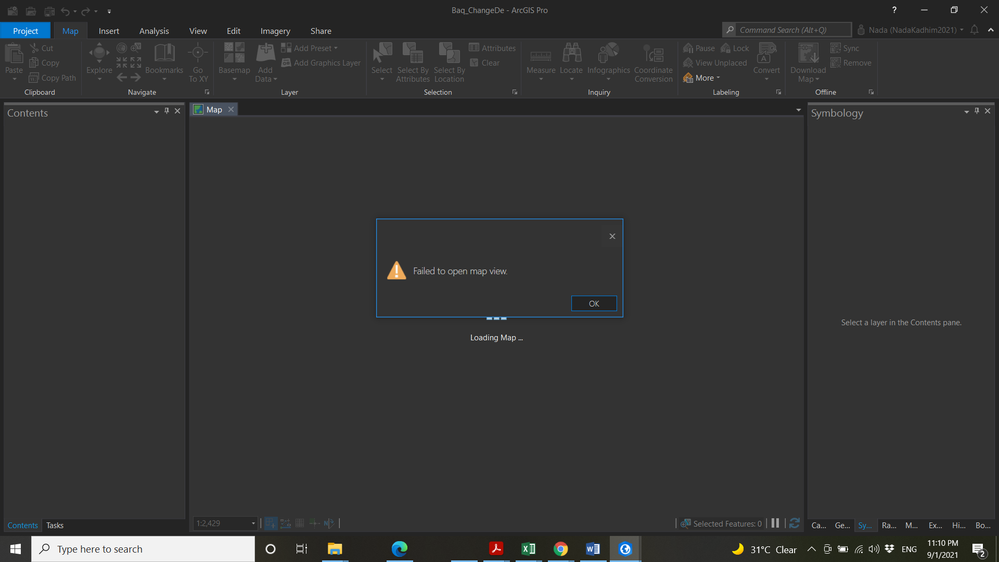
- Failed to open map view
- Subscribe to RSS Feed
- Mark Topic as New
- Mark Topic as Read
- Float this Topic for Current User
- Bookmark
- Printer Friendly Page

- Mark as New
- Bookmark
- Subscribe to RSS Feed
- Permalink
Solved! Go to Solution.

- Mark as New
- Bookmark
- Subscribe to RSS Feed
- Permalink
I'm running ArcGIS Pro 3.6.1 and this just happened to me. I was giving a live demo when the Map suddenly stopped displaying the layers that I was turning on via the checkbox in the Contents pane. I had Uber hexagons displaying count data with labels. Layers had displayed correctly just minutes before the meeting and then . . . nothing.
When I restarted ArcGIS Pro and loaded the aprx, I got the dreaded "Failed to open map view". I am not able to copy/paste or duplicate the offending Map, but the other 2 Maps in the project still open.
I ended up rebuilding the project on the fly to be able to do the demo, but that was far from ideal because some layers that had been based on selection logic involving multiple steps could not be done that quickly.
This software behavior is totally unacceptable and needs to be fixed ASAP. Oddly, there was also no "backup" copy of the project file. While I didn't lose any feature classes, there is a ton of work that goes into symbology, label expressions, definition queries, selection map layers, etc. To lose several hours of work is very sad.

- Mark as New
- Bookmark
- Subscribe to RSS Feed
- Permalink
Just reiterating the problem everyone else is having... I just encountered the "Failed to open map view" error where my primary map with all crucial details no longer works, and I am having to roll all project data back to an earlier instance. All other maps and layouts work just fine, but the primary map cannot be copied, cannot be duplicated, exported, packaged or otherwise. The only option is to roll back, and thankfully that is an option for me.
I can only imagine the horror show that this would look like for a single user without a backup infrastructure who is paying big bucks for a license...
This appears to be directly tied to the new 3.6.1 update. Never encountered this prior to my recent update, the sad thing is I avoided 3.6 because I knew it would be broken- so I held out for 3.6.1 only to encounter this.

- Mark as New
- Bookmark
- Subscribe to RSS Feed
- Permalink
This is happening for multiple people in my organization. By the look of this thread, it seems it was a problem in earlier versions that has now returned in 3.6. Any updates on a solution for this? All of the trouble shooting suggestions have not worked for us ☹️

- Mark as New
- Bookmark
- Subscribe to RSS Feed
- Permalink
This happened to me for the first time today. Got both "Failed to open map view" and "Failed to open table" (I had a table open with the map when the project was last saved). I deleted one of the 2 maps shown under Maps in the Catalog window - it pointed to a service and I thought that could be causing an issue. Saved the map. Now it opens without the errors, but the map window is still closed and if I try to open it I get the "Failed to open map view" pop-up. If I select "Update data sources" from the map context menu, the full list of datasets I had in the map window is shown. I exported the list so I can rebuild the project later, but it was a large project - aargh!
Nearly all datasets that were in the map are on my local external hard drive or our office NAS drive. Data from these sources are behaving normally in another project I am working in. Three datasets are National Park Service service layers from sites that I checked are still live. Nothing is accessing One Drive. Aprx file was ~2.3 Mb.
Running 3.5.6
Not using classify or doing any raster processing last time the project was open, which was late May. A field calculation was the last operation according to the history tab. None of the suggested fixes worked. The copy on my backup drive was also corrupt.



- Mark as New
- Bookmark
- Subscribe to RSS Feed
- Permalink
Hi everyone, .aprx files will need to be investigated to determine the underlying issue. Please Contact Technical Support to investigate and support can handle the file on our side to see if it can be recovered. You may also visit the APRX Doctor idea and add your kudos to indicate it is a feature that might help as a self-serve mechanism. Thank you.

- « Previous
- Next »
- « Previous
- Next »