- Home
- :
- All Communities
- :
- Products
- :
- ArcGIS Online
- :
- ArcGIS Online Questions
- :
- Symbology of voxel layer in ArcGIS Online
- Subscribe to RSS Feed
- Mark Topic as New
- Mark Topic as Read
- Float this Topic for Current User
- Bookmark
- Subscribe
- Mute
- Printer Friendly Page
Symbology of voxel layer in ArcGIS Online

- Mark as New
- Bookmark
- Subscribe
- Mute
- Subscribe to RSS Feed
- Permalink
Hi all,
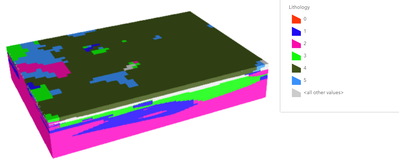
I published a voxel layer to ArcGIS Online, but the color scheme doesn't not match. For example, the dark green should be shown as red. I've gone through the layer property in ArcGIS Online. It seems that there is no option for me to change the color scheme. May I know if there any way to solve this problem? Any comment is welcome. Thank you!
Matthew


- Mark as New
- Bookmark
- Subscribe
- Mute
- Subscribe to RSS Feed
- Permalink
Thanks! If you can share the raw data as well that would be helpful. I am seeing the difference between the SL online and the SLPK on pro.
- Mark as New
- Bookmark
- Subscribe
- Mute
- Subscribe to RSS Feed
- Permalink
Do you mean the original voxel file in ".nc" format? Sure, I can provide if you need.
- Mark as New
- Bookmark
- Subscribe
- Mute
- Subscribe to RSS Feed
- Permalink
Yup if you dont want to post it here you can dm me the file.
- Mark as New
- Bookmark
- Subscribe
- Mute
- Subscribe to RSS Feed
- Permalink
got it thanks!
- Mark as New
- Bookmark
- Subscribe
- Mute
- Subscribe to RSS Feed
- Permalink
It seems that this problem is difficult to solve... and I still have no clue...
- Mark as New
- Bookmark
- Subscribe
- Mute
- Subscribe to RSS Feed
- Permalink
This issue will be resolved with Pro 3.0 update. Here is SV left and Pro Right with a voxel SLPK generated in Pro 3.0


- « Previous
-
- 1
- 2
- Next »
- « Previous
-
- 1
- 2
- Next »