- Home
- :
- All Communities
- :
- Developers
- :
- JavaScript Maps SDK
- :
- JavaScript Maps SDK Questions
- :
- Re: Render MapView.graphics above highlights
- Subscribe to RSS Feed
- Mark Topic as New
- Mark Topic as Read
- Float this Topic for Current User
- Bookmark
- Printer Friendly Page
Render MapView.graphics above highlights

- Mark as New
- Bookmark
- Subscribe to RSS Feed
- Permalink
In my map, I place a marker graphic whenever the user clicks or searches on the map:
view.graphics.add(markerGraphic)
I'm rendering the map's popup in a separate area of the DOM:
view.popup = new Features({
  container: 'popup-container-id',
});
But when a user clicks on the map and selects a feature, the map marker graphic is drawn underneath the feature highlight graphic:
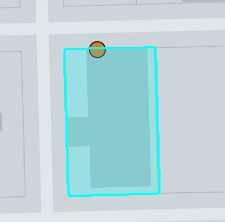
Is there a way to force the map marker to render on top? For example, setting the default MapView.graphics layer to the top? I could probably hack something together by making highlights and the map marker render in custom GraphicsLayers, but I would prefer something more straightforward.

- Mark as New
- Bookmark
- Subscribe to RSS Feed
- Permalink
Did you ever find a solution to this? I'm encountering the same behavior, but not able to find a reasonable solution. I've tried using the MapView.graphics collection as well as adding a new GraphicsLayer to the top of the layer stack, but the graphics still render behind the popup highlight. When using the new GraphicsLayer approach, I tried using that layer's highlight method, thinking that its highlights might be rendered in front of the popup's highlight, but no luck. I also tried setting the popup's highlightDisabled to true before rendering the graphics in my GraphicsLayer, but setting highlightDisabled doesn't clear any existing popup highlights.
I suspect the next option would be to disable automatic popup highlighting altogether and implement custom highlighting to gain the control I'm looking for. But, it would be great to avoid that if there's another option.
- Mark as New
- Bookmark
- Subscribe to RSS Feed
- Permalink
FWIW, in the case of highlighting the features added to the graphics layer, I can gain some control by adjusting the opacity of the highlight options I've defined on the mapView. They're still not in front of the popup highlight, but at least they can be more prominent. But, that still doesn't address your original issue, which I'm also wanting to solve.
- Mark as New
- Bookmark
- Subscribe to RSS Feed
- Permalink
I unfortunately still have not found a solution to this. Thankfully in my case it's no longer an issue (the client actually prefers the highlight on top of the marker).
