Select to view content in your preferred language

Switch to a translated map using the Instant Apps Language Switcher

1056
10
03-19-2025 10:44 AM
BethRomero
Esri Contributor
5 10 1,056

The language switcher is a feature in ArcGIS Instant Apps that makes it easier to create multilingual Instant Apps. The language switcher setting makes entering translated text for all app-authored text easy. Once the app-authored text is generated and reviewed, the toggle in the app will update app-authored and Esri-defined text in the selected language. Some authors would like to take it further and switch out the webmap, which may include translated labels or basemaps.  Currently, this option isn’t exposed in the language switcher UI but it can be done using the ArcGIS Assistant.

  1. To get started, configure your app, including the language switcher component. For help with those steps, visit the language switcher blog.
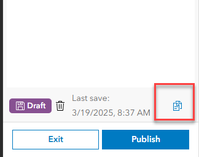
  2. Next, creating a copy of the app is recommended, as editing an app with ArcGIS Assistant could cause errors with the app.  To do this, open the app's configuration panel and click the copy button on the lower right above the publish button. Complete any other configuration of the app.
 

BethRomero_0-1742405189296.png

      3. Open the ArcGIS Assistant beta and sign into your account with the Instant App you are working with. Click on the item to open the side panel options and select “View Item JSON”

      4. Select the “Data” tab to view the app JSON in the JSON Editor. Click the Edit JSON button to activate the editing experience.

BethRomero_1-1742405189297.png

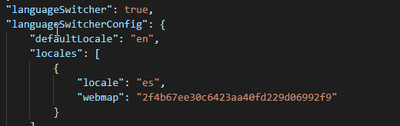
      5. Navigate through the JSON and find the “languageSwitcher”. You will see all the languages you previously selected listed as locales.  Under each locale, a webmap parameter can be added to identify which webmap should load with that language.

To do this enter in “webmap”: “add in the webmap id”
 

BethRomero_2-1742405189298.png

Verify there are no errors and save.

     6. View your Instant App and toggle to the language associated with the webmap. You will see the updated map load.

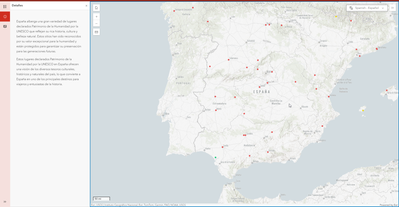
Test out this sample app, which updates the map’s basemap to a Spanish version.
BethRomero_3-1742405189354.png

10 Comments
Beversdorf
Occasional Explorer

@BethRomero , can you provide a link to the map that is shared within this sample app, so we can see how to configure the popups with switching the language?  The blog post is helpful, but sometimes seeing it in demo in the map form helps a bit more.  

We are actively doing this with our instant app, and would like some details on arcade functions with the popup on our map. 

Thank you!  

BethRomero
Esri Contributor

@Beversdorf Here is a link to the sample map - https://www.arcgis.com/apps/mapviewer/index.html?webmap=1254619b08ec4ee9949af6c8eeb121d5  Let me know if you have any other questions.

gabrielacruz
Esri Contributor

Hi! Thank you for your contribution—it was really helpful!
I do have a question, though. I'm using the search tool and have some data layers configured in my main map. Is it possible to change the data sources linked to this main map and include the layers I’ve configured in another language from another map?


For example: I create a map in Portuguese and other in English. The search tool is currently configured to retrieve information from the map layers in Portuguese. How can I make it search for information from the layers in the other map that I’ve configured in English?

jgarcia_qk4
Occasional Contributor

Hi @BethRomero, I think that this feature is great and has a lot of potential! Much of my work involves Native American tribes and having an option to add custom translations for indigenous languages not represented in the list of available languages would be a great way to improve accessibility for users. Please see my idea here: Custom Language Translation - Esri Community

BrittaneyHarkness
Regular Contributor

Hi @BethRomero, thanks for sharing this solution. I implemented this solution prior to the last AGO update and everything was working great. Were there any changes to the language switcher parameters in this last AGO update? Just curious because I am unable to toggle between webmaps in the Basic Viewer instant app.


thanks,

Britt

BethRomero
Esri Contributor

@BrittaneyHarkness Thanks for letting me know. We were able to make an update to resolve this issue. It should be working now. 

BrittaneyHarkness
Regular Contributor

Hi Beth, 


Thanks for the quick resolution! 


-Britt

BrittaneyHarkness
Regular Contributor

Hi @BethRomero ,

Reaching out again because we noticed an issue with search widget breaking in an instant app when switching between maps using the language switcher. It seems like the search configuration breaks once the webmap is switched and is unable to find the search source layers. Are there any solutions for handling the search sources when toggling between webmaps using the language switcher? 


thanks,

Britt

BethRomero
Esri Contributor

@BrittaneyHarkness, was this working previously, and are you able to share your app? Is the same layer in both maps, or are they two different layers? Are you using feature search from the map or URL? 

BrittaneyHarkness
Regular Contributor

Hi @BethRomero,

I just sent you an invite to a group in AGO to view the app. I cannot confirm it was working before the update. I believe we started testing the search feature after the update. The same layers are available in both, and the layer ids are the same. The only difference is the visible layer name in the english app and the spanish app. The interesting thing is that when you first load the app without the locale parameter the search works fine, when the locale parameter is initialized and the language switcher references the spanish webmap id the search breaks and still does not function with the language switcher reverts back to english, the default language.