- Home
- :
- All Communities
- :
- Products
- :
- ArcGIS Experience Builder
- :
- ArcGIS Experience Builder Questions
- :
- Re: Spatial filter in Experience Builder: How to r...
- Subscribe to RSS Feed
- Mark Topic as New
- Mark Topic as Read
- Float this Topic for Current User
- Bookmark
- Subscribe
- Mute
- Printer Friendly Page
Spatial filter in Experience Builder: How to replicate the functionality from Dashboards?

- Mark as New
- Bookmark
- Subscribe
- Mute
- Subscribe to RSS Feed
- Permalink
Hi everyone,
I am using Experience Builder and I want to replicate the spatial filter as it works in Dashboards.
The task is very simple. I have 2 polygon layers and by selecting a feature from 'Layer 1', I need to filter all the features from 'Layer 2' that intersect with 'Layer 1'. This is very simple in Dashboards, but I can't figure it out in Experience Builder. Below is how I would set this up in Dashboards:

I tried to achieve similar functionality with Query widget, which can spatially filter the features and show them among the query results, but not on the map. I configured the Query widget with actions (like below), but in this case it will always be just 1 feature (the selected one) that is displayed on the map.
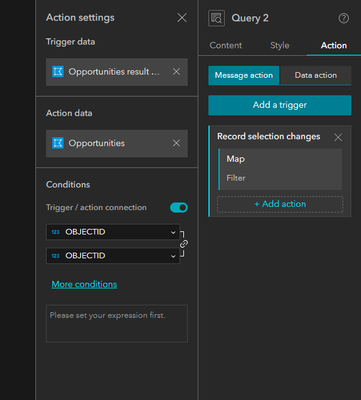
Surely that has to be possible and I'm missing something very obvious?
Thanks


- Mark as New
- Bookmark
- Subscribe
- Mute
- Subscribe to RSS Feed
- Permalink
Hi @doronwen,
This is in the product plan. You can also track this enhancement ENH-000165284: Provide support for Spatial Filters in the Filter Widget in ArcGIS Experience Builder.
Thanks,
Ke

- « Previous
- Next »
- « Previous
- Next »