- Home
- :
- All Communities
- :
- Products
- :
- ArcGIS Experience Builder
- :
- ArcGIS Experience Builder Questions
- :
- Re: Issue with collapsable sidebar making content ...
- Subscribe to RSS Feed
- Mark Topic as New
- Mark Topic as Read
- Float this Topic for Current User
- Bookmark
- Printer Friendly Page
Issue with collapsable sidebar making content underneath unusable

- Mark as New
- Bookmark
- Subscribe to RSS Feed
- Permalink
Using Experience Builder for developers (v 1.2), I want to use a side bar that covers part of the main stage content but can be collapsed to maximize page real estate. However, the content "underneath" the sidebar is unusable even when the sidebar is collapsed and the content is visible. Below, the buttons and drop-downs on the embedded dashboard under the sidebar outline do not work on the live application. I have to minimize the embedded content so that it is not underneath the side bar when the side bar is extended for it to work.
I'm wondering if this is a bug that will be fixed in future versions or if there is a workaround anyone would suggest. I like the pop-out bar for people who want to free up space for smaller screens, but it limits the functionality of even a basic web map if any of the map buttons are in one of the affected corners.
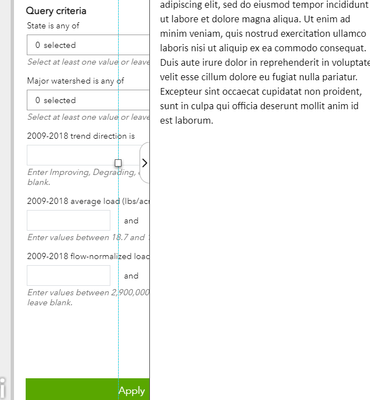
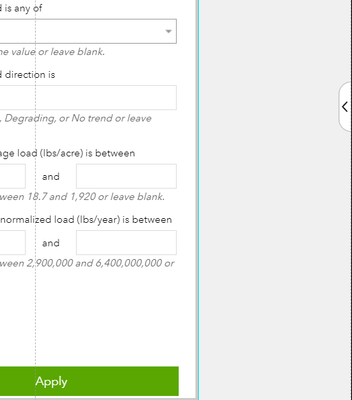
Solved! Go to Solution.


- Mark as New
- Bookmark
- Subscribe to RSS Feed
- Permalink
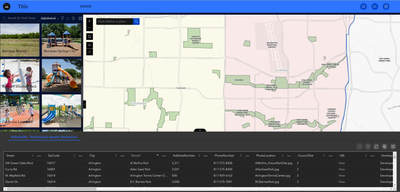
It can be done. Here is a two sidebar page. Neither sidebar interferes with the map. I shoved the whole sidebar with my map and list into the first side of my second sidebar.
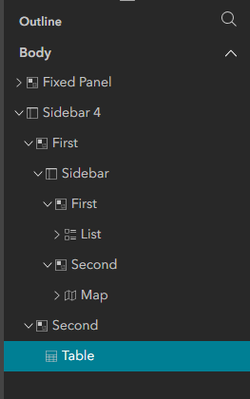
City of Arlington, Texas

- Mark as New
- Bookmark
- Subscribe to RSS Feed
- Permalink
@JeffreyThompson2 thanks for that, it works! I noticed that the bottom sidebar when it is expanded upward, it causes the map and side sidebar to shrink in height. Would there be a way to accomplish a similar effect but have the bottom sidebar somehow be on top of the map and side sidebar, so that it can expand and collapse without affecting the size of those elements? In other words it would be "on top".
- Mark as New
- Bookmark
- Subscribe to RSS Feed
- Permalink
If I am understanding your question correctly, you want to use the Overlay option.

City of Arlington, Texas
- Mark as New
- Bookmark
- Subscribe to RSS Feed
- Permalink
@JeffreyThompson2 works like a charm! Thank you!

- Mark as New
- Bookmark
- Subscribe to RSS Feed
- Permalink
I've been annoyed by this issue for a month! And thought it was just be design that it would inactivate whatever was behind it - but I always thought it was annoying!
I'm working on an app that uses the sidebar to increase screen space. Just by chance, I figured I'd see if other people had this issue and found this thread.
Thank you for the solution!!
Jon
If this response helps or is the solution to your post, please consider marking it as a solution

- Mark as New
- Bookmark
- Subscribe to RSS Feed
- Permalink
Very helpful discussion folks! Just diving into EB recently. Thank you!
Office of Conservation Planning

- Mark as New
- Bookmark
- Subscribe to RSS Feed
- Permalink
How do you tackle, zooming and panning, when you have multiple sidebars?
Thanks,
Abi
- Mark as New
- Bookmark
- Subscribe to RSS Feed
- Permalink
If you have your Sidebars set up correctly, panning and zooming shouldn't be a problem. If you have an issue, it's a symptom of The Sidebar Problem.
City of Arlington, Texas
- Mark as New
- Bookmark
- Subscribe to RSS Feed
- Permalink
Thank you, @JeffreyThompson2
- Mark as New
- Bookmark
- Subscribe to RSS Feed
- Permalink
I have two sidebars stacked. Please see screenshot below. Is there a way to use the space occupied by the bottom sidebar to scroll the table behind it? The table you see is in the lower section of the sidebar containing the map. As you can also see, I have intentionally left space on the right side so users can scroll either from that area or from the space above not occupied by the bottom sidebar, even when it is collapsed.
I would really like to extend the bottom sidebar all the way to the right while still being able to scroll the table behind it, either using the scrollbar on the side while the bottom sidebar is still expanded or from anywhere on the table once the bottom sidebar is collapsed.

Thank you,
Abi
