- Home
- :
- All Communities
- :
- Products
- :
- ArcGIS Experience Builder
- :
- ArcGIS Experience Builder Questions
- :
- Re: https://localhost:3001 no longer supported wit...
- Subscribe to RSS Feed
- Mark Topic as New
- Mark Topic as Read
- Float this Topic for Current User
- Bookmark
- Printer Friendly Page
https://localhost:3001 no longer supported with ArcGIS Online


- Mark as New
- Bookmark
- Subscribe to RSS Feed
- Permalink
It seems that ArcGIS Online no longer permits you to use "localhost" as an Allowed Origin for CORS. So you cannot set https://localhost:3001 as an Allowed Origin, as required by Experience Builder.
The instructions in ArcGIS Experience Builder install, therefore, no longer work. When you get to Step #8 under "Create Client ID using ArcGIS Online or ArcGIS Enterprise", you cannot get past the error message, "Your application domain is not allowed via Cross-Origin Resource Sharing (CORS)..."
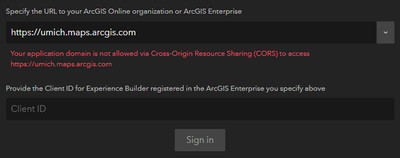
Instead of localhost, one has to set the fully-qualified domain name of their computer (e.g., http://mycomputer.mydomain:3001) as an Allowed Origin on your ArcGIS Online instance, and use it in place of https://localhost:3001 everywhere in the Experience Builder instructions.
Do the instructions need updating, or is there an easy way around this that I am missing?
- Mark as New
- Bookmark
- Subscribe to RSS Feed
- Permalink
@awgeezrick we ended up getting real SSL certs for our development machines, and ensuring their domains were added to the "Allow origins" list in ArcGIS Online settings.

- Mark as New
- Bookmark
- Subscribe to RSS Feed
- Permalink
Thanks for the info, I ended up doing the same thing an all is good now.
Thanks again.
Mark

- Mark as New
- Bookmark
- Subscribe to RSS Feed
- Permalink
Running into this issue too... Literally no idea how I can continue from here... This is so frustrating, update the guide or just remove it for crying out loud

- « Previous
-
- 1
- 2
- Next »
- « Previous
-
- 1
- 2
- Next »