- Home
- :
- All Communities
- :
- Products
- :
- ArcGIS Experience Builder
- :
- ArcGIS Experience Builder Questions
- :
- Re: How to change default docked popup location in...
- Subscribe to RSS Feed
- Mark Topic as New
- Mark Topic as Read
- Float this Topic for Current User
- Bookmark
- Subscribe
- Mute
- Printer Friendly Page
How to change default docked popup location in Experience Builder

- Mark as New
- Bookmark
- Subscribe
- Mute
- Subscribe to RSS Feed
- Permalink
Experience Builder Version: 1.2 (running on ArcGIS Enterprise)
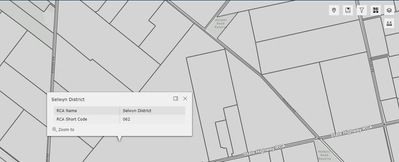
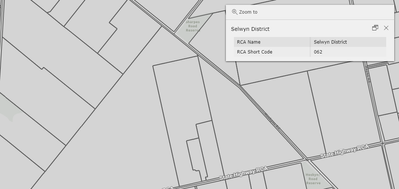
Is it possible to change the default location for docked popups in experience builder? The experience I am building defaults to the top-right of the screen which obstructs other tools.
Undocked:
Docked:
Solved! Go to Solution.


- Mark as New
- Bookmark
- Subscribe
- Mute
- Subscribe to RSS Feed
- Permalink
Hi David, I'm trying to follow along with your suggestion but running into issues viewing the new widget in the ExB. I copied the map widget and pasted it into client/your-extensions/widgets, added code sample above:

changed the name of the widget in the manifest.json to Map2, and then attempted to run the compiler as described in step 5 of this documentation. However, I get an error in the command prompt:
C:\Program Files\ArcGIS\ArcGISExperienceBuilder\client>npm run build:prod
> exb-client@1.11.0 build:prod
> cross-env NODE_ENV=production OUTPUT_FOLDER=./dist-prod webpack --mode production
'cross-env' is not recognized as an internal or external command,
operable program or batch file.
Am I missing a step? I don't have a lot of experience with customizing or creating new widgets.
- Zach

- Mark as New
- Bookmark
- Subscribe
- Mute
- Subscribe to RSS Feed
- Permalink
Make sure that the name in manifest.json matches the name of the folder it's in.
City of Arlington, Texas

- Mark as New
- Bookmark
- Subscribe
- Mute
- Subscribe to RSS Feed
- Permalink
I was able to modify my copy of the 'arcgis-map' widget to dock the popup by default by updating the 'onJimuMapViewCreated' function in v1.13. To change the location of the docked popup update the "position" attribute.
onJimuMapViewCreated = (jimuMapView: JimuMapView) => {
    jimuMapView.setMapWidgetState(this.props.state)
    this.setShowPopupUponSelectionForJimuMapView(jimuMapView)
    // START CUSTOM CODE
    console.log('onJimuMapViewCreated function loaded')
    if (jimuMapView.view && jimuMapView.view.popup) {
      // Modify the popup property to dock the popup by default
      jimuMapView.view.popup.dockEnabled = true;
      jimuMapView.view.popup.dockOptions = {
        breakpoint: false,
        position: "top-right"
      };
    } else {
      console.error('MapView or Popup is not initialized');
    }
    // END CUSTOM CODE
  }
- Mark as New
- Bookmark
- Subscribe
- Mute
- Subscribe to RSS Feed
- Permalink
Kinda like this?

That doesn't seem to have made a difference.
- Zach
- Mark as New
- Bookmark
- Subscribe
- Mute
- Subscribe to RSS Feed
- Permalink
Are you trying to do a server installation? You are connected to the C drive.
If you are trying to set up a local installation on your desktop, you should be following these directions. https://developers.arcgis.com/experience-builder/guide/install-guide/
City of Arlington, Texas

- Mark as New
- Bookmark
- Subscribe
- Mute
- Subscribe to RSS Feed
- Permalink
Ah well I've already done the installation, this particular one with the assistance of an ESRi tech to get the Experience Builder running as a Windows Service as opposed to starting it up from the command prompt. Our installation experience revealed that we couldn't run ExB as a service if it was installed on a Network location, only on a machine's C drive, so there it lives. All I'm looking to do now is add the new widget.
- Zach


- Mark as New
- Bookmark
- Subscribe
- Mute
- Subscribe to RSS Feed
- Permalink
The ability to dock the popup is great. It's now under Map -> Content configuration. But what would also be good is the ability to add the popup to a sidebar like in the picture below. (and stop the popup displaying). The Feature Info window is close put not the same.

- Mark as New
- Bookmark
- Subscribe
- Mute
- Subscribe to RSS Feed
- Permalink
@Bryan_krg , could you please elaborate a bit more on Feature Info not working in the way you want in a side panel?
- Mark as New
- Bookmark
- Subscribe
- Mute
- Subscribe to RSS Feed
- Permalink
I'd like to agree with @Bryan_krg on this one: the feature info widget is not the same, primarily in how it reads Arcade. I spoke with some of the ExB Team at the UC this year about it (still haven't gotten back to me) and they said they would investigate and probably log a bug. It would be nice to have even more auto-docking options, but this is a good feature added, thank you @Jianxia !
- Zach
