- Home
- :
- All Communities
- :
- Products
- :
- ArcGIS Experience Builder
- :
- ArcGIS Experience Builder Questions
- :
- Re: Hide time in Table widget
- Subscribe to RSS Feed
- Mark Topic as New
- Mark Topic as Read
- Float this Topic for Current User
- Bookmark
- Subscribe
- Mute
- Printer Friendly Page

- Mark as New
- Bookmark
- Subscribe
- Mute
- Subscribe to RSS Feed
- Permalink
I'm using the Table widget in Experience Builder (the online version, not developer edition). My date fields are displaying the time, and I'm wondering if there is a way to hide that? Time is irrelevant for this dataset - they just need to track the date.
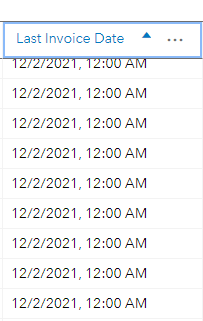
Solved! Go to Solution.

- Mark as New
- Bookmark
- Subscribe
- Mute
- Subscribe to RSS Feed
- Permalink
@JulioGarrido yeah unfortunately still the same.. unfortunate because it messes up exports to excel as well retaining the time. Surprised this has gone so long without a fix..
- Mark as New
- Bookmark
- Subscribe
- Mute
- Subscribe to RSS Feed
- Permalink
Adding on something new that I learned today. I thought for sure that I could create a hosted feature service on ArcGIS Online that included the new "date only" field, which would eliminate the time factor from the problem. Sadly, Experience Builder does not recognize date only fields at this time. So, the waiting continues...

- Mark as New
- Bookmark
- Subscribe
- Mute
- Subscribe to RSS Feed
- Permalink
Hey @AmyRoust, I went through the same motions as you. With anything new that is released by Esri, I always err on the side of caution. I have a feature layer with nearly a dozen date fields that I was excited to try it for.
I decided to try it for another layer that only had one date field and immediately realized it wouldn't work. Not only that, adding the date only field seemed to alter my projection for some reason, which then caused another issue in the AGOL environment (can't remember what exactly, but it was a whole ton of hoops to jump through just to try one change). Hopefully it was an easier time for you!

- Mark as New
- Bookmark
- Subscribe
- Mute
- Subscribe to RSS Feed
- Permalink
Do we know when this bug will be fixed? This has been an ongoing issue for quite some time now

- Mark as New
- Bookmark
- Subscribe
- Mute
- Subscribe to RSS Feed
- Permalink
It’s 2025 now 😢
Friendly reminder: Never change the data type to Date Only. That type of data won’t display on Experience Builder.

- Mark as New
- Bookmark
- Subscribe
- Mute
- Subscribe to RSS Feed
- Permalink
Same situation here:
I don't need the time but there's no way to get rid of it.
This could be a minor thing for someone, but is very important to my users and I can't use ExB in production if the date field contains the time component!
Please, fix it

- Mark as New
- Bookmark
- Subscribe
- Mute
- Subscribe to RSS Feed
- Permalink
Also looking for an update on this.
Can anyone tell me where to enter the ENH-000135112 that was logged for this to get an update?
If I enter it into the ESRI support page nothing returns, adding it to google doesn't return the details either. Surely giving out the enhancement number should allow users to obtain an update or am I missing something?

- Mark as New
- Bookmark
- Subscribe
- Mute
- Subscribe to RSS Feed
- Permalink
With Esri retiring Classic in Q1 2026, there really needs to be a fix to this.

- « Previous
- Next »
- « Previous
- Next »