- Home
- :
- All Communities
- :
- Products
- :
- ArcGIS Experience Builder
- :
- ArcGIS Experience Builder Ideas
- :
- Request to add the functionality to retain Attribu...
- Subscribe to RSS Feed
- Mark as New
- Mark as Read
- Bookmark
- Follow this Idea
- Printer Friendly Page
Request to add the functionality to retain Attribute Expressions from ArcGIS Map Viewer within the Table Widget in ArcGIS Experience Builder

- Mark as New
- Bookmark
- Subscribe
- Mute
- Subscribe to RSS Feed
- Permalink
In Web Map Viewer, users are able to create Attribute Expressions using Arcade. When a Web Map is added to an Experience Builder, these Attribute Expressions are visible in the pop-up, but not in the Table Widget or in the Web Map Viewer table. The ability to see Attribute Expressions in a table was a function of the table in Web App Builder and is an important capability.
Example:
1. Attribute Expressions in Web Map:

2. Attribute Expressions do not display within the table in the Web Map Viewer. There is not an option to turn them on or off in the Field Visibility tab within the table:
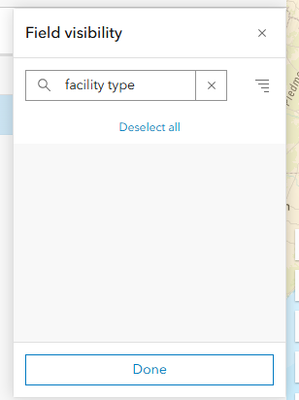
3. Attribute Expressions populate in the pop-up of a Web Map added to an Experience Builder:

4. Attribute Expressions do not populate in the Table Widget in Experience Builder, nor are they present in order to turn visibility on or off:

Please add the functionality to view Attribute Expressions in the Table Widget in Experience Builder. This an important component in the transition of applications from Web App Builder to Experience Builder.
In ArcGIS Online, it is now possible to add arcade expressions to a layer directly in ArcGIS Experience Builder and to use them in the table widget. There is also a function to copy the arcade of a map expression set in the web map into the arcade script window in Experience Builder. However, if the map expression is updated in the web map, the builder must also update the arcade expression manually in the Experience Builder - they are not linked.
Step 1: Add an Arcade Expression to a Layer in the Data Tab of an Experience Builder

Step 2: Copy a Map Expression From a Web Map Into the Arcade Script for the Arcade Expression

Step 3: Add the Newly Added Arcade Expression to the Table Widget


This is great news. Any word on when this functionality will be available in Enterprise?

You must be a registered user to add a comment. If you've already registered, sign in. Otherwise, register and sign in.