- Home
- :
- All Communities
- :
- Products
- :
- ArcGIS Experience Builder
- :
- ArcGIS Experience Builder Ideas
- :
- Filter Widget - Option To Allow Only One Filter To...
- Subscribe to RSS Feed
- Mark as New
- Mark as Read
- Bookmark
- Printer Friendly Page
Filter Widget - Option To Allow Only One Filter To Be Applied At A Time (radio buttons)

- Mark as New
- Bookmark
- Subscribe to RSS Feed
- Permalink
For our use case, these are our filters:
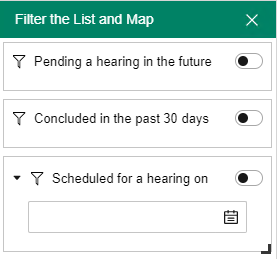
As you can see, it wouldn't make sense to apply more than one at a time, and applying the first two at the same time filters out all of the data. You can try this out here:
http://map.opkansas.org/find-a-development-proposal/
- « Previous
-
- 1
- 2
- Next »

So are we all still waiting for a solution, then? I have several filters which display varying emission/timeframe scenarios for climate data. Right now, I have a text box next to my filters instructing the user to only activate one filter at a time as to not break the display. Would love to have the filter widget adjusted so we can set a rule saying "only one filter allowed" or "deactivate previous filter when new filter is toggled on."

Same problem here. I also want to filter where only 1 year of data shows at a time. The Timeline widget needs updates to better support annual data - first thing being the line at the top of the widget shows the beginning & end time down to the millisecond. It is the first element of the map to draw the user's eye & confuses them. The filter option for each year would be ideal if there is an option to have only one active at a time like in Dashboards. Looking forward to trying the proposed workaround from @DickieRigdon.

What about this solution? https://www.esri.com/arcgis-blog/products/arcgis-online/mapping/a-hug-for-group-layers-show-only-one...


Hi - Would really appreciate this functionality. There are ways around it but they're convoluted and can make the experience worse for the user than just having an option for setting filters as mutually exclusive. Thanks.

Hi Dickie, thanks for sharing this workaround. I implemented the same approach for my 3D building floor selector, and it works reasonably well. However, I found one major limitation: when I select F2, the previous filter (F1) remains active. Ideally, selecting F2 should automatically deactivate F1, similar to a radio button or single-selection control.
This is a common GIS workflow, especially for floor navigation (F1, F2, F3...), where users expect only one floor selection to be active at a time. Currently, the Filter widget doesn't provide an option for exclusive or single-selection behavior.
It would be great if Esri could add a simple "Allow only one active filter" option to the Filter widget. Similar single-selection behavior is already available in ArcGIS Dashboards through the Category Selector, and having a comparable option in Experience Builder would greatly improve usability while eliminating the need for custom widgets or workarounds.
Have you found any better solution since your original post?
You must be a registered user to add a comment. If you've already registered, sign in. Otherwise, register and sign in.