- Home
- :
- All Communities
- :
- Products
- :
- ArcGIS Reality
- :
- ArcGIS Drone2Map
- :
- ArcGIS Drone2Map Questions
- :
- Re: Drone2Map OBJ and SLPK quality
- Subscribe to RSS Feed
- Mark Topic as New
- Mark Topic as Read
- Float this Topic for Current User
- Bookmark
- Subscribe
- Mute
- Printer Friendly Page
Drone2Map OBJ and SLPK quality

- Mark as New
- Bookmark
- Subscribe
- Mute
- Subscribe to RSS Feed
- Permalink
Hello,
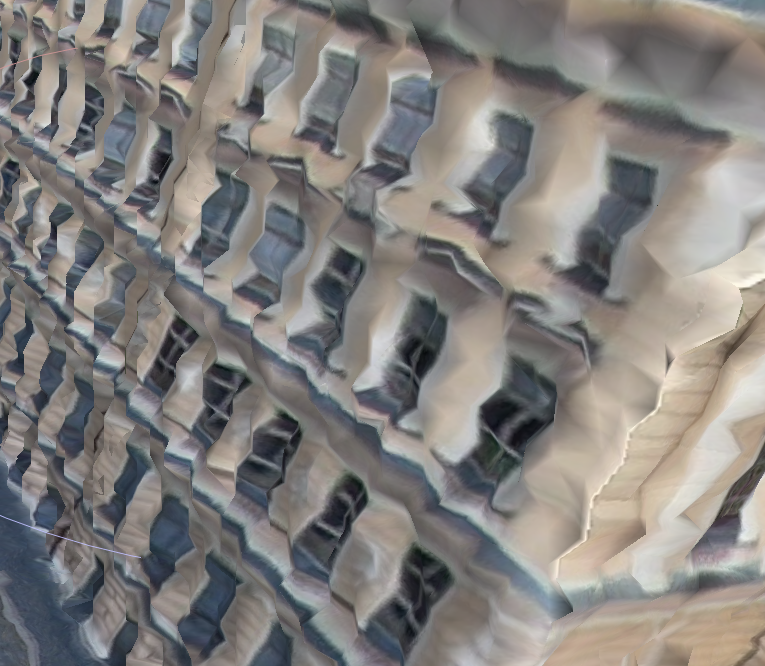
I have an issue with creation of 3D model of a building in D2M. The .slpk in D2M and also in ArcGIS Pro looks great, but when I open the .obj file (which is my main goal), it looks absolutely horrible (see below). I have tried opening it in City Engine, Meshlab and Blender and it was the same, so the issue must be with the format or export from D2M. I've tried .dae, but I cannot open the exported file in any software, not even City Engine, so I cannot check the quality. Has anyone encountered problem like this?

- Mark as New
- Bookmark
- Subscribe
- Mute
- Subscribe to RSS Feed
- Permalink
Thanks Mark!
That makes sense, i hadn't checked cloud compare but it shows as expected with global shift applied. I was actually able to view the obj correctly in blender and other software after running the python script @PierreloupDucroix outlined here: https://community.esri.com/t5/arcgis-drone2map-questions/drone2map-obj-and-slpk-quality/m-p/1673193#...


- Mark as New
- Bookmark
- Subscribe
- Mute
- Subscribe to RSS Feed
- Permalink
I made a script that will shift coordinates of your OBJ file. The result can now be opened in Blender with a normal looking render :

Be careful because the coordinates have now been altered and precision has decreased.
Here is the sample code that you may adapt and test :
input_filename = r'D:\pathTo\Mesh.obj'
output_filename = r'D:\pathTo\Mesh_modified.obj'
# Adapt shift here
x_shif = - 18533500
y_shift = 2538800

with open(input_filename, 'r') as f_in, open(output_filename, 'w') as f_out:
    for line in f_in:
        # Check if the line starts with 'v' followed by a space (to exclude vt, f, ...)
        if line.startswith('v '):
            parts = line.split()
            # parts[0] is 'v', parts[1] is X, parts[2] is Y, parts[3] is Z
            try:
                x = float(parts[1])
                y = float(parts[2])
                z = float(parts[3])

                # Apply the requested shifts
                new_x = x + x_shif
                new_y = y + y_shift
                # Z remains unchanged

                # Write the modified line
                f_out.write(f"v {new_x} {new_y} {z}\n")
            except ValueError:
                # In case of parsing error, write the original line
                f_out.write(line)
        else:
            # Write lines that are not vertices (vt, f, comments, etc.) as is
            f_out.write(line)

print(f"Done. The modified file has been saved as '{output_filename}'.")
- Mark as New
- Bookmark
- Subscribe
- Mute
- Subscribe to RSS Feed
- Permalink
Thanks Pierre, this helped immensely!
- Mark as New
- Bookmark
- Subscribe
- Mute
- Subscribe to RSS Feed
- Permalink
Vote for me : https://community.esri.com/t5/arcgis-drone2map-ideas/offset-obj-mesh-coordinates-to-export-a-file/id...
😉

- « Previous
-
- 1
- 2
- Next »
- « Previous
-
- 1
- 2
- Next »