- Home
- :
- All Communities
- :
- Products
- :
- ArcGIS Dashboards
- :
- ArcGIS Dashboards Questions
- :
- Missing "Globals" in my data expression editor
- Subscribe to RSS Feed
- Mark Topic as New
- Mark Topic as Read
- Float this Topic for Current User
- Bookmark
- Subscribe
- Mute
- Printer Friendly Page
Missing "Globals" in my data expression editor

- Mark as New
- Bookmark
- Subscribe
- Mute
- Subscribe to RSS Feed
- Permalink
It looks like that inside the data expression editor of my sample ArcGIS Dashboard the "Globals" are missing
(as described in this video: https://www.youtube.com/watch?v=Dub1Ako2ljw&t=1008s😞
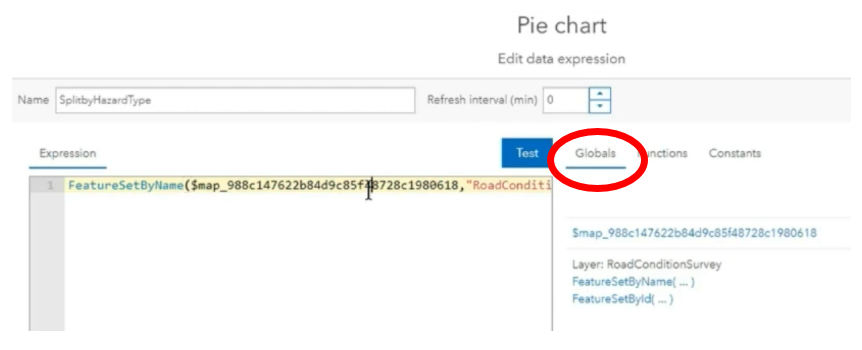
Is there any setting or somethings else to get it?
Thanks and regards,
Daniel.



- Mark as New
- Bookmark
- Subscribe
- Mute
- Subscribe to RSS Feed
- Permalink
Hi @dstrigl
I really think this has something to do with the data. Just did a small test with a data expression in the Dashboard and it can find the domain (in my data the code and description are the same values, but the domain can be accessed after reading the featureset using FeatureSetByPortalItem():


- Mark as New
- Bookmark
- Subscribe
- Mute
- Subscribe to RSS Feed
- Permalink
Hi @XanderBakker,
thanks again for your help. You are right, it must be the data itself which causes the problems!
I am currently working with ArcGIS Online.
Now I created a complete new Feature Layer with a Feature Class including some domains with ArcGIS Pro.
I added some sample data and published it to ArcGIS Online.
And with this data the request of the domain names inside a data expression works!
Do you have any idea what causes the problem with the other data?
Regards,
Daniel.
- Mark as New
- Bookmark
- Subscribe
- Mute
- Subscribe to RSS Feed
- Permalink
Hi @dstrigl ,
I have no idea how the data was published and from what format, but I am glad that the test you performed shows that it does work (for the test dataset). This confirms that the issue is data-related. I would recommend you to reach out to support and create a case to discover the reason why this is not working. The fact that you are using ArcGIS Online helps since you automatically always have access to the latest version.
- Mark as New
- Bookmark
- Subscribe
- Mute
- Subscribe to RSS Feed
- Permalink
Hi @XanderBakker,
thanks again.
> I would recommend you to reach out to support and create a case to discover the reason why this is not working.
That's the way I will follow.
Thanks in the meantime and regards,
Daniel.

- « Previous
-
- 1
- 2
- Next »
- « Previous
-
- 1
- 2
- Next »