- Home
- :
- All Communities
- :
- Products
- :
- ArcGIS Dashboards
- :
- ArcGIS Dashboards Questions
- :
- Dashboard Selector for Related Records?
- Subscribe to RSS Feed
- Mark Topic as New
- Mark Topic as Read
- Float this Topic for Current User
- Bookmark
- Printer Friendly Page
Dashboard Selector for Related Records?

- Mark as New
- Bookmark
- Subscribe to RSS Feed
- Permalink
Is there a way to have a selector populated with fields from a related table, that when one is selected, filters the related locations on a map?
I have a Dashboard I'm working on building for our county Vector Control guy. We have tick dragging locations on a map, and a related table of Drag Reports, where he enters the tick species that are captured at a drag.
He wants a filter on his dashboard that will
so like say I wanted only the drag sites that i caught Dermacentor variabilis, I could selected that specie and only the spots where that species has been found will pop up on the map
Seems to me that this should be possible with field mapping but I have not been able to get this.
I have it wired in the opposite direction, where selecting a map location filters a list of related reports, but I've not had success coming up with some combination of widgets that allows him to select a related table field to filter the map.
Any suggestions?
Thanks!

- Mark as New
- Bookmark
- Subscribe to RSS Feed
- Permalink
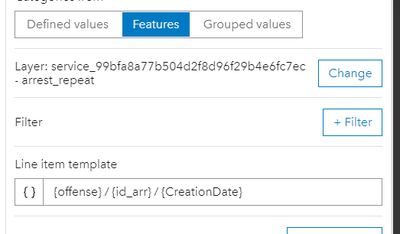
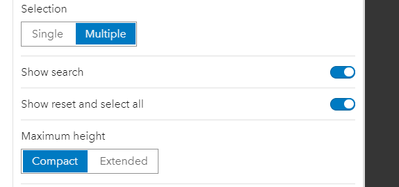
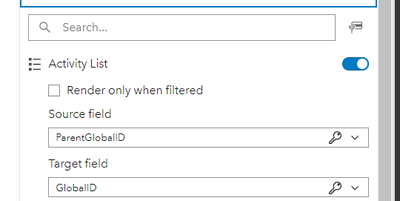
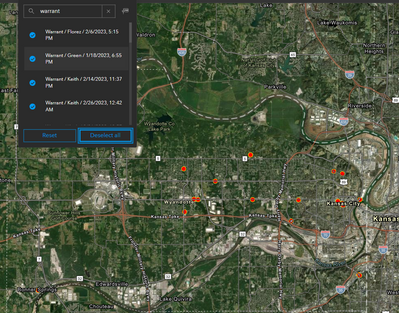
Hi Guys - The work around I found was to go ahead and use 'Features' instead of 'Grouped values'. Of course, doing so will show all of the duplicates so I added a little extra context in 'List Item Template' to make it less obvious. In the Selector section, change Selection from Single to Multiple and make sure 'Show reset and select all' is enabled. Then, in the Actions section, you have the ability to link the related table to it's parent table for the map and other widgets on the dashboard.
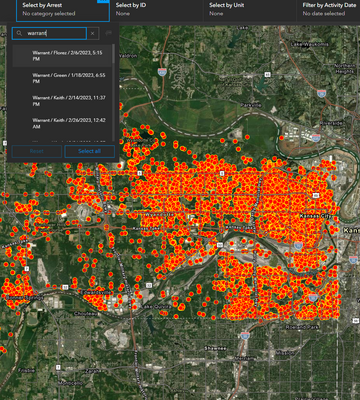
On the Dashboard end, I show screenshots below where the user can type in 'warrant', click on 'select all', and as expected, it selects all warrants in the arrest category and displays only those on the map.
The downside, is that the user has to know what they are looking for. It's not as easy as selecting an item from a dropdown menu.
Also... if you do this, make sure to increase the 'Maximum Categories' to accommodate the number of records you may have. The default is 50.
Hope this helps a bit.

- Mark as New
- Bookmark
- Subscribe to RSS Feed
- Permalink
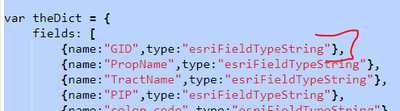
Hi all - regarding using a data expression with GlobalIDs. I found that when you use a data expression as a data source, and you want to use a GlobalID as a key to filter other elements, you need to make the field type 'esriFieldTypeString' to store it. I tried storying it as a GUID field type and it didn't work, but making it a string did. I also converted the GlobalID to text using Text(), though I don't know if it's necessary, but it worked.

- Mark as New
- Bookmark
- Subscribe to RSS Feed
- Permalink
Would be great to have this functionality bit more seemless. @Elizabeth_Burniston's solution above does get around the issue, but still has problems - i.e. selecting multiple different categories. And is slow loading if have lots of features. Grouped features functionality would be perfect, if it didn't lock the field as one of the keys when configuring filtering actions.

- Mark as New
- Bookmark
- Subscribe to RSS Feed
- Permalink
It is April 2025, I am still looking for ways to view and download found related records as a batch. I am also looking to be able to add batches of records to the related table, without having to republish the whole data set each time. I'd love to hear about how I am missing something very obvious, and these solutions are available to work in this fashion. Please let me know if this is the case and there is now a solution for these tasks. Thanks in advance.

- « Previous
-
- 1
- 2
- Next »
- « Previous
-
- 1
- 2
- Next »