I have been working on an ArcGIS Notebook to count points within polygons. A simplified example is the following:
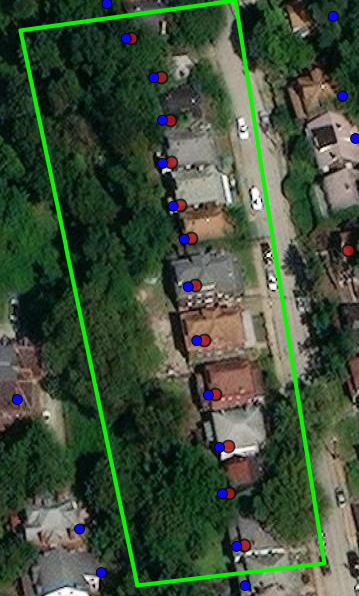
In this image the polygon and red dots are features in a hosted feature layer in ArcGIS Online. The blue dots are coming from an ArcGIS Enterprise / ArcGIS Server feature service.
When I perform an intersection query for points that intersect the polygon using the hosted feature layer, I get the correct result (12). To do this I am using the following:
feature_geom = polygon.features[0].geometry
feature_sr = polygon.features[0].geometry['spatialReference']['wkid']
polygon_filter = intersects(feature_geom, feature_sr)
svc_query = point_lyr.query(geometry_filter=polygon_filter)
print(len(svc_query))
However, when I perform the same query to get the number of points from ArcGIS Enterprise/ArcGIS Server within the same polygon, I get an incorrect result (10). To do this I am using the following:
# Connect to ArcGIS Enterprise
gis2 = GIS(url=gis2_URL, username=gis2_username, password=gis2_password)

# Feature layer
water_network_url = "https://<url>/FeatureServer"
water_network_featurelayer = FeatureLayerCollection(water_network_url, gis=gis2)
water_network_layers = water_network_featurelayer.layers
service_connection = water_network_layers[0]

# Query
feature_geom = polygon.features[0].geometry
feature_sr = polygon.features[0].geometry['spatialReference']['wkid']
polygon_filter = intersects(feature_geom, feature_sr)
svc_query2 = service_connection.query(geometry_filter=polygon_filter)
print(len(svc_query2))
Are there any issues with how I'm referencing the ArcGIS Enterprise layer that would cause this issue? Or is there anything else to consider that might be causing the incorrect result?

