I am trying to use an Esri Web Style, "3D Residential", in my Portal for ArcGIS WebScene:
https://esri-styles.maps.arcgis.com/home/item.html?id=4e7dd1bc3af44a9ea2cba435e2c2f7f2
After I download it, I get a file called "3D_Residential_en.stylx"
In my Pro project, I right-click styles>new style>navigate to the file.
I get this:
"
Upgrade Style?
This style does not match the current version of ArcGIS Pro and will be read-only. Would you like to upgrade it?
"
I click yes, and the style gets upgraded, and allows me to access the 132 style classes within the style.
When I try to Share As Web Style, I get this:
"
1 2 WebStyle ArcGIS Enterprise SandBox https://2nqv-gc-gi11101.neeaws.local/portal/ AXC013O@ESINT 2019-11-14 15:07:44 Status: Failed StatusMessage: Failed to share, the stylx file is empty or does not contain any valid symbols ErrorMessage: Failed to share, the stylx file is empty or does not contain any valid symbols "
I'd rather use the Esri styles because they have texture and pattern already, as opposed to other 3D models I get that remove those details when I upload them to ArcGIS Pro, as guided by this blog:
https://www.esri.com/arcgis-blog/products/arcgis-online/3d-gis/how-to-publish-web-styles-with-3d-symbols/
For example, here is how one of the 3D models I can get from online that appear as one solid color:
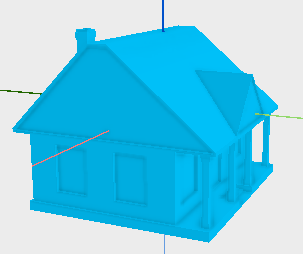
Versus an Esri Style:
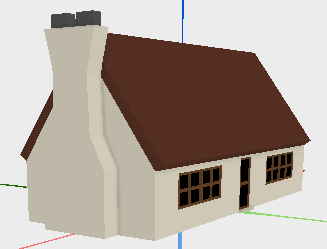
I like the Esri Style better.
Any ideas on how I can get this to work?
Chris Andrews
Ivonne Seler
Philip Mielke
Eric Krause
Keith VanGraafeiland
Khalid Duri
Ken Field
Nathan Shephard
William Morrish
Tamrat Belayneh
Jie Chang
Lindsay Weitz
Stephen Heidelberg
Gianluca Miele
Javier Gutierrez
Javier Martínez Gutierrez
Michael Contreras
Kristian Ekenes
Jinwu Ma
Gert Van Maren
Phil Sanchez
Janett Baresel
Russell Roberts
Jacob Helfman
Esri Technical Support
3D Mapping



