- Home
- :
- All Communities
- :
- User Groups
- :
- Web AppBuilder Custom Widgets
- :
- Questions
- :
- WidgetManager.js references
- Subscribe to RSS Feed
- Mark Topic as New
- Mark Topic as Read
- Float this Topic for Current User
- Bookmark
- Printer Friendly Page


- Mark as New
- Bookmark
- Subscribe to RSS Feed
- Permalink
WABDev 1.19
Theme: Launchpad
I'm looking for how WAB refers to the WidgetManager.js file when a page is initially loaded. Is there a specific .html file that refers to it like,
<script src="WidgetManager.js" ></script>
Thanks for any info!
Solved! Go to Solution.
Accepted Solutions


- Mark as New
- Bookmark
- Subscribe to RSS Feed
- Permalink
So if you look at the source tab and search for WidgetManager.js file (after loading your WAB app) you will see "WidgetManager.js?wab_dv=2.20" so the easy way to manage no caching is to change the "deployVersion = '2.20';" in the env.js file each time you make some code changes. For example
- Mark as New
- Bookmark
- Subscribe to RSS Feed
- Permalink
That js file is loader inside the configLoader.js, configManager.js, main.js, etc files. There is not a script tag that loads it.
- Mark as New
- Bookmark
- Subscribe to RSS Feed
- Permalink
I see. The issue I have is I included a bit of code in the WidgetManager.js to attempt to deal with caching. Anytime I redeploy a WAB with custom widgets this cache issue rears its head and telling users to clear browser cache or use incognito window (both work) is not an acceptable solution.
I updated the _tryLoadWidgetConfig function in the WidgetManager.js with this,
_tryLoadWidgetConfig: function (setting) {
        var def = new Deferred();
        //need load config first, because the template may be use the config data
        if (setting.config && lang.isObject(setting.config)) {
            //if widget is configurated in the app config.json, the i18n has beed rocessed
            def.resolve(setting.config);
            return def;
        } else if (setting.config) {
            if (require.cache['url:' + setting.config]) {
                def.resolve(json.parse(require.cache['url:' + setting.config]));
                return def;
            }
            var configFile = utils.processUrlInAppConfig(setting.config);
            // The widgetConfig filename is dependent on widget label,
            // IE8 & IE9 do not encode automatically while attempt to request file.
            var configFileArray = configFile.split('/');
            configFileArray[configFileArray.length - 1] =
            encodeURIComponent(configFileArray[configFileArray.length - 1]);
            configFile = configFileArray.join('/');
            //Append date to ensure you get the latest json file
            configFile += "?currentVersion=" + Date.now();
            return xhr(configFile, {
                handleAs: "json",
                headers: {
                    "X-Requested-With": null
                }
            });
        } else {
            return this._tryLoadResource(setting, 'config').then(function (config) {
                //this property is used in map config plugin
                setting.isDefaultConfig = true;
                return config;
            });
        }
    },
However, the WidgetManager.js file itself is being cached. So I hoped to apply something to whatever loaded this to force a new version to be loaded each time.
- Mark as New
- Bookmark
- Subscribe to RSS Feed
- Permalink
So if you look at the source tab and search for WidgetManager.js file (after loading your WAB app) you will see "WidgetManager.js?wab_dv=2.20" so the easy way to manage no caching is to change the "deployVersion = '2.20';" in the env.js file each time you make some code changes. For example
- Mark as New
- Bookmark
- Subscribe to RSS Feed
- Permalink
Ok thank you I will give that a go!
- Mark as New
- Bookmark
- Subscribe to RSS Feed
- Permalink
Robert this looks like it will be the winner on this issue. I had a strange result when I tested but since I redeployed again the initial testing is promising and just need users to validate.
Thanks for the tips.
- Mark as New
- Bookmark
- Subscribe to RSS Feed
- Permalink
I took one of our dev WABs with custom widgets and updated the env.js file line #83 with your suggestion:
deployVersion = '2.19.20210709';
I added the Bookmarks widget to the WAB app, redeployed it and navigated to the app and this is what shows when it opens:
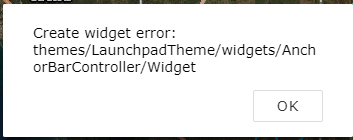
Inspecting the env.js that got loaded, line 83 shows the cached version not what I changed it to.
If I use incognito browser window (Chrome) it opens just fine with the Bookmarks widget!
- Mark as New
- Bookmark
- Subscribe to RSS Feed
- Permalink
I then tried to update the index.html with this,
<script type="text/javascript" src="env.js?1"></script>Which seemed to do something! I can see the Bookmarks widget and I didn't get the error as before but now the WAB loads weird like top of the page is split.
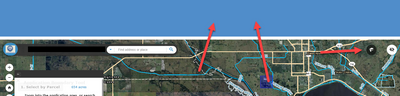
- Mark as New
- Bookmark
- Subscribe to RSS Feed
- Permalink
In the index.html file there are script tags that call the init.js file that loads most of the WAB js files.
