- Home
- :
- All Communities
- :
- Products
- :
- ArcGIS Enterprise
- :
- Publishing and Managing Services Questions
- :
- Re: Relationship classes in Map Service
- Subscribe to RSS Feed
- Mark Topic as New
- Mark Topic as Read
- Float this Topic for Current User
- Bookmark
- Subscribe
- Mute
- Printer Friendly Page
Relationship classes in Map Service

- Mark as New
- Bookmark
- Subscribe
- Mute
- Subscribe to RSS Feed
- Permalink
A year ago, I published a map with 6 layers related to a non-spatial table from ArcMap to a hosted server. Data is in a SDE geodatabase with relationship classes.
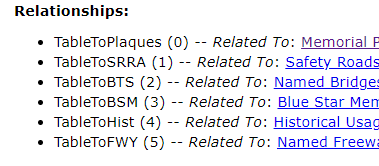
A year later, I imported that map into ArcGIS Pro and made some updates. I accidentally deleted a Relationship Class, so I had to recreate them all. I published to our AGOL Feature/Map Services Server (not hosted).
Now when I query the map in my web app, the related layers are displayed in a different order that makes no sense for this data. It looks like something happened to them when I published.
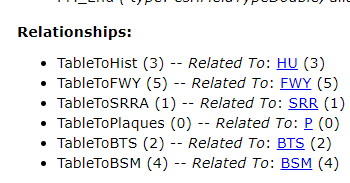
I tried to delete the Relationship Classes, recreate them in the order I want and republish. I still get the relationships in a random order. I want them to be in sequential order by layer 0, 1, 2, 3, 4, 5... I can't figure out why they would've changed from one publishing to the next.
Is this due to publishing one to a hosted server vs. AGOL server? Is there a way to publish them in sequential order? Or force the related layers to be displayed in a different order?
Any suggestions would be appreciated!

- Mark as New
- Bookmark
- Subscribe
- Mute
- Subscribe to RSS Feed
- Permalink
I know this is an old thread but I'm having the same issue. We have an integration with another system and republishing the map service is changing the ID's of the relationship classes in the feature service and thus breaking that part of our integration. Anyway, it looks like this issue has been addressed with ArcGIS Server/Enterprise 11.3: Relationships (Feature Service) | ArcGIS REST APIs | Esri Developer I haven't tested this yet but we may be moving to this version soon.


- Mark as New
- Bookmark
- Subscribe
- Mute
- Subscribe to RSS Feed
- Permalink
Thanks@MatthewStull1 for adding your note here. You are right, this is fixed for both map service and feature service in 11.3.
Once you have both sides of a relates in your map in Pro, if you open the layer/table's Properties page and go to Relates tab, you will see an option to provide user defined ids for relationships.

Note: please note that we have an issue -- if you already have 'allow assignment of unique ids...' option checked at the map level, and you added the layers/tables; you might not see this option; You need to reset (or toggle it if you wanted to preserve your already assigned layer ids) that at the map level to see this text box to enter your desired id.
We apologies for this issue; we are hoping to fix this issue in a future release.
Thank you!

- « Previous
-
- 1
- 2
- Next »
- « Previous
-
- 1
- 2
- Next »