- Home
- :
- All Communities
- :
- Products
- :
- Geoprocessing
- :
- Geoprocessing Questions
- :
- Display Multiple Feature Class Fields in Geoproces...
- Subscribe to RSS Feed
- Mark Topic as New
- Mark Topic as Read
- Float this Topic for Current User
- Bookmark
- Printer Friendly Page
Display Multiple Feature Class Fields in Geoprocessing Pane

- Mark as New
- Bookmark
- Subscribe to RSS Feed
- Permalink
Hello everyone,
I'm creating a custom arcpy script geoprocessing tool that allows a user to do the following:
1. Geocode an address table or process an XY table.
2. Do N spatial joins based on how many feature classes the user selects.
I was successful in creating the script to handle #1. But for #2, while I can ask the user to input N feature classes, I also want to allow them to select which fields they want to keep from each layer after each spatial join, and this is where I'm stuck. I would like to implement a script that would either display the available fields for all of the feature classes in the same pane or separate window (before they click "Run") for user to add as text in a separate parameter, or display as options that the user can select in the UI. My current script seems to only capture the fields for the first feature class. I don't know if it's a limitation or perhaps I'm missing something. I'm new to arcpy, so any help/pointers would be appreciated, thank you in advance!
Code snippet:
poly_fc = arcpy.GetParameterAsText(0)
field_names = [f.name for f in arcpy.ListFields(poly_fc)]
arcpy.SetParameterAsText(1, ";".join(field_names))
--------------------------------------------------------------------------
Fields for the first selected layer are displayed:
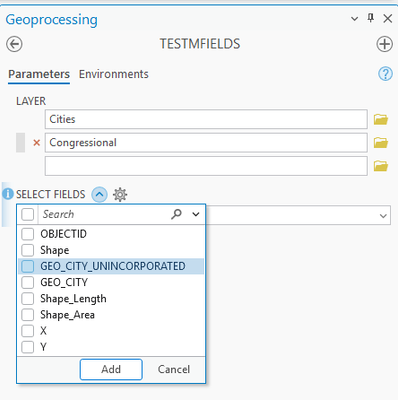
My current implementation of the tool properties:

Solved! Go to Solution.
Accepted Solutions

- Mark as New
- Bookmark
- Subscribe to RSS Feed
- Permalink
I would use a python toolbox (.pyt file) for this task. I slapped this together with Gemini. Add Spatial Join was refusing to honor the field map so I just made an intermediate layer instead. It won't let you add fields with the same name from multiple sources. It automatically deletes the Join_Count field from output. Hopefully this helps!
import arcpy

class Toolbox(object):
    def __init__(self):
        self.label = "In-Place Spatial Join Toolbox"
        self.alias = "InPlaceSpatialJoin"
        self.tools = [InPlaceSpatialJoinTool]

class InPlaceSpatialJoinTool(object):
    def __init__(self):
        self.label = "Add Spatial Joins In-Place"
        self.description = "Appends spatial joins sequentially to a target layer context using custom field selections."
        self.canRunInBackground = False

    def getParameterInfo(self):
        # Parameter 0: Target Feature Layer (Modified In-Place)
        param0 = arcpy.Parameter(
            displayName="Target Feature Layer",
            name="target_layer",
            datatype="GPFeatureLayer",
            parameterType="Required",
            direction="Input"
        )

        # Parameter 1: Input Polygon Layers (Multi-value choice)
        param1 = arcpy.Parameter(
            displayName="Input Polygon Feature Layers",
            name="input_layers",
            datatype="GPFeatureLayer",
            parameterType="Required",
            direction="Input",
            multiValue=True
        )

        # Parameter 2: Selective Fields (Formatted List)
        param2 = arcpy.Parameter(
            displayName="Fields to Join",
            name="fields_to_join",
            datatype="GPString",
            parameterType="Required",
            direction="Input",
            multiValue=True
        )
        param2.filter.type = "ValueList"

        return [param0, param1, param2]

    def isLicensed(self):
        return True

    def updateParameters(self, parameters):
        # Populate checklist as "Source : Field" when layers are selected
        if parameters[1].altered and parameters[1].values:
            display_fields = []
            for layer in parameters[1].values:
                try:
                    # Using Describe handles layers from map or directly from a folder structure smoothly
                    layer_name = arcpy.Describe(layer).name
                    fields = arcpy.ListFields(layer)
                    for f in fields:
                        # Exclude system structural attributes
                        if f.type not in ["OID", "Geometry"] and f.name.upper() not in [
                            "SHAPE", "OBJECTID", "FID", "SHAPE_LENGTH", "SHAPE_AREA", "SHAPE.AREA", "SHAPE.LEN"
                        ]:
                            display_fields.append(f"{layer_name} : {f.name}")
                except Exception:
                    pass
            parameters[2].filter.list = sorted(display_fields)
        elif not parameters[1].values:
            parameters[2].filter.list = []
        return

    def updateMessages(self, parameters):
        # Check validation: Block execution if duplicate column definitions are selected
        if parameters[2].altered and parameters[2].values:
            field_names = []
            for val in parameters[2].values:
                parts = val.split(" : ")
                if len(parts) == 2:
                    field_names.append(parts[1])

            # Find intersections/duplicates
            duplicates = [x for x in set(field_names) if field_names.count(x) > 1]
            if duplicates:
                parameters[2].setErrorMessage(
                    f"Duplicate base fields chosen: ({', '.join(duplicates)}). "
                    "To prevent mapping overhead conflicts, ensure your selection "
                    "only checks this field name from a single layer source."
                )
        return

    def execute(self, parameters, messages):
        target_layer = parameters[0].valueAsText
        input_layers = parameters[1].values
        selected_items = parameters[2].values

        # 1. Sort chosen strings out into a lookup dictionary: { LayerName: [Field1, Field2] }
        layer_field_map = {}
        for item in selected_items:
            parts = item.split(" : ")
            if len(parts) == 2:
                lyr_name, f_name = parts[0], parts[1]
                if lyr_name not in layer_field_map:
                    layer_field_map[lyr_name] = []
                layer_field_map[lyr_name].append(f_name)

        # 2. Sequential join loop using MakeFeatureLayer + FieldInfo
        for layer in input_layers:
            lyr_name = arcpy.Describe(layer).name

            if lyr_name in layer_field_map:
                fields_to_keep = layer_field_map[lyr_name]
                messages.addMessage(f"Configuring field visibility for layer '{lyr_name}'...")

                # Create a fresh FieldInfo engine
                field_info = arcpy.FieldInfo()
                all_fields = arcpy.ListFields(layer)

                for f in all_fields:
                    # CRITICAL: Always keep OID and Geometry visible so the spatial engine can compute intersections
                    if f.type in ["OID", "Geometry"] or f.name.upper() in ["SHAPE", "OBJECTID", "FID"]:
                        field_info.addField(f.name, f.name, "VISIBLE", "NONE")
                    # If the user selected the field, leave it visible
                    elif f.name in fields_to_keep:
                        field_info.addField(f.name, f.name, "VISIBLE", "NONE")
                    # Otherwise, shroud it completely from the geoprocessing framework
                    else:
                        field_info.addField(f.name, f.name, "HIDDEN", "NONE")

                # Generate a temporary layer view name for this step
                temp_lyr_name = f"temp_join_view_{lyr_name}"

                # Build the filtered layer view
                arcpy.management.MakeFeatureLayer(
                    in_features=layer,
                    out_layer=temp_lyr_name,
                    field_info=field_info
                )

                messages.addMessage(f"Applying spatial join from clean view '{lyr_name}'...")

                # 3. Apply the join (Notice field_mapping is omitted; it respects layer structure natively)
                arcpy.management.AddSpatialJoin(
                    target_features=target_layer,
                    join_features=temp_lyr_name,
                    join_operation="JOIN_ONE_TO_ONE",
                    join_type="KEEP_ALL",
                    match_option="INTERSECT",
                    permanent_join="PERMANENT_FIELDS"
                )

                # Safely delete the temporary layer view from memory session context
                arcpy.management.Delete(temp_lyr_name)

                # 4. Clean up only the standard system fields added by the join engine
                system_fields = ["Join_Count", "TARGET_FID"]
                fields_to_drop = []

                target_fields = [f.name for f in arcpy.ListFields(target_layer)]
                for sf in system_fields:
                    if sf in target_fields:
                        fields_to_drop.append(sf)

                if fields_to_drop:
                    messages.addMessage(f"Removing system clutter: {', '.join(fields_to_drop)}")
                    arcpy.management.DeleteField(target_layer, fields_to_drop)

        messages.addMessage("All selective spatial joins appended successfully.")
        return
- Mark as New
- Bookmark
- Subscribe to RSS Feed
- Permalink
I would use a python toolbox (.pyt file) for this task. I slapped this together with Gemini. Add Spatial Join was refusing to honor the field map so I just made an intermediate layer instead. It won't let you add fields with the same name from multiple sources. It automatically deletes the Join_Count field from output. Hopefully this helps!
import arcpy

class Toolbox(object):
    def __init__(self):
        self.label = "In-Place Spatial Join Toolbox"
        self.alias = "InPlaceSpatialJoin"
        self.tools = [InPlaceSpatialJoinTool]

class InPlaceSpatialJoinTool(object):
    def __init__(self):
        self.label = "Add Spatial Joins In-Place"
        self.description = "Appends spatial joins sequentially to a target layer context using custom field selections."
        self.canRunInBackground = False

    def getParameterInfo(self):
        # Parameter 0: Target Feature Layer (Modified In-Place)
        param0 = arcpy.Parameter(
            displayName="Target Feature Layer",
            name="target_layer",
            datatype="GPFeatureLayer",
            parameterType="Required",
            direction="Input"
        )

        # Parameter 1: Input Polygon Layers (Multi-value choice)
        param1 = arcpy.Parameter(
            displayName="Input Polygon Feature Layers",
            name="input_layers",
            datatype="GPFeatureLayer",
            parameterType="Required",
            direction="Input",
            multiValue=True
        )

        # Parameter 2: Selective Fields (Formatted List)
        param2 = arcpy.Parameter(
            displayName="Fields to Join",
            name="fields_to_join",
            datatype="GPString",
            parameterType="Required",
            direction="Input",
            multiValue=True
        )
        param2.filter.type = "ValueList"

        return [param0, param1, param2]

    def isLicensed(self):
        return True

    def updateParameters(self, parameters):
        # Populate checklist as "Source : Field" when layers are selected
        if parameters[1].altered and parameters[1].values:
            display_fields = []
            for layer in parameters[1].values:
                try:
                    # Using Describe handles layers from map or directly from a folder structure smoothly
                    layer_name = arcpy.Describe(layer).name
                    fields = arcpy.ListFields(layer)
                    for f in fields:
                        # Exclude system structural attributes
                        if f.type not in ["OID", "Geometry"] and f.name.upper() not in [
                            "SHAPE", "OBJECTID", "FID", "SHAPE_LENGTH", "SHAPE_AREA", "SHAPE.AREA", "SHAPE.LEN"
                        ]:
                            display_fields.append(f"{layer_name} : {f.name}")
                except Exception:
                    pass
            parameters[2].filter.list = sorted(display_fields)
        elif not parameters[1].values:
            parameters[2].filter.list = []
        return

    def updateMessages(self, parameters):
        # Check validation: Block execution if duplicate column definitions are selected
        if parameters[2].altered and parameters[2].values:
            field_names = []
            for val in parameters[2].values:
                parts = val.split(" : ")
                if len(parts) == 2:
                    field_names.append(parts[1])

            # Find intersections/duplicates
            duplicates = [x for x in set(field_names) if field_names.count(x) > 1]
            if duplicates:
                parameters[2].setErrorMessage(
                    f"Duplicate base fields chosen: ({', '.join(duplicates)}). "
                    "To prevent mapping overhead conflicts, ensure your selection "
                    "only checks this field name from a single layer source."
                )
        return

    def execute(self, parameters, messages):
        target_layer = parameters[0].valueAsText
        input_layers = parameters[1].values
        selected_items = parameters[2].values

        # 1. Sort chosen strings out into a lookup dictionary: { LayerName: [Field1, Field2] }
        layer_field_map = {}
        for item in selected_items:
            parts = item.split(" : ")
            if len(parts) == 2:
                lyr_name, f_name = parts[0], parts[1]
                if lyr_name not in layer_field_map:
                    layer_field_map[lyr_name] = []
                layer_field_map[lyr_name].append(f_name)

        # 2. Sequential join loop using MakeFeatureLayer + FieldInfo
        for layer in input_layers:
            lyr_name = arcpy.Describe(layer).name

            if lyr_name in layer_field_map:
                fields_to_keep = layer_field_map[lyr_name]
                messages.addMessage(f"Configuring field visibility for layer '{lyr_name}'...")

                # Create a fresh FieldInfo engine
                field_info = arcpy.FieldInfo()
                all_fields = arcpy.ListFields(layer)

                for f in all_fields:
                    # CRITICAL: Always keep OID and Geometry visible so the spatial engine can compute intersections
                    if f.type in ["OID", "Geometry"] or f.name.upper() in ["SHAPE", "OBJECTID", "FID"]:
                        field_info.addField(f.name, f.name, "VISIBLE", "NONE")
                    # If the user selected the field, leave it visible
                    elif f.name in fields_to_keep:
                        field_info.addField(f.name, f.name, "VISIBLE", "NONE")
                    # Otherwise, shroud it completely from the geoprocessing framework
                    else:
                        field_info.addField(f.name, f.name, "HIDDEN", "NONE")

                # Generate a temporary layer view name for this step
                temp_lyr_name = f"temp_join_view_{lyr_name}"

                # Build the filtered layer view
                arcpy.management.MakeFeatureLayer(
                    in_features=layer,
                    out_layer=temp_lyr_name,
                    field_info=field_info
                )

                messages.addMessage(f"Applying spatial join from clean view '{lyr_name}'...")

                # 3. Apply the join (Notice field_mapping is omitted; it respects layer structure natively)
                arcpy.management.AddSpatialJoin(
                    target_features=target_layer,
                    join_features=temp_lyr_name,
                    join_operation="JOIN_ONE_TO_ONE",
                    join_type="KEEP_ALL",
                    match_option="INTERSECT",
                    permanent_join="PERMANENT_FIELDS"
                )

                # Safely delete the temporary layer view from memory session context
                arcpy.management.Delete(temp_lyr_name)

                # 4. Clean up only the standard system fields added by the join engine
                system_fields = ["Join_Count", "TARGET_FID"]
                fields_to_drop = []

                target_fields = [f.name for f in arcpy.ListFields(target_layer)]
                for sf in system_fields:
                    if sf in target_fields:
                        fields_to_drop.append(sf)

                if fields_to_drop:
                    messages.addMessage(f"Removing system clutter: {', '.join(fields_to_drop)}")
                    arcpy.management.DeleteField(target_layer, fields_to_drop)

        messages.addMessage("All selective spatial joins appended successfully.")
        return
- Mark as New
- Bookmark
- Subscribe to RSS Feed
- Permalink
Hi Brennan,
Thank you so much for your help. I was able to display the layer fields in a warning message in the Geoprocessing pane using the following code:
def updateMessages(self):
if self.params[0].altered and self.params[0].values:
display_fields = []
for layer in self.params[0].values:
try:
layer_name = arcpy.Describe(layer).name
fields = arcpy.ListFields(layer)
for f in fields:
display_fields.append(f"{layer_name} --> {f.name}")
except Exception:
pass
self.params[0].setWarningMessage(f"The selected layer(s) contain(s) the following fields:\n{display_fields}")
return
Not pretty but I think it does the job (I selected 2 layers in my example):

I will take a look and analyze the rest of the code that you provided as I move along my project.
Thanks again!
