Do you work for a city or state government in the United States of America? Or some quasi-governmental entity like a school district? Did you know that the Department of Justice has ruled that your public facing websites must meet certain accessibility standards or you will be found in violation of the Americans with Disabilities Act and be vulnerable to lawsuits? The exact standards and timeline vary depending on the size of your organization, but for a city of over 50,000 people, it's WCAG 2.1 AA by April 24, 2026. That is alarmingly soon. (At least, if you are the person that needs to fix everything. If you need these features, it is painfully slow.) Are you ready? Have you started preparing?
For the record, the federal government is already required to meet these standards. So, federal workers should already be aware of the issue, but well... you guys have other problems right now.
You may have noticed that in the most recent updates ESRI has become increasingly focused on improving the accessibility of their products. Well, now you know why. Here's a big post with a bunch of links to ESRI's Accessibility Resources. And, of course, Experience Builder has been adding new accessibility helpers, but also of course, the Experience Builder team loves to hide the important new features.
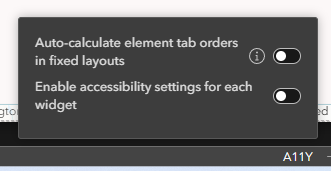
It took me 20 minutes to find this magic button. Look in the bottom bar of the Builder. Do you see the letters A11Y? That's actually a Button.

Click it and you will see two sliders. Auto-Calculate Element Tab Orders In Fixed Layouts will tell screen readers what order your Page should be read in. It does have the potential to re-arrange your Layout, so be aware and be prepared to move things around again after turning it on. The other slider, Enable Accessibility Settings For Each Widget, will add a new sub-panel to the Settings Panel of every Widget.
The Accessibility Settings sub-panel adds two options to each Widget. The Accessible Label allows you to write a description for what a Widget does for the screen reader to read. Giving screen readers stuff to read is a large percent of meeting the compliance standards, so be sure to use this. The Enable In Skip To Checkbox makes the checked Widget a priority for the screen reader. This option is only available if the Widget is not wrapped in any other Widget.

Also in the redesigned Themes Color Tab, picking a Text and Background combination with insufficient contrast, should trigger a warning. So don't ignore those yellow triangles.


