- Home
- :
- All Communities
- :
- Products
- :
- Data Management
- :
- Data Management Ideas
- :
- Database Views: Modify SQL definition in Catalog
- Subscribe to RSS Feed
- Mark as New
- Mark as Read
- Bookmark
- Printer Friendly Page

- Mark as New
- Bookmark
- Subscribe to RSS Feed
- Permalink
Edited as suggested by @JohannesLindner
Regarding database views in geodatabases:
It would be helpful if we could edit the SQL view definition in ArcGIS Pro/Catalog. We can create database views in ArcGIS Pro. Why not let us update the SQL in Pro too?
Edit: It should also be possible to modify the SQL of a broken view. Related: Display database view SQL definition in Catalog properties, even when view is broken
Edit: It turns out it's possible to replace a database view using the Create Database View geoprocessing tool. Just use the same name as the existing view. See my comment below for details.


Thanks for the Idea @Bud,
I think the idea is well placed here in the Data Management Ideas Exchange. I've altered the label to 'Filtering - Relating Data', instead of Geodatabase, as it better matched the label description.
Link to Label Descriptions


The viewing part was implemented in 2.7 thanks to this idea: ArcGIS Pro should allow you to see the SQL used to... - Esri Community
3:42 in this video: Ideas in ArcGIS Pro 2.7 - YouTube
So this idea would be about editing that query.
This idea is especially applicable to FGDB views. We need to be able to modify existing FGDB views in Catalog, since it's not possible to alter them in an SQL client (FGDBs are inaccessible outside of ArcObjects, unlike EGDBs).
We don't want to delete and recreate views every time we need to make a minor change to the SQL definition.

I wish I could up vote this by about 20.
ESRI, WHY isn't this an existing feature?
ArcGIS Pro 3.1.1
It looks like it's possible to replace a database view using the Create Database View geoprocessing tool. The key is to create a view using the same name as the existing view.
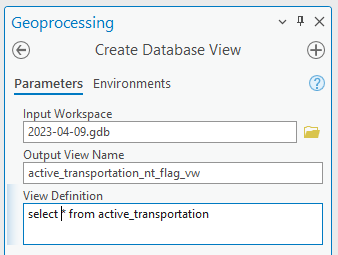
That will replace the existing view. (Although it's unclear if it modifies the existing view or just deletes it and creates a new one.)
With that said, I think this idea is still valid. It would be best if we could edit the SQL definition of the existing view from the view's properties in Catalog:
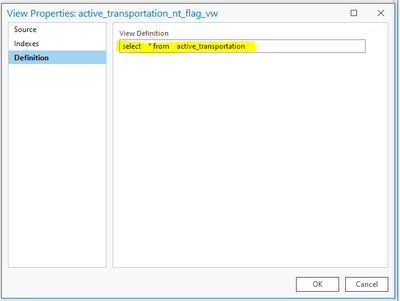
That would be more intuitive.
@Bud , This workflow will work as long as you have the 'Allow geoprocessing tools to overwrite existing datasets' option clicked on in the geoprocessing page of the options menu.
Without this clicked, the workflow will fail with 'Table already exists'. The GP tool is creating a brand new view and not editing the original in place.

A much needed feature...


Additionally, doing this still requires you to remove and re-add the layer to a map in order to implement the updated query. Not the end of the world but it can be frustraing.
I like this idea and would love to see it implemented, especially if it would automatically update the layer in the map. I'm guessing the limitation will be that it will require the view to be registered but that seems reasonable to me at least.

Stuck here myself, being used to sql server development its insane we cannot update a view in a gdb. Thanks for making me fix symbology classes like for the 5th time when I "change" the field because I made the cardinal sin of forgetting a left in my join due to the fact no other relate/join/relationship class to make this public map work allows the data to be where it is needed for the symbols but manually hacking a view works. But only if you do it perfectly, else back to step 1 again, enjoy. And I absolutely love Thanks for making the class auto-update without even asking, including changing all the labeling and class ranges. Glad its only 5 fields, if this were a complicated map of many coloration based on attribute values I would seek out any other GIS implementation on the planet to use.
You must be a registered user to add a comment. If you've already registered, sign in. Otherwise, register and sign in.