- Home
- :
- All Communities
- :
- Products
- :
- ArcMap (Retired)
- :
- ArcMap Questions
- :
- Re: Convert a text field to a numeric field
- Subscribe to RSS Feed
- Mark Topic as New
- Mark Topic as Read
- Float this Topic for Current User
- Bookmark
- Printer Friendly Page

- Mark as New
- Bookmark
- Subscribe to RSS Feed
- Permalink
I have a shape file that was exported from Autocad Map. It represents pipes in a network. I have a field representing the pipe dia, but it is a text field and would like to convert it to numeric. Can someone walk me thru those steps? Name of the text field is "LAYER" and I need the new numeric one to be "DIA" Thanks for any help you can give.
MKH
Solved! Go to Solution.
Accepted Solutions


- Mark as New
- Bookmark
- Subscribe to RSS Feed
- Permalink
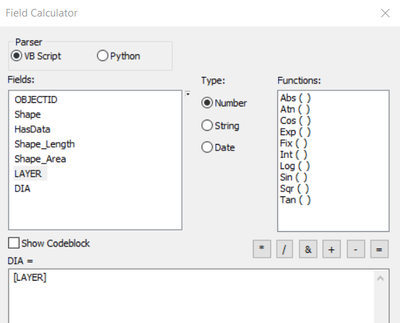
As mentioned by Sean, you need to add a field "DIA" with Type LONG INTEGER or FLOAT, depending on whether the desired value is an integer or Decimal Point value respectively.
Then Right-click "DIA" field > Field Calculator.
Expression:
[LAYER]
Think Location


- Mark as New
- Bookmark
- Subscribe to RSS Feed
- Permalink
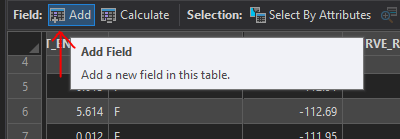
The first thing you need to do is Add a Field and make sure you make it numeric. If you just need integers (whole numbers), choose Long as the data type. If you need a floating point decimal, choose Double as the data type:
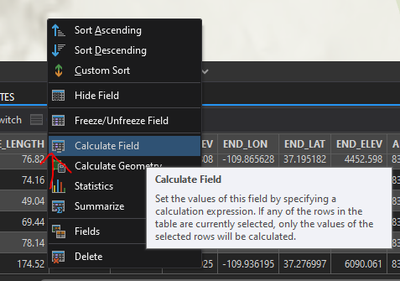
Now that you have this new field, DIA, right click on it and choose "Calculate Field":
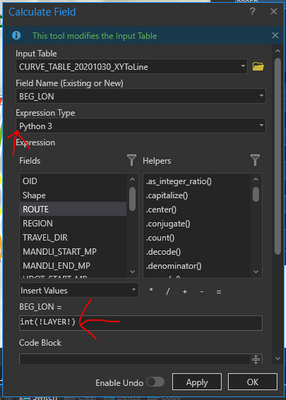
If you need to convert to an integer, in the field calculation box type this:
int(!LAYER!)If it's a floating point, type this:
float(!LAYER!)Make sure Python 3 is chosen as your Expression Type:

- Mark as New
- Bookmark
- Subscribe to RSS Feed
- Permalink
Yes - my apologies for the rushed answer...
In ArcMap open your table. On the drop down choose Add Field.
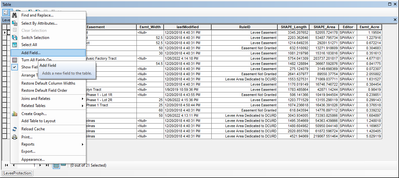
Name it - define it as double

The right click the new field name in the table and choose Field Calculator
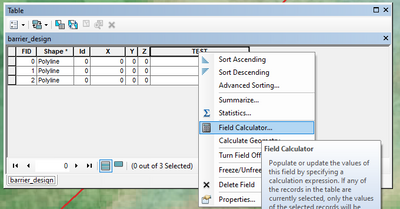
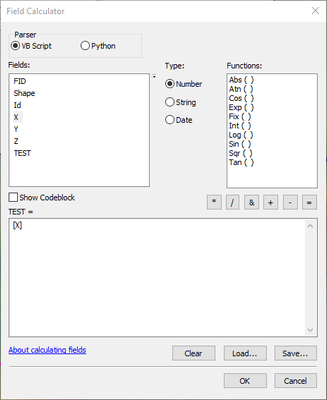
A box will popup. The field you are calculating will be populated. See in the screenshot where it says TEST=. Then in the fields box, double click the field name you want to copy the data from. In the example I choose X and click OK
- Mark as New
- Bookmark
- Subscribe to RSS Feed
- Permalink
You can use the add field tool and then use the field calculator to calculate what goes in it.
https://desktop.arcgis.com/en/arcmap/10.3/tools/data-management-toolbox/add-field.htm
- Mark as New
- Bookmark
- Subscribe to RSS Feed
- Permalink
yeah, I've seen the help, but it reads like a programming language, which confuses me entirely!
- Mark as New
- Bookmark
- Subscribe to RSS Feed
- Permalink
The first thing you need to do is Add a Field and make sure you make it numeric. If you just need integers (whole numbers), choose Long as the data type. If you need a floating point decimal, choose Double as the data type:
Now that you have this new field, DIA, right click on it and choose "Calculate Field":
If you need to convert to an integer, in the field calculation box type this:
int(!LAYER!)If it's a floating point, type this:
float(!LAYER!)Make sure Python 3 is chosen as your Expression Type:
- Mark as New
- Bookmark
- Subscribe to RSS Feed
- Permalink
As mentioned by Sean, you need to add a field "DIA" with Type LONG INTEGER or FLOAT, depending on whether the desired value is an integer or Decimal Point value respectively.
Then Right-click "DIA" field > Field Calculator.
Expression:
[LAYER]
Think Location
- Mark as New
- Bookmark
- Subscribe to RSS Feed
- Permalink
Thanks very much. I appreciate the replies!
- Mark as New
- Bookmark
- Subscribe to RSS Feed
- Permalink
Yes - my apologies for the rushed answer...
In ArcMap open your table. On the drop down choose Add Field.
Name it - define it as double
The right click the new field name in the table and choose Field Calculator
A box will popup. The field you are calculating will be populated. See in the screenshot where it says TEST=. Then in the fields box, double click the field name you want to copy the data from. In the example I choose X and click OK
