The security workflow for desired authentication workflow seems convoluted, so I'm hoping I can find some clarity here.
I can't seem to get an OAuth2 popup to challenge a user trying to login to a self hosted Web App builder app (i.e. downloaded from WAB Developer edition and hosted on my own web server) with a secured web map OR secured layer. The only authentication challenge I get is
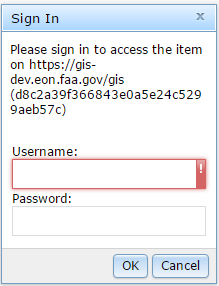
instead of
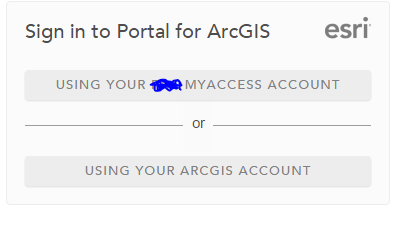
I've followed the instructions in What's the proper configuration for proxy.config and config.json for a self-hosted Web AppBuilder for ArcGIS Web Applica… but it doesn't work.
Has anyone successfully been able to replicate this workflow? I want my users to be able to go to the application (without having to go through my Portal - just a direct link to the URL), and login using an identity provider (as opposed to built in Portal credentials).
Here is what I've done:
1. Created a web map in Portal for ArcGIS 10.4 (which is federated with my server)
2. Created a web app (based on my web map) in web app builder dev edition, downloaded the code, and placed it on my own web server. Lets say its https://mywebserver/myapp
3. Registered https://mywebserver/myapp as an application in Portal for ArcGIS, and set the redirect URIs to be https://mywebserver and the URI for my portal (https://myportalsite). This generated an appID and appSecret.
4. Following instructions in Alex Mahrou's post, I have modified my config.json items as such:
"portalUrl": "https://myportalsite",
  "appId": "myappid",
"isWebTier": true,
  "httpProxy": {
    "useProxy": true,
    "alwaysUseProxy": false,
    "url": "https://mywebserver/proxy/proxy.ashx",
    "rules": [{"urlPrefix":"https://myportalsite","proxyUrl":"/proxy/proxy.ashx"}]
}5. Also following instructions in Alex Mahrou's post, I have modified my proxy.config as such:
<serverUrls>
        <serverUrl url="http://services.arcgisonline.com"
                   matchAll="true"/>
  <serverUrl url="https://mywebserver"
           matchAll="true"
           />
  <serverUrl url="https://myportalsite/"
    clientId="myappid"
    clientSecret="myappsecret"
  oauth2Endpoint="https://myportalsite/sharing/oauth2/"
    rateLimit="600"
    rateLimitPeriod="60"
    matchAll="true">
</serverUrl>
</serverUrls>
7. Secured my web map to only be accessible to a specific group
8. Tried to log into app.
I am only presented with the basic sign in challenge instead of the Oauth2 challenge. The same behavior happens if I secure the registered web app in Portal, or secure one of the layers in my web map. Can anyone here give me any assistance?
Thanks
