Turn on suggestions
Auto-suggest helps you quickly narrow down your search results by suggesting possible matches as you type.
Cancel
- Home
- :
- All Communities
- :
- Products
- :
- ArcGIS Viewer for Flex (Retired)
- :
- ArcGIS Viewer for Flex Questions
- :
- Problem with PopUps in Flex Viewer
Options
- Subscribe to RSS Feed
- Mark Topic as New
- Mark Topic as Read
- Float this Topic for Current User
- Bookmark
- Subscribe
- Mute
- Printer Friendly Page

03-01-2013
06:22 AM
- Mark as New
- Bookmark
- Subscribe
- Mute
- Subscribe to RSS Feed
- Permalink
I'm having a difficult time displaying information on layers that I have in my flex viewer application. I have set up the configuration file to show the certain fields in the pop-up, but there are no corresponding information in those fields, even though I know that there are attributes to them.
Here it is:
[ATTACH=CONFIG]22295[/ATTACH]
Here's the XML for that particular pop-up named PopUp_Parcels.xml:
<?xml version="1.0" ?>
<configuration>
<title>GPIN: {GPIN} </title>
<fields>
<field name="NAME" visible="true" />
<field name="ST_NO" alias= "STREET NO." visible="true" />
<field name="ST_ALPHA" alias= "STREET ALPHA" visible="true" />
<field name="ST_NAME" alias= "STREET NAME" visible="true" />
<field name="ST_TYPE" alias= "STREET TYPE" visible="true" />
<field name="CITY" visible="true" />
<field name="ZIP" visible="true" />
</fields>
<showattachments>false</showattachments>
</configuration>
<!--
Pop-up configuration file for:
http://sampleserver3.arcgisonline.com/ArcGIS/rest/services/HomelandSecurity/operations/FeatureServer...
See pop-up documentation at
http://links.esri.com/flexviewer/popups
<field name="STATUS" visible="True"/>
-->
And here's the section of the config file where I've added this xml:
<layer label="My Layers" type="dynamic" visible="true" mode="snapshot"
useproxy="false"
url="http://..../MapServer">
<sublayer id="3" popupconfig="popups/PopUp_Parcels.xml"
/>
</layer>
Am I missing any steps to get this working fine?
Thanks!
Here it is:
[ATTACH=CONFIG]22295[/ATTACH]
Here's the XML for that particular pop-up named PopUp_Parcels.xml:
<?xml version="1.0" ?>
<configuration>
<title>GPIN: {GPIN} </title>
<fields>
<field name="NAME" visible="true" />
<field name="ST_NO" alias= "STREET NO." visible="true" />
<field name="ST_ALPHA" alias= "STREET ALPHA" visible="true" />
<field name="ST_NAME" alias= "STREET NAME" visible="true" />
<field name="ST_TYPE" alias= "STREET TYPE" visible="true" />
<field name="CITY" visible="true" />
<field name="ZIP" visible="true" />
</fields>
<showattachments>false</showattachments>
</configuration>
<!--
Pop-up configuration file for:
http://sampleserver3.arcgisonline.com/ArcGIS/rest/services/HomelandSecurity/operations/FeatureServer...
See pop-up documentation at
http://links.esri.com/flexviewer/popups
<field name="STATUS" visible="True"/>
-->
And here's the section of the config file where I've added this xml:
<layer label="My Layers" type="dynamic" visible="true" mode="snapshot"
useproxy="false"
url="http://..../MapServer">
<sublayer id="3" popupconfig="popups/PopUp_Parcels.xml"
/>
</layer>
Am I missing any steps to get this working fine?
Thanks!
Solved! Go to Solution.
1 Solution
Accepted Solutions
03-01-2013
08:17 AM
- Mark as New
- Bookmark
- Subscribe
- Mute
- Subscribe to RSS Feed
- Permalink
I actually figured it out. You helped point me in the right direction though, GisDEV01. Looking at the REST service, I noticed that the field names were all in lower case. I changed them to lower case and now it works.
Thanks!
Thanks!
9 Replies

03-01-2013
06:33 AM
- Mark as New
- Bookmark
- Subscribe
- Mute
- Subscribe to RSS Feed
- Permalink
I'm having a difficult time displaying information on layers that I have in my flex viewer application. I have set up the configuration file to show the certain fields in the pop-up, but there are no corresponding information in those fields, even though I know that there are attributes to them.
Thanks!
Try this:
Popup XML:
<?xml version="1.0" ?>
<configuration>
    <title>GPIN: {GPIN} </title>
    <fields>
         <field name="GPIN" />
  <field name="NAME"  visible="true" />
  <field name="ST_NO" alias= "STREET NO." visible="true" />
  <field name="ST_ALPHA" alias= "STREET ALPHA" visible="true" />
  <field name="ST_NAME" alias= "STREET NAME" visible="true" />
  <field name="ST_TYPE" alias= "STREET TYPE" visible="true" />
  <field name="CITY" visible="true" />
  <field name="ZIP" visible="true" />
    </fields>
    <showattachments>false</showattachments>
</configuration>
Main config.xml
<layer label="My Layers"  type="dynamic" visible="true"
    url="http://..../MapServer">
   <sublayer id="3" popupconfig="popups/PopUp_Parcels.xml"/>
   </layer>
If this doesn't work, can you post a screenshot of your REST Service page for this service?
03-01-2013
08:07 AM
- Mark as New
- Bookmark
- Subscribe
- Mute
- Subscribe to RSS Feed
- Permalink
If this doesn't work, can you post a screenshot of your REST Service page for this service?
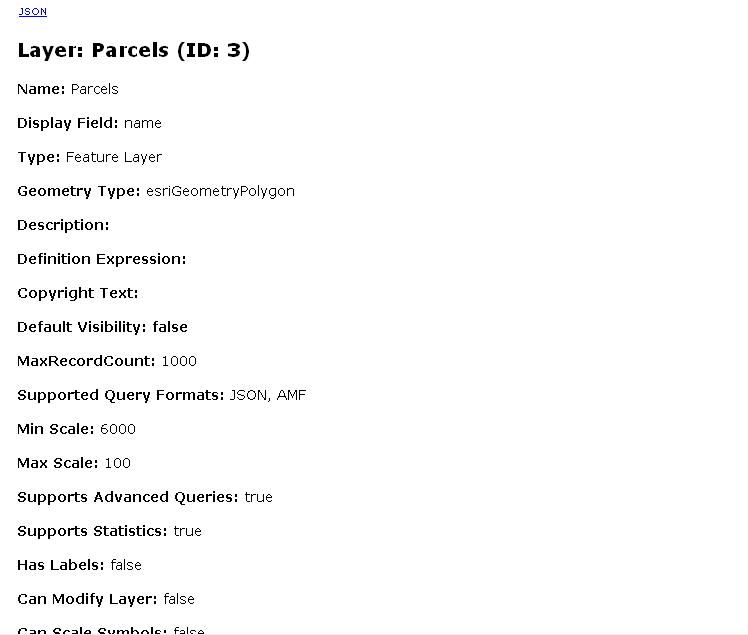
Unfortunately, that didn't work. Thank you, though. I appreciate it. Here's a screenshot of the REST service:
1/3
[ATTACH=CONFIG]22309[/ATTACH]
2/3
[ATTACH=CONFIG]22310[/ATTACH]
3/3
[ATTACH=CONFIG]22311[/ATTACH]
03-01-2013
08:17 AM
- Mark as New
- Bookmark
- Subscribe
- Mute
- Subscribe to RSS Feed
- Permalink
I actually figured it out. You helped point me in the right direction though, GisDEV01. Looking at the REST service, I noticed that the field names were all in lower case. I changed them to lower case and now it works.
Thanks!
Thanks!
03-01-2013
09:33 AM
- Mark as New
- Bookmark
- Subscribe
- Mute
- Subscribe to RSS Feed
- Permalink
I actually figured it out. You helped point me in the right direction though, GisDEV01. Looking at the REST service, I noticed that the field names were all in lower case. I changed them to lower case and now it works.
Thanks!
Excellent, I'm glad you figured it out.

03-07-2013
02:09 PM
- Mark as New
- Bookmark
- Subscribe
- Mute
- Subscribe to RSS Feed
- Permalink
I'm also having an issue getting a popup working, and hope someone can point out what I'm doing wrong.
I've got 2 set up (at least in theory). One of them, PopUp_Parcels, is working correctly. The other, PopUp_WS simply doesn't "pop up" at all. For the life of me I cannot figure out where my error is
The pertinant bit of my config.xml:
and my PopUp_WS.xml:
the application is at http://gispublic.co.lake.ca.us/BWS/
I've got 2 set up (at least in theory). One of them, PopUp_Parcels, is working correctly. The other, PopUp_WS simply doesn't "pop up" at all. For the life of me I cannot figure out where my error is
The pertinant bit of my config.xml:
    <operationallayers>
      <layer label="Watersheds" type="dynamic" alpha="0.5" url="http://gispublic.co.lake.ca.us:6080/arcgis/rest/services/watersheds/MapServer">
        <sublayer id="0" popconfig="popups/PopUp_WS.xml" />
      </layer>
      <layer label="GeoTIFF Images" type="dynamic" alpha="0.8" visible="true" url="http://gispublic.co.lake.ca.us:6080/arcgis/rest/services/BWS_GeoTIFF/MapServer" />
      <layer label="Culverts" type="dynamic" alpha="0.9" url="http://gispublic.co.lake.ca.us:6080/arcgis/rest/services/culverts/MapServer" />
      <layer label="Base Layers" type="dynamic" alpha="0.8" visible="true" url="http://gispublic.co.lake.ca.us:6080/arcgis/rest/services/BWS_base/MapServer" >
        <sublayer id="9" popupconfig="popups/PopUp_Parcels.xml" />
      </layer>
    </operationallayers>
and my PopUp_WS.xml:
<?xml version="1.0" encoding="utf-8"?>
<configuration>
  <fields>
    <field name="HUNAME" visible="true" />
    <field name="HANAME" visible="true" />
    <field name="HSANAME" visible="true" />
    <field name="SPWSNAME" visible="true" />
    <field name="PWSNAME" visible="true" />
    <field name="SubWS" visible="true" />
  </fields>
</configuration>
<!--
    Pop-up configuration file for:
    http://gispublic.co.lake.ca.us:6080/arcgis/rest/services/watersheds/Mapserver/

    See pop-up documentation at
    http://links.esri.com/flexviewer/popups
-->
the application is at http://gispublic.co.lake.ca.us/BWS/


03-07-2013
04:32 PM
- Mark as New
- Bookmark
- Subscribe
- Mute
- Subscribe to RSS Feed
- Permalink
Lon,
Your issue is that you have popconfig instead of popupconfig:
Your issue is that you have popconfig instead of popupconfig:
<sublayer id="0" popupconfig="popups/PopUp_WS.xml" />
03-08-2013
07:15 AM
- Mark as New
- Bookmark
- Subscribe
- Mute
- Subscribe to RSS Feed
- Permalink
Yet again, thank you for pointing out the obvious!




03-12-2013
05:50 PM
- Mark as New
- Bookmark
- Subscribe
- Mute
- Subscribe to RSS Feed
- Permalink
I am having quite a different problem with the popups in 3.1. When I try to use a dynamic service and assign popups to a sublayer the popups appear in the upper left corner of the screen (the majority of the time) or end up frozen on one particular location. The popups only work correctly on one of the sublayers when all part of a dynamic service.
In contrast, if I add each sublayer from the dynamic service, the popups will work fine. It would be quite unwieldy to add each sublayer as its own individual layer. Any thoughts on how to possibly address this issue would be appreciated.
JP
In contrast, if I add each sublayer from the dynamic service, the popups will work fine. It would be quite unwieldy to add each sublayer as its own individual layer. Any thoughts on how to possibly address this issue would be appreciated.
JP
03-13-2013
08:45 AM
- Mark as New
- Bookmark
- Subscribe
- Mute
- Subscribe to RSS Feed
- Permalink
I am having quite a different problem with the popups in 3.1. When I try to use a dynamic service and assign popups to a sublayer the popups appear in the upper left corner of the screen (the majority of the time) or end up frozen on one particular location. The popups only work correctly on one of the sublayers when all part of a dynamic service.
In contrast, if I add each sublayer from the dynamic service, the popups will work fine. It would be quite unwieldy to add each sublayer as its own individual layer. Any thoughts on how to possibly address this issue would be appreciated.
JP
Due to Esri's setup of this forum, it is best if you create a new thread for your own issues.
Most forums encourage compiling of information by topic into threads, such as how you have mentioned a popup issue in a thread about popup issues, but Esri has decided that they'd like their forums to function more like a Q & A than a forum, and therefore they believe it is best to have a ton of threads which perhaps answer the exact same questions if the user doesn't search (which new users usually do not search).
