- Home
- :
- All Communities
- :
- Products
- :
- ArcGIS Utility Network
- :
- ArcGIS Utility Network Questions
- :
- Utility and Pipeline Data Model (UPDM) Arcade erro...
- Subscribe to RSS Feed
- Mark Topic as New
- Mark Topic as Read
- Float this Topic for Current User
- Bookmark
- Printer Friendly Page
Utility and Pipeline Data Model (UPDM) Arcade error: Field not found

- Mark as New
- Bookmark
- Subscribe to RSS Feed
- Permalink
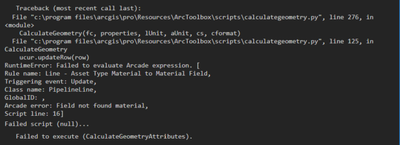
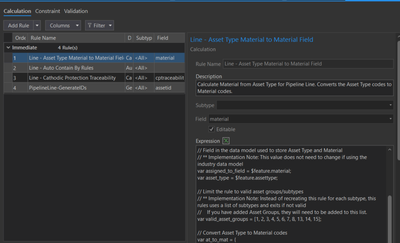
I am having a issue with Arcade code not being able to find field in the featureclass(Pipeline Line), when trying to do calculate geometry on a field. I use to be able to do this fine as of week ago but know it wont work at all. I updated my ArcGIS pro to 2.9.2 and added some domains to the pressure sensor pipe since than. I for a fact that the field "material" is in the table and spelled correctly and matched the arcade expression in the attribute rules.
I attached a Blank GDB for reference to replicate the issue
Anyone have any ideas?


- Mark as New
- Bookmark
- Subscribe to RSS Feed
- Permalink
If you have an active edit session, it should work. When there is an active edit session, the backend logic pulls all the fields.
- Mark as New
- Bookmark
- Subscribe to RSS Feed
- Permalink
The rule is calling Angle, I am testing to see if angle ever worked on a geographic system.
- Mark as New
- Bookmark
- Subscribe to RSS Feed
- Permalink
I narrowed it down to Buffer, not angle. This worked on my 2.8.4 machine, but did not work on my 2.9.2 machine. I will post an update if I learn more.
- Mark as New
- Bookmark
- Subscribe to RSS Feed
- Permalink
I have recreated that rule to not use buffer. There are disabled rules, the Auto_Contain_By_Rules that also will not work now. I have rewrote them to not use buffer, but found that Distance is now blocked on projected systems. If you need these rules, I will look at how to rewrite distance for you.
- Mark as New
- Bookmark
- Subscribe to RSS Feed
- Permalink
I will check this out, I am going to try and revert back to the older version of ArcGIS pro and see if that will fix the issues.
Thank you,
I will post again to give a update once I found something.

- « Previous
-
- 1
- 2
- Next »
- « Previous
-
- 1
- 2
- Next »