- Home
- :
- All Communities
- :
- Products
- :
- ArcGIS Utility Network
- :
- ArcGIS Utility Network Questions
- :
- Utility and Pipeline Data Model (UPDM) Arcade erro...
- Subscribe to RSS Feed
- Mark Topic as New
- Mark Topic as Read
- Float this Topic for Current User
- Bookmark
- Printer Friendly Page
Utility and Pipeline Data Model (UPDM) Arcade error: Field not found

- Mark as New
- Bookmark
- Subscribe to RSS Feed
- Permalink
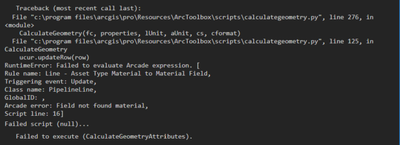
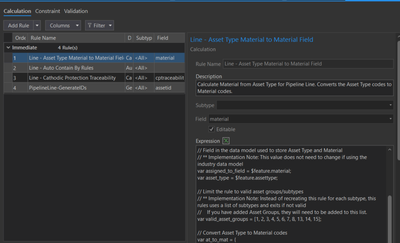
I am having a issue with Arcade code not being able to find field in the featureclass(Pipeline Line), when trying to do calculate geometry on a field. I use to be able to do this fine as of week ago but know it wont work at all. I updated my ArcGIS pro to 2.9.2 and added some domains to the pressure sensor pipe since than. I for a fact that the field "material" is in the table and spelled correctly and matched the arcade expression in the attribute rules.
I attached a Blank GDB for reference to replicate the issue
Anyone have any ideas?
- Mark as New
- Bookmark
- Subscribe to RSS Feed
- Permalink
I am having a issue with Arcade code not being able to find field in the featureclass(Pipeline Line), when trying to do calculate geometry on a field. I use to be able to do this fine as of week ago but know it wont work at all. I updated my ArcGIS pro to 2.9.2 and added some domains to the pressure sensor pipe since than. I for a fact that the field "material" is in the table and spelled correctly and matched the arcade expression in the attribute rules.
I attached a Blank GDB for reference to replicate the issue
Anyone have any ideas?


- Mark as New
- Bookmark
- Subscribe to RSS Feed
- Permalink
Hi Jacob,
I'd suggest posting this to the Utility Network community as that's where most of the arcade and attribute rule topics have been answered. https://community.esri.com/t5/arcgis-utility-network/ct-p/arcgis-utility-network

- Mark as New
- Bookmark
- Subscribe to RSS Feed
- Permalink
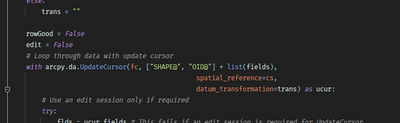
There is an issue when you use a cursor on a class with attribute rules. You need to make sure all the fields in the AR are in the fields list for the cursor.
- Mark as New
- Bookmark
- Subscribe to RSS Feed
- Permalink
AR?
Shouldn't the "Calculate Geometry" include all the fields when running the cursor.
- Mark as New
- Bookmark
- Subscribe to RSS Feed
- Permalink
AR = Attribute Rule, sorry for the abbreviation
Looking at the script, it does not. Only fields it is updating. The core script would need to be modified.
- Mark as New
- Bookmark
- Subscribe to RSS Feed
- Permalink
Ok, I guess I am confused as to why it just stopped working this week and was fine last week. It seems more likely that the issues is something with Arcade expressions or the network.
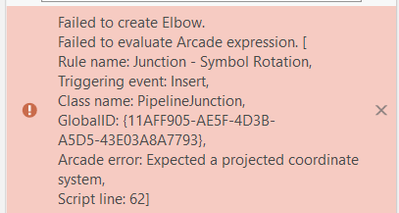
Also have had this issue, (which was also working last week as well) The project map is set to a state plane.
- Mark as New
- Bookmark
- Subscribe to RSS Feed
- Permalink
I did find a bug for the issue if you want to follow https://support.esri.com/en/bugs/nimbus/QlVHLTAwMDE0NTc2MA==
- Mark as New
- Bookmark
- Subscribe to RSS Feed
- Permalink
Thanks you,
Any ideas about symbol rotation error? (maybe just another bug)
