- Home
- :
- All Communities
- :
- Products
- :
- ArcGIS Utility Network
- :
- ArcGIS Utility Network Questions
- :
- Re: Dirty Area Status meaning
- Subscribe to RSS Feed
- Mark Topic as New
- Mark Topic as Read
- Float this Topic for Current User
- Bookmark
- Printer Friendly Page


- Mark as New
- Bookmark
- Subscribe to RSS Feed
- Permalink
Hi,
I am having an issue with Electric Distribution Utility Network. I am fixing some data errors but some dirty areas dont go away. I had error with two ElectricLines of different subtypes joining without a junction. I added a junction that has connectivity to both asset types and ran the validate subnetwork. The command was successful with message "Validate successful" message in notifications. However, dirty area doesn't go away. I tried to move the vertex away from the junctions on both ends of the line, and revalidated. The command was successful with message "Validate successful" message but Dirty area is still there. And dirty area's geometry is still covering old line geometry and not the new shortened geometry on both ends.
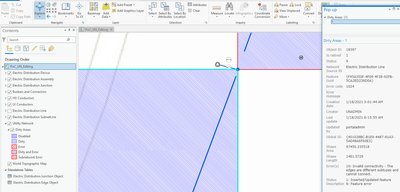
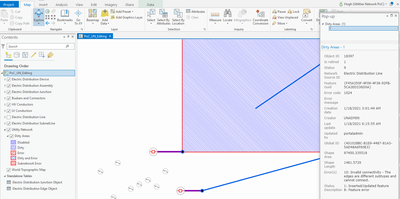
Does anyone know what Status 9 means for Dirty Area? It seems to be a bit-wise integer and Arcade expression in the symbology says
var Status = $feature.status; if (Status == 0) return 0; if ((Status & 0x7) > 0) if ((Status & 0x38) == 0) return 1; else return 3; if ((Status & 0x20) > 0) return 4; return 2;
Any idea how I can fix this? I cannot run Update Subnetwork with dirty areas.
Solved! Go to Solution.

- Mark as New
- Bookmark
- Subscribe to RSS Feed
- Permalink
Thank you Robert!
I will log this case to Support system.

- Mark as New
- Bookmark
- Subscribe to RSS Feed
- Permalink
I've also experienced this issue; Dirty Areas not being removed after a successful validation. This was seen in Pro 3.0.1 with a standard topology. Data is stored in MSSQL, traditional versioning, 10.8.1.

- « Previous
-
- 1
- 2
- Next »
- « Previous
-
- 1
- 2
- Next »