- Home
- :
- All Communities
- :
- Products
- :
- ArcGIS Survey123
- :
- ArcGIS Survey123 Questions
- :
- Re: Alphabetizing responses to a repeat question
- Subscribe to RSS Feed
- Mark Topic as New
- Mark Topic as Read
- Float this Topic for Current User
- Bookmark
- Subscribe
- Mute
- Printer Friendly Page
Alphabetizing responses to a repeat question

- Mark as New
- Bookmark
- Subscribe
- Mute
- Subscribe to RSS Feed
- Permalink
Hi all,
I have a survey where users identify all the plant species in an area. Users select a species in the repeat and some additional information, then repeat for each species they see. There is a need for the surveyor to see the list of species they have observed, which can get quite long. I have created a HTML table that lists all the species observed and their associated data as a note in the repeat below.
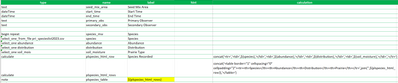
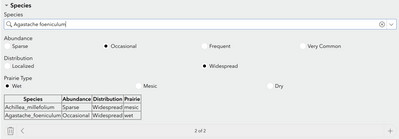
This works well, but can make going back and finding if you entered a species already difficult if you have 100+ entries. Is there a way to alphabetize such a list by species? Open to different list building methodologies as well.


- Mark as New
- Bookmark
- Subscribe
- Mute
- Subscribe to RSS Feed
- Permalink
No there is no built it way. You would have to write a custom javascript function. join just uses them as they were created.
In my form I use a seperate summary page at the end of the form and the grid appearance. That way it is on its own page and has more room horizontally and vertically. I have my species list setup up like
CODE Scientific Name Common Name
that way the user can search on anything they may know.
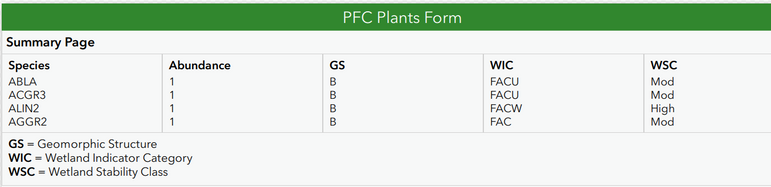
hope that helps

- Mark as New
- Bookmark
- Subscribe
- Mute
- Subscribe to RSS Feed
- Permalink
@DougBrowning, can you explain how this works? I see that you posted an explanation here, but I'm not trying to summarize from the repeat, just want to review records from the repeat as a table(/grid), and it would be great to have them alphabetized rather than just in an HTML table. I'm doing something similar to the OP (building a species list and would like to review it as an alphabetized table). I see that you mentioned using join() for display rather than summarizing, but I haven't gotten it to work and would love a little additional guidance. Thanks!
- Mark as New
- Bookmark
- Subscribe
- Mute
- Subscribe to RSS Feed
- Permalink
I do not know of any way to order them, join is the order they were created is all you can do. Would have to be a javascript addin prob.
- Mark as New
- Bookmark
- Subscribe
- Mute
- Subscribe to RSS Feed
- Permalink
Ah, I see, thanks. I noticed that the first few species codes in your example screenshot were alphabetical, but I see now that they aren't all alphabetical, and the first few were only because of the order in which they were entered.
The JavaScript function suggested below didn't work for me, but I eventually came up with one that does (with help from Microsoft Copilot). Happy to share if anyone wants it, but it's tailored specifically to work with the way I have built my table, so I won't post it here.
Here is example output. The # field is the repeat index (order in which species were entered) to make it easier to find a species in the repeat if you need to make a change.


- Mark as New
- Bookmark
- Subscribe
- Mute
- Subscribe to RSS Feed
- Permalink
We have a similar issue that 'messes' up dashboards when the answers are selected in different orders.
As mentioned, no inbuilt sort() function and can make your own.
/*
 * JavaScript functions for Survey123
 */

function sort_many(selected) {

    // Add your code here

    var selected_array = selected.toString().split(",")
    var selected_sorted = selected_array.sort();
    return selected_sorted.toString()
}
Then in the survey can use a pulldata("@javascript", ...
PS Javascript will only run if the a user is logged in.
