- Home
- :
- All Communities
- :
- Products
- :
- ArcGIS StoryMaps
- :
- ArcGIS StoryMaps Ideas
- :
- Text configuration
- Subscribe to RSS Feed
- Mark as New
- Mark as Read
- Bookmark
- Follow this Idea
- Printer Friendly Page

- Mark as New
- Bookmark
- Subscribe
- Mute
- Subscribe to RSS Feed
- Permalink
my idea relates to text configuration through adding a toolbar for text to be able to choose the font type, font color, font weight , text-alignment and font size.


Hi @karimelmasri -- Are you familiar with the StoryMaps theme builder? If not, you can read more about it here: Tips on using the ArcGIS StoryMaps theme builder (esri.com)
When creating a theme you can choose from many different fonts. There are over a dozen natively available in theme builder, but you can also browse 1000+ fonts from Google Fonts and specify the font weights used by your theme. You can also set font colors for different styles of text.
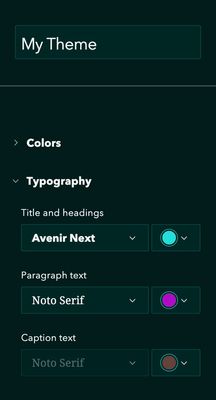
Once you create a theme, you can apply it to a story in the Design panel. Then, in the story builder you can change a text block's style from a regular paragraph to a heading, subheading, large paragraph, or other styles that represent different sizes and appearances. You can also make any text selection bold, italic, or change its color using the toolbar that appears when you highlight text.
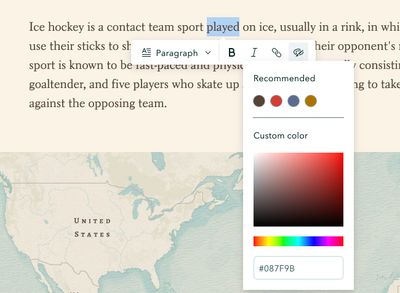
If the options described above don't meet your needs, please clarify what is missing and how you'd like to use any additional capabilities so we can consider your request.
Additional font sizes were added to ArcGIS StoryMaps in November 2025. For details, see What's new in ArcGIS StoryMaps (November 2025)
I believe most of the requested features are available. Please create a new idea for any specific features that are still needed.
You must be a registered user to add a comment. If you've already registered, sign in. Otherwise, register and sign in.