- Home
- :
- All Communities
- :
- Developers
- :
- Native Maps SDKs
- :
- Runtime SDK for Android Questions
- :
- How do I properly clip the mapView?
- Subscribe to RSS Feed
- Mark Topic as New
- Mark Topic as Read
- Float this Topic for Current User
- Bookmark
- Printer Friendly Page
How do I properly clip the mapView?

- Mark as New
- Bookmark
- Subscribe to RSS Feed
- Permalink
Dear all,
One of our product require two mapView; one acting as a main map for the application, while the other mapView acts as a mini-map on the top right corner, like so:
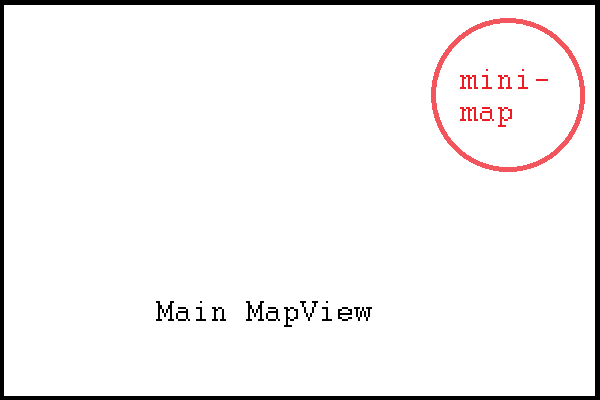
The problem I am encountering is that I cannot properly clip the mini-map to be a circle. During my search for a solution, I have encountered numerous ways, which includes but not limited to:
- Simple XML manipulation with a background with 4 rounded corners (making a circle). This did not work as it seem the mini-map mapView simply ignored its parent's parameters, making the mini map square again.
- Manipulation involving a custom circle layout (Extended from ViewGroup) with onDispatch() and onDraw() overwritten to clip the provided canvas instance with a circle path instance. This gave a behaviour that I will specify below.
- Clipping the custom circle layout using a ViewOutlineProvider and overriding the getOutline() method to set the Outline instance as an oval of equal dimensions (a circle). This gave the same behaviour I mentioned above.
The behaviour I mentioned above is very strange and unexpected. In the event that I have the mini-map on top of the main map, the mini-map will simply ignore whatever clipping that I specified. Like so:
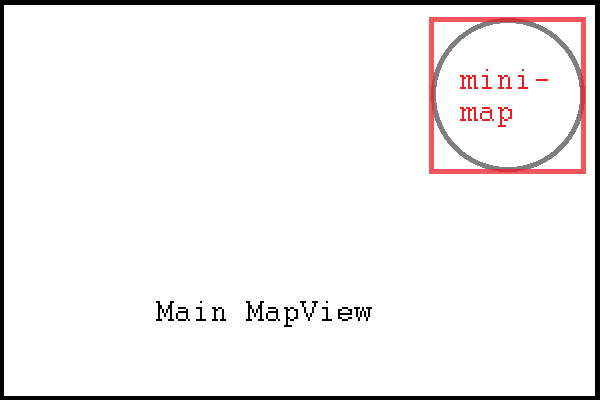
(The grey outline is the intended outline of the clipped path, while the red square represents the boundaries of the mini-map)
At first I thought it was simply because I did not set the clipping correctly. However, as I did more tests, it becomes apparent that the mini-map clipping works with every other generic type of view (e.g. FrameLayout, ImageButton), except for other mapView. This is hard to describe, so I will again use a picture. To see this, I made the main mapView half in height and aligned to the bottom, with the mini-map dipping half-way to the mapView.
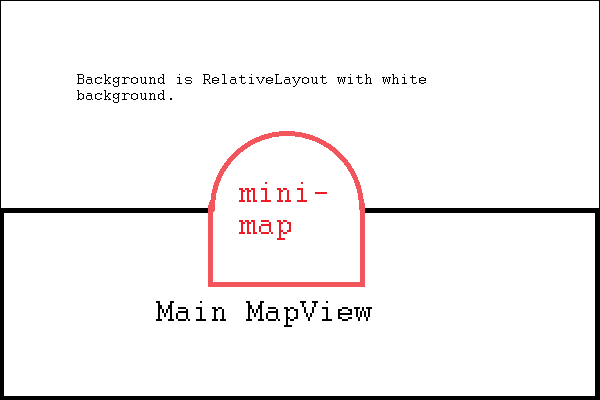
As it can been seen above, the mini-map will not clip with the main MapView underneath, but will clip with the regular white RelativeLayout in the background (color can be changed, and the clipping still applies). I have struggled many hours over this. An even stranger clipping behaviour will occur if I move the mini-map dynamically with a button; the clipping will clip/revert dynamically as well, depending on if it is above the main mapView.
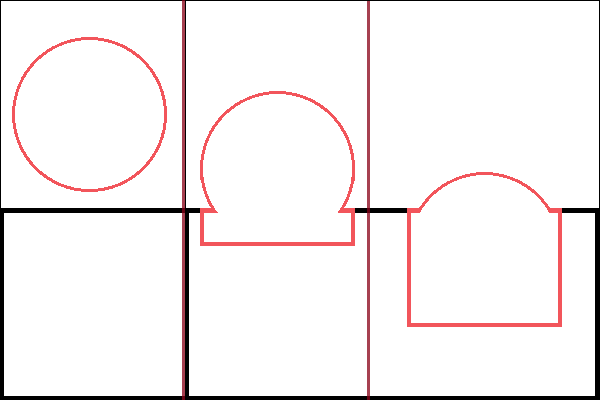
I would strong appreciate any help on this, as I could not find anything else similar to the situation I am facing. I have suggested to a senior developer that the mini-map be changed to a square, but this strongly goes against the established design, and I would like to give this one last try. Thank you.

- Mark as New
- Bookmark
- Subscribe to RSS Feed
- Permalink
Can you share the XML that you used above so we can inspect it further?
- Mark as New
- Bookmark
- Subscribe to RSS Feed
- Permalink
Dear Alexander,
I attach XML file for demonstration of strange behaviour.
<?xml version="1.0" encoding="utf-8"?>
<RelativeLayout xmlns:android="http://schemas.android.com/apk/res/android"
 xmlns:tools="http://schemas.android.com/tools"
 android:layout_width="match_parent"
 android:layout_height="match_parent"
 tools:context="xx.xxxxx.xxxx.MainActivity">


 <!-- The mini-map. The mini-map right now has strange behaviours -->
 <LinearLayout
 android:layout_width="match_parent"
 android:layout_height="match_parent"
 android:orientation="vertical"
 android:id="@+id/mini_map_layout">

 <!-- We reserve space for application specific top bar that uses 10 percent of screen-->
 <!-- Hence we have touch space to make the mini-map use only rest 90 percent -->

 <FrameLayout
 android:layout_width="match_parent"
 android:layout_height="match_parent"
 android:id="@+id/mini_map_touch_space"
 android:layout_weight="0.9">
 </FrameLayout>

 <!-- For the rest of the 90 percent of the screen -->
 <FrameLayout
 android:layout_width="match_parent"
 android:layout_height="match_parent"
 android:layout_weight="0.1"
 android:id="@+id/mini_map_centering_layout">

 <!-- Custom circle layout for mini map in center of screen. Very simple layout -->
 <xx.xxxxx.xxxx.xxxxxxx.CircleLayout
 android:layout_width="350dp"
 android:layout_height="350dp"
 android:id="@+id/mini_map"
 android:layout_gravity="center_vertical|center_horizontal">
 </xx.xxxxx.xxxx.xxxxxxx.CircleLayout>
 </FrameLayout>
 </LinearLayout>


 <!-- Map. The map will only show the bottom half for purpose of demonstration-->

 <LinearLayout
 android:orientation="vertical"
 android:layout_width="match_parent"
 android:layout_height="match_parent">

 <!-- Usually the layout weight for the touch space is 0.9-->

 <FrameLayout
 android:layout_width="match_parent"
 android:layout_height="match_parent"
 android:id="@+id/main_map_touch_space"
 android:layout_weight="0.5">
 </FrameLayout>

 <!-- Usually the layout weight for the main map is 0.1-->
 <RelativeLayout
 android:id="@+id/main_map"
 android:layout_width="match_parent"
 android:layout_height="match_parent"
 android:layout_gravity="fill"
 android:layout_weight="0.5">
 </RelativeLayout>
 </LinearLayout>
</RelativeLayout>
The frames of id "main_map" and "mini_map" are loaded respectively with their mapViews. The mini map uses custom CircleLayout, which I attach below.
package xx.xxxxx.xxxx.xxxxxxx;

import android.content.Context;
import android.graphics.Canvas;
import android.graphics.Path;
import android.util.AttributeSet;
import android.widget.FrameLayout;


public class CircleLayout extends FrameLayout {

 private Path mClippingPath = new Path();

 public CircleLayout(Context context) {
 super(context);

 }

 public CircleLayout(Context context, AttributeSet attributeSet){
 super(context, attributeSet);

 }

 public CircleLayout(Context context, AttributeSet attributeSet, int defStyle){
 super(context, attributeSet, defStyle);

 }

 @Override
 protected void onSizeChanged(int w, int h, int oldw, int oldh) {
 super.onSizeChanged(w, h, oldw, oldh);

 // Find the clipping path.
 float halfWidth = w / 2f;
 float halfHeight = h / 2f;

 mClippingPath.reset();
 mClippingPath.addCircle(halfWidth, halfHeight, Math.min(halfWidth, halfHeight), Path.Direction.CW);
 mClippingPath.close();

 }

 @Override
 protected void dispatchDraw(Canvas canvas) {

 int save = canvas.save();
 canvas.clipPath(mClippingPath);

 super.dispatchDraw(canvas);

 canvas.restoreToCount(save);
 }
}
Thank you
- Mark as New
- Bookmark
- Subscribe to RSS Feed
- Permalink
After looking into this a bit this morning, I imagine the issue may lie somewhere with the MapSurfaceView which is part of the mapView. I think more discussion on how to achieve this would be needed. Additionally, I think it would be a good idea to submit an enhancement request or idea for a guide on how to make circular inset maps.
