- Home
- :
- All Communities
- :
- Products
- :
- ArcGIS Pro
- :
- ArcGIS Pro Questions
- :
- Spatial Join tool: result layer does not count all...
- Subscribe to RSS Feed
- Mark Topic as New
- Mark Topic as Read
- Float this Topic for Current User
- Bookmark
- Subscribe
- Mute
- Printer Friendly Page
Spatial Join tool: result layer does not count all joined features contained in target features

- Mark as New
- Bookmark
- Subscribe
- Mute
- Subscribe to RSS Feed
- Permalink
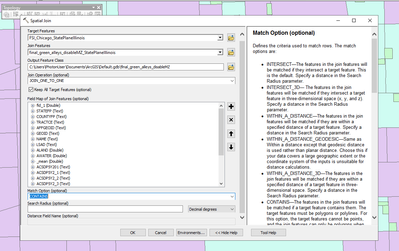
I have one green alley polygon feature layer and another census tract layer. I used spatial join to create a census tract layer containing green alley polygon features. I set the Shape Area field rule as Count, as shown in the following screenshot:
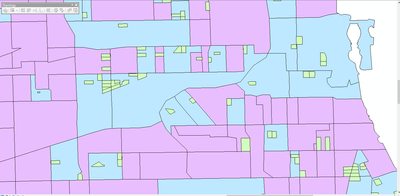
I got the results as shown in the following screenshot: The green color polygon layer is original green alley polygon features layer. The blue color polygon layer is the output results showing census tracts containing green alley polygon features. The purple polygon layer is the census tract layer for the whole area. The Spatial Join tool operation does not count green alleys for all census tracts: some census tracts contain green alleys features, but the results count them as 0. How to fix it? Thank you
- Mark as New
- Bookmark
- Subscribe
- Mute
- Subscribe to RSS Feed
- Permalink
I have one green alley polygon feature layer and another census tract layer. I used spatial join to create a census tract layer containing green alley polygon features. I set the Shape Area field rule as Count, as shown in the following screenshot:
I got the results as shown in the following screenshot: The green color polygon layer is original green alley polygon features layer. The blue color polygon layer is the output results showing census tracts containing green alley polygon features. The purple polygon layer is the census tract layer for the whole area. The Spatial Join tool operation does not count green alleys for all census tracts: some census tracts contain green alleys features, but the results count them as 0. How to fix it? Thank you


- Mark as New
- Bookmark
- Subscribe
- Mute
- Subscribe to RSS Feed
- Permalink
identifying the tabular results would help
this is Pro's help (arcmaps should be similar)
Spatial Join (Analysis)—ArcGIS Pro | Documentation
make sure both featureclasses are singlepart and not multipart features
Try one of the other options like intersect, or have there center in
since many of your features share boundaries between subject and target featureclasses and this may be affecting the "contains" option
... sort of retired...
- Mark as New
- Bookmark
- Subscribe
- Mute
- Subscribe to RSS Feed
- Permalink
Both feature classes are single parts and not multipart features
The problem with intersect is that it overcounts features outside the census tracts that share the boundaries
have the center in is not applied in this case - census tract is the target layer

- Mark as New
- Bookmark
- Subscribe
- Mute
- Subscribe to RSS Feed
- Permalink
In cases like this, when the output is not as expected, it could be a fault with the input layers. Do run the Repair Geometry go tool then try again.
