- Home
- :
- All Communities
- :
- Products
- :
- ArcGIS Pro
- :
- ArcGIS Pro Questions
- :
- Re: Selectbylocation and CopyFeatures via Arcpy
- Subscribe to RSS Feed
- Mark Topic as New
- Mark Topic as Read
- Float this Topic for Current User
- Bookmark
- Printer Friendly Page

- Mark as New
- Bookmark
- Subscribe to RSS Feed
- Permalink
Hello everyone, I am having trouble when trying to automate the process of select-by-location and copy-features in python. My codes looks like below: The logic seems to be right but once it runs, it runs forever which definitely exceeds the time I ran in Arcpro. Any ideas would be appreciated, thank you!
import arcpy
from arcpy import env
env.workspace = "D:/Backup/shapefile/NE_validation"
outworkspace = "D:/Backup/shapefile/NE_validation"
NEEEfishnet = "D:/Backup/shapefile/NE_validation/NE_validation.gdb/NEEE_NewEngland_fishnet"
shplist = arcpy.ListFeatureClasses("*Point*")
for shp in shplist:
# select by location
arcpy.management.SelectLayerByLocation(NEEEfishnet, "INTERSECT", shp, None, "NEW_SELECTION", "NOT_INVERT")
# export selected features (use copy features tool)
outfeature = outworkspace + "/" + NEEEfishnet[52:75] + shp[37:40] + ".shp"
arcpy.management.CopyFeatures(NEEEfishnet, outfeature, '', None, None, None)
# clear selection
arcpy.SelectLayerByAttribute_management(NEEEfishnet, "CLEAR_SELECTION")
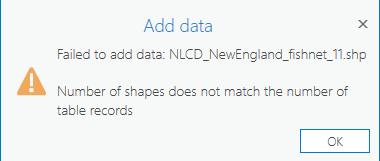
Update: I change the code to adopt two more functions: make feature layer and save layer to file. The code runs but it does not produce shapefile that is openable. The error message says below. I am going to stop updating, and maybe someone someday will find a solution to this problem...
Solved! Go to Solution.
Accepted Solutions


- Mark as New
- Bookmark
- Subscribe to RSS Feed
- Permalink
Selections don't apply to data sets, they apply to layers or views. Although you can now pass a data set directly to a Select Layer tool (personally, I disagreed with this change when Esri made it a couple years back), the selection isn't being made directly on the data set. Instead, when a data set is passed directly to a Select Layer tool, a layer or view is created behind the scenes and the selection is placed on it. With your code, you are not retrieving the auto-generated layer.
I still personally think it is best practice to create a layer first and then pass it to Select Layer tools.

- Mark as New
- Bookmark
- Subscribe to RSS Feed
- Permalink
it runs forever which definitely exceeds the time I ran in Arcpro
does it produce output though?
... sort of retired...
- Mark as New
- Bookmark
- Subscribe to RSS Feed
- Permalink
Thanks, Dan, it does not produce any output.

- Mark as New
- Bookmark
- Subscribe to RSS Feed
- Permalink
definitely add some print statements to try and track what's going on, I would also separate the directories that your outputs are going into as it's asking for issues.
- Mark as New
- Bookmark
- Subscribe to RSS Feed
- Permalink
Selections don't apply to data sets, they apply to layers or views. Although you can now pass a data set directly to a Select Layer tool (personally, I disagreed with this change when Esri made it a couple years back), the selection isn't being made directly on the data set. Instead, when a data set is passed directly to a Select Layer tool, a layer or view is created behind the scenes and the selection is placed on it. With your code, you are not retrieving the auto-generated layer.
I still personally think it is best practice to create a layer first and then pass it to Select Layer tools.
- Mark as New
- Bookmark
- Subscribe to RSS Feed
- Permalink
Wow, thanks for this answer Joshua! It really cleared my puzzles 👏
