- Home
- :
- All Communities
- :
- Products
- :
- ArcGIS Pro
- :
- ArcGIS Pro Questions
- :
- Re: Pro 2.7 - Change map coordinate display precis...
- Subscribe to RSS Feed
- Mark Topic as New
- Mark Topic as Read
- Float this Topic for Current User
- Bookmark
- Printer Friendly Page

- Mark as New
- Bookmark
- Subscribe to RSS Feed
- Permalink
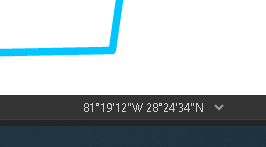
I need to have two decimal places for the seconds in the coordinate tracker in the map view, the thing that tells your the coordinates of the cursor. Where can I change that?
Solved! Go to Solution.
Accepted Solutions


- Mark as New
- Bookmark
- Subscribe to RSS Feed
- Permalink
Did you change it under location units > Degree Minute Second? How does your option page look (screenshot)?
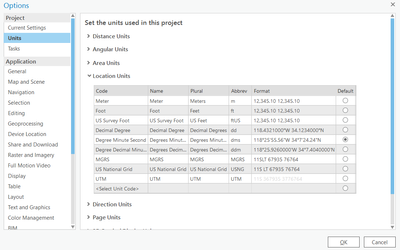
Does Refreshing the map help?

Is an upgrade to 2.8, an option?
Think Location
- Mark as New
- Bookmark
- Subscribe to RSS Feed
- Permalink
From the location view dropdown
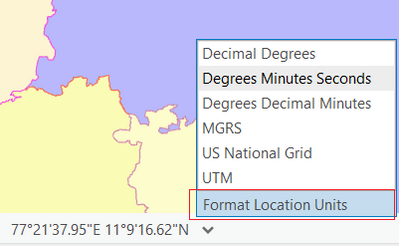
Under Location Units > Right-click on the particular value (Format Column)
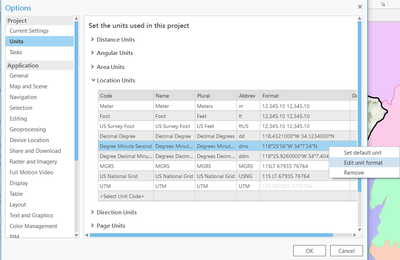
Change Decimal places
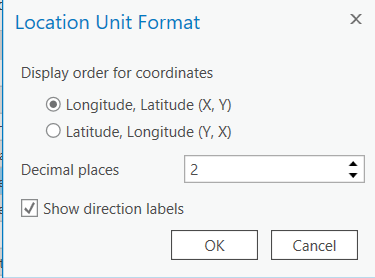
Ensure DMS is marked as default

Think Location
- Mark as New
- Bookmark
- Subscribe to RSS Feed
- Permalink
The Format Location Units in the drop down doesn't seem to show up in 2.7. I can set the DMS units through the options to 2 decimal places, but the coordinate tracker still doesn't and decimals for the seconds.
- Mark as New
- Bookmark
- Subscribe to RSS Feed
- Permalink
Did you change it under location units > Degree Minute Second? How does your option page look (screenshot)?
Does Refreshing the map help?
Is an upgrade to 2.8, an option?
Think Location
- Mark as New
- Bookmark
- Subscribe to RSS Feed
- Permalink
It showed up correctly after a reset. The unit type changes instantly without restart but apparently precision sometimes needs a program reboot to show up.
