- Home
- :
- All Communities
- :
- Products
- :
- ArcGIS Pro
- :
- ArcGIS Pro Questions
- :
- Placing labels at a specific offset and rotation f...
- Subscribe to RSS Feed
- Mark Topic as New
- Mark Topic as Read
- Float this Topic for Current User
- Bookmark
- Printer Friendly Page
Placing labels at a specific offset and rotation from point

- Mark as New
- Bookmark
- Subscribe to RSS Feed
- Permalink
Hi,
I've made a symbol which creates a view cone, similar to that shown below (black line), which illustrates the location (point of the cone), the angle of rotation (red dashed line, not shown on the symbol), and the angle of view of the image at that location (driven from the point's data).
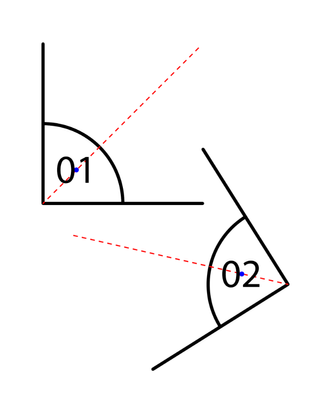
I now need to add a label to this point, driven by a field. I want the centre point of the label to sit on the blue dot (just shown for illustrative purposes). This will be a standard offset from the insertion point, and correspond to the rotation of the symbol.
I can't see any way of doing this in the standard label tools.
Can anyone point me in the right direction as to how I might achieve this?


- Mark as New
- Bookmark
- Subscribe to RSS Feed
- Permalink
Using the Maplex label engine, set a Preferred offset distance from the feature geometry to offset the label from the location.

Then use the Rotation settings to position the label around the point location at the angle the symbol is rotated. Set the Rotation field and Rotation type to match the settings used to rotate the symbols.
Depending on how the symbol is constructed you may need to add an amount to the Additional rotation setting.

Result:

Note: A bug was fixed in version 3.6 that may have prevented rotated labels from offsetting the correct distance from the feature geometry in some situations. The workflow described above works with the latest version of ArcGIS Pro.
